EasyManua.ls Logo

Sony STR-AV780 - Receiving FM Simulcast TV Programs; Receiving FM Simulcast Cable TV Programs

Sony STR-AV780
32 pages
Print Icon
To Next Page IconTo Next Page
To Previous Page IconTo Previous Page
Loading...
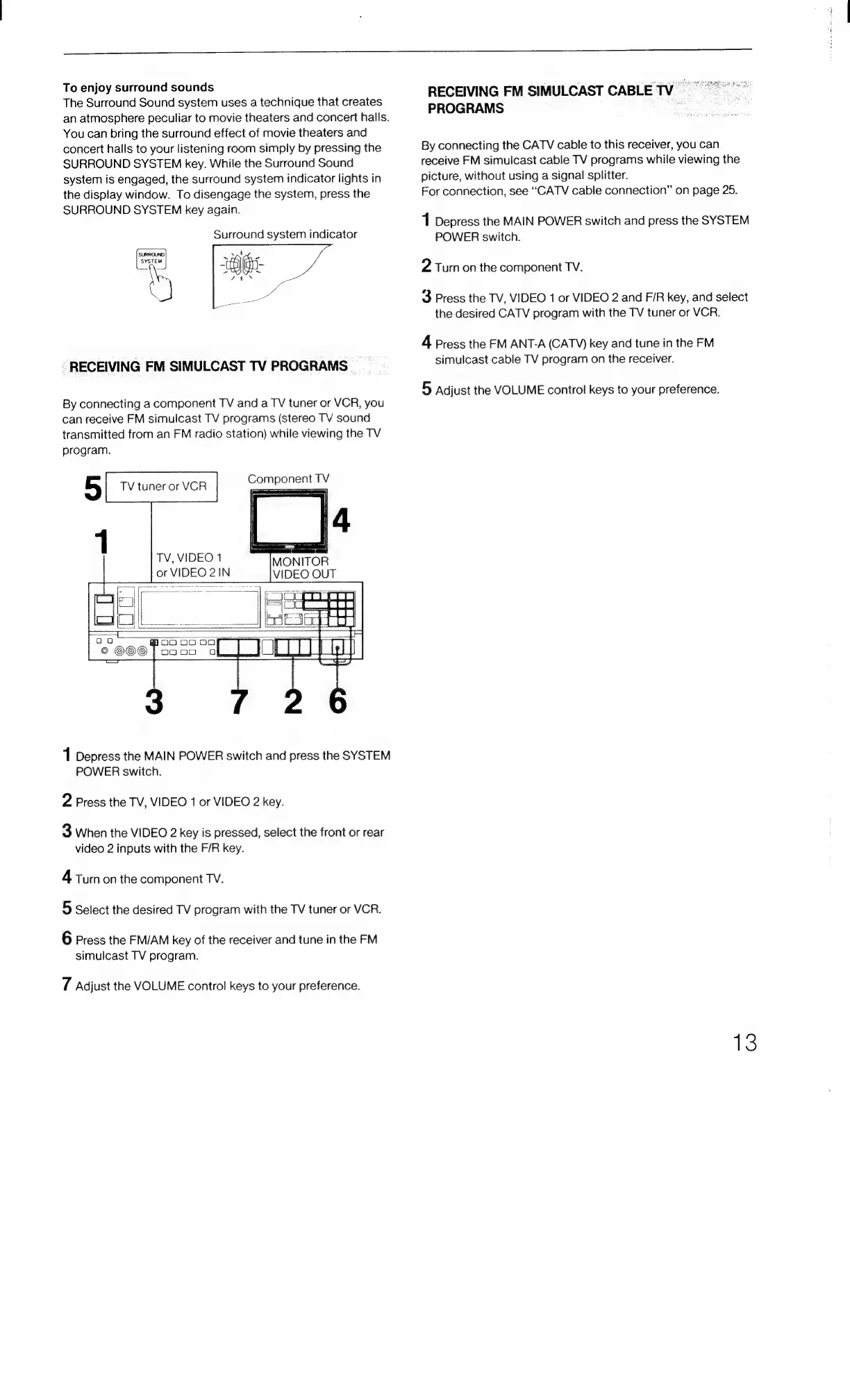
To
enjoy
surround
sounds
The
Surround
Sound
system
uses
a
technique
that
creates
an
atmosphere
peculiar
to
movie
theaters
and
concert
halls.
You
can
bring
the
surround
effect
of
movie
theaters
and
concert
halls
to
your
listening
room
simply
by
pressing
the
SURROUND
SYSTEM
key.
While
the
Surround
Sound
system
is
engaged,
the
surround
system
indicator
lights
in
the
display
window.
To
disengage
the
system,
press
the
SURROUND
SYSTEM
key
again.
Surround
system
indicator
_
RECEIVING
FM
SIMULCAST
TV
PROGRAMS
By
connecting
a
component
TV
and
a
TV
tuner
or
VCR,
you
can
receive
FM
simulcast
TV
programs
(stereo
TV
sound
transmitted
from
an
FM
radio
station)
while
viewing
the
TV
program.
|
[te
|
MONITOR
TV,
VIDEO
1
or
VIDEO
21N
1
Depress
the
MAIN
POWER
switch
and
press
the
SYSTEM
POWER
switch.
2
Press
the
TV,
VIDEO
1
or
VIDEO
2
key.
3
When
the
VIDEO
2
key
is
pressed,
select
the
front
or
rear
video
2
inputs
with
the
F/R
key.
4
Turn
on
the
component
TV.
5
Select
the
desired
TV
program
with
the
TV
tuner
or
VCR.
6
Press
the
FM/AM
key
of
the
receiver
and
tune
in
the
FM
simulcast
TV
program.
tT
Adjust
the
VOLUME
control
keys
to
your
preference.
RECEIVING
FM
SIMULCAST
CABLETV)
=
PROGRAMS
By
connecting
the
CATV
cable
to
this
receiver,
you
can
receive
FM
simulcast
cable
TV
programs
while
viewing
the
picture,
without
using
a
signal
splitter.
For
connection,
see
“CATV
cable
connection”
on
page
25.
1
Depress
the
MAIN
POWER
switch
and
press
the
SYSTEM
POWER
switch.
2
Turn
on
the
component
TV.
3
Press
the
TV,
VIDEO
1
or
VIDEO
2
and
F/R
key,
and
select
the
desired
CATV
program
with
the
TV
tuner
or
VCR.
4
Press
the
FM
ANT-A
(CATV)
key
and
tune
in
the
FM
simulcast
cable
TV
program
on
the
receiver.
5
Adjust
the
VOLUME
control
keys
to
your
preference.
13

Related product manuals