EasyManua.ls Logo

Sony STR-AV780 - To Set the ACOUSTIC SETTINGS

Sony STR-AV780
32 pages
Print Icon
To Next Page IconTo Next Page
To Previous Page IconTo Previous Page
Loading...
TO
SET
THE
ACOUSTIC
SETTINGS
The
receiver
can
store
and
recall
three
different
tone
control
settings
to
easily
set
the
tone
controls
to
match
different
types
of
music.
eee
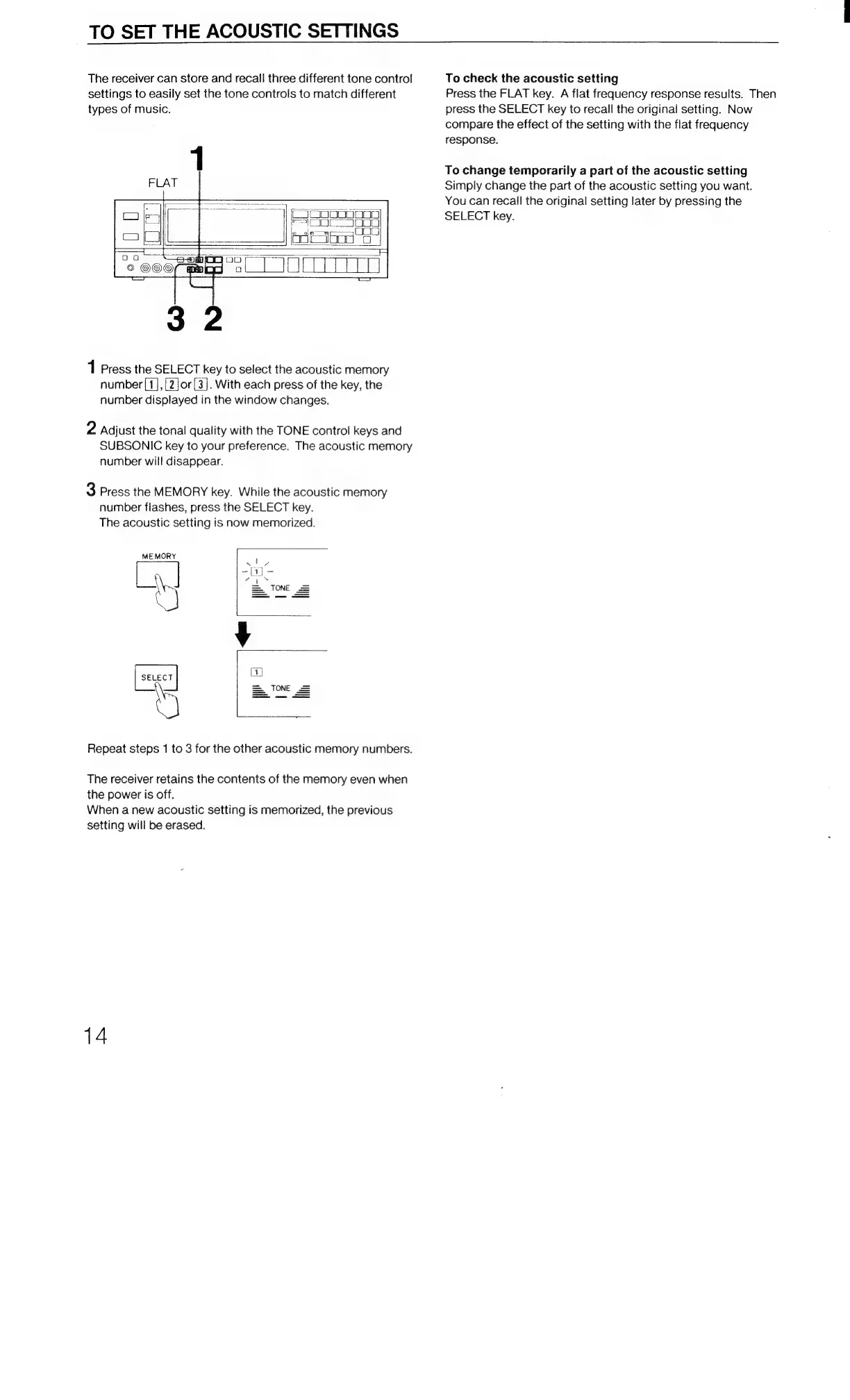
1
Press
the
SELECT
key
to
select
the
acoustic
memory
number
([1],[2]or[3].
With
each
press
of
the
key,
the
number
displayed
in
the
window
changes.
2
Adjust
the
tonal
quality
with
the
TONE
control
keys
and
SUBSONIC
key
to
your
preference.
The
acoustic
memory
number
will
disappear.
3
Press
the
MEMORY
key.
While
the
acoustic
memory
number
flashes,
press
the
SELECT
key.
The
acoustic
setting
is
now
memorized.
MEMORY
se.ecr|
Repeat
steps
1
to
3
for
the
other
acoustic
memory
numbers.
The
receiver
retains
the
contents
of
the
memory
even
when
the
power
is
off.
When
a
new
acoustic
setting
is
memorized,
the
previous
setting
will
be
erased.
14
To
check
the
acoustic
setting
Press
the
FLAT
key.
A
flat
frequency
response
results.
Then
press
the
SELECT
key
to
recall
the
original
setting.
Now
compare
the
effect
of
the
setting
with
the
flat
frequency
response.
To
change
temporarily
a
part
of
the
acoustic
setting
Simply
change
the
part
of
the
acoustic
setting
you
want.
You
can
recail
the
original
setting
later
by
pressing
the
SELECT
key.

Related product manuals