EasyManua.ls Logo

Sony STR-AV780 - COPMECHON CIAQIAIIS Sacscsssvsasterhetsetercutee Baladeedasaaiccntaiaiens

Sony STR-AV780
32 pages
Print Icon
To Next Page IconTo Next Page
To Previous Page IconTo Previous Page
Loading...
CONNECTION
DIAGRAMS
Connection
notes
¢
The
power
cord
should
be
connected
last
of
all,
first
making
sure
that
the
MAIN
POWER
switch
is
turned
off.
e
When
connecting
program
sources
or
tape
recorders,
note
that
the
red
jacks
of
the
receiver
are
for
right-channel
audio
connections,
the
white
jacks
for
left-channel
audio
connections
and
the
yellow
jacks
for
video
connections.
e
The
cable
connectors
should
be
fully
inserted
into
the
jacks.
A
loose
connection
may
cause
hum
and
noise.
Before
connection,
be
sure
to
set
the
MAIN
POWER
switch
to
OFF
(a).
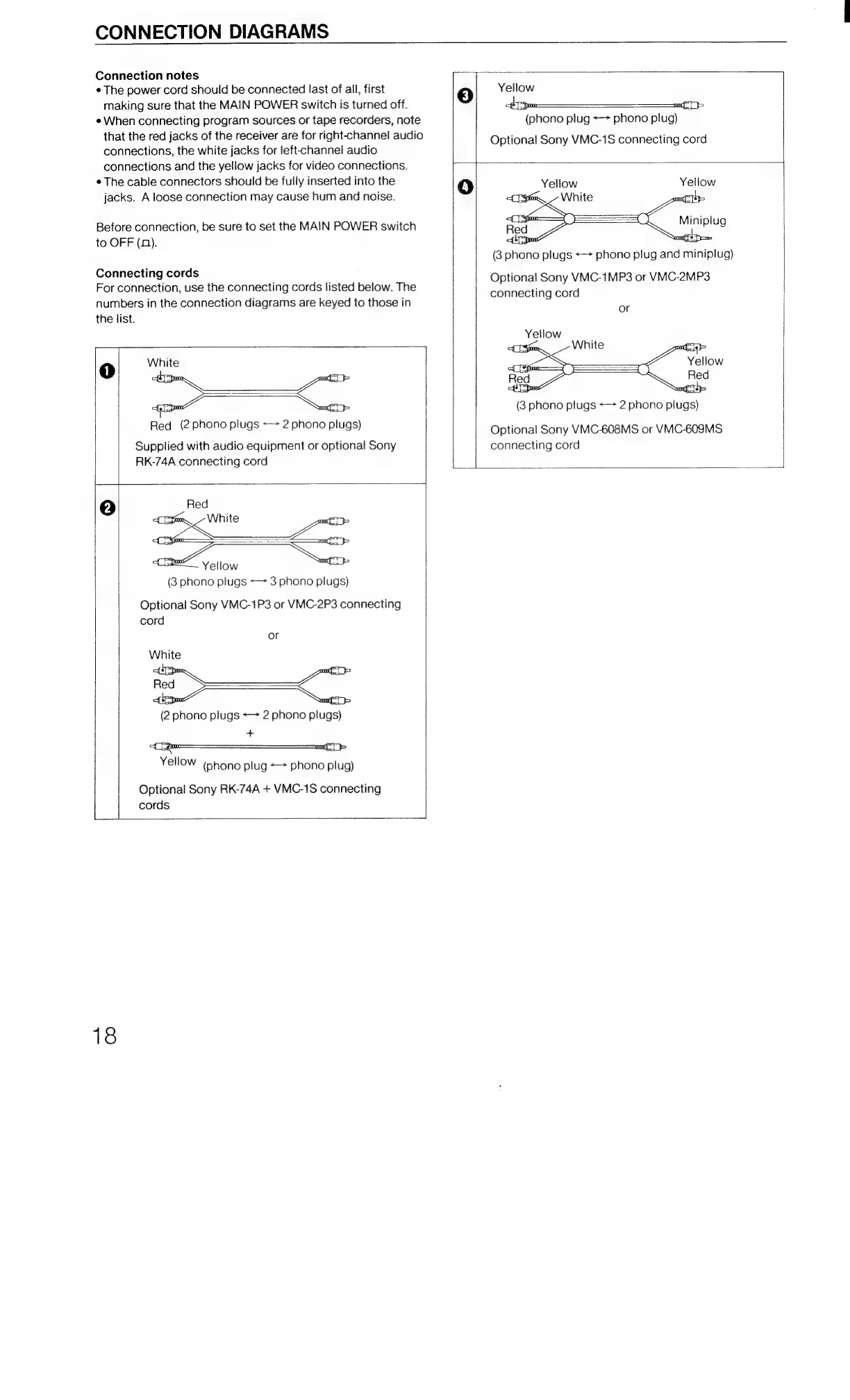
Connecting
cords
For
connection,
use
the
connecting
cords
listed
below.
The
numbers
in
the
connection
diagrams
are
keyed
to
those
in
the
list.
yea
ones}
Red
(2
phono
plugs
«>
2
phono
plugs)
Supplied
with
audio
equipment
or
optional
Sony
RK-74A
connecting
cord
Yellow
(3
phono
plugs
«>
3
phono
plugs)
Optional
Sony
VMC-1P3
or
VMC-2P3
connecting
cord
or
Sno
ont}
(2
phono
plugs
«>
2
phono
plugs)
+
oP
Yellow
(phono
plug
phono
plug)
Optional
Sony
RK-74A
+
VMC-1S
connecting
cords
18
Yellow
eT
a
(phono
plug
<->
phono
plug)
Optional
Sony
VMC-1S
connecting
cord
Optional
Sony
VMC-1MP3
or
VMC-2MP3
connecting
cord
or
Optional
Sony
VMC-608MS
or
VMC-6098MS
connecting
cord

Related product manuals