EasyManua.ls Logo

Sony STR-AV780 - Recording AUGIO Plograms 2.0; Recording FV Diogramms <.Ckecnuncdseecntsainsenguraaanss

Sony STR-AV780
32 pages
Print Icon
To Next Page IconTo Next Page
To Previous Page IconTo Previous Page
Loading...
HI-Fl
VIDEO
RECORDING
For
operation
of
the
hi-fi
VCR,
refer
to
its
instruction
manual.
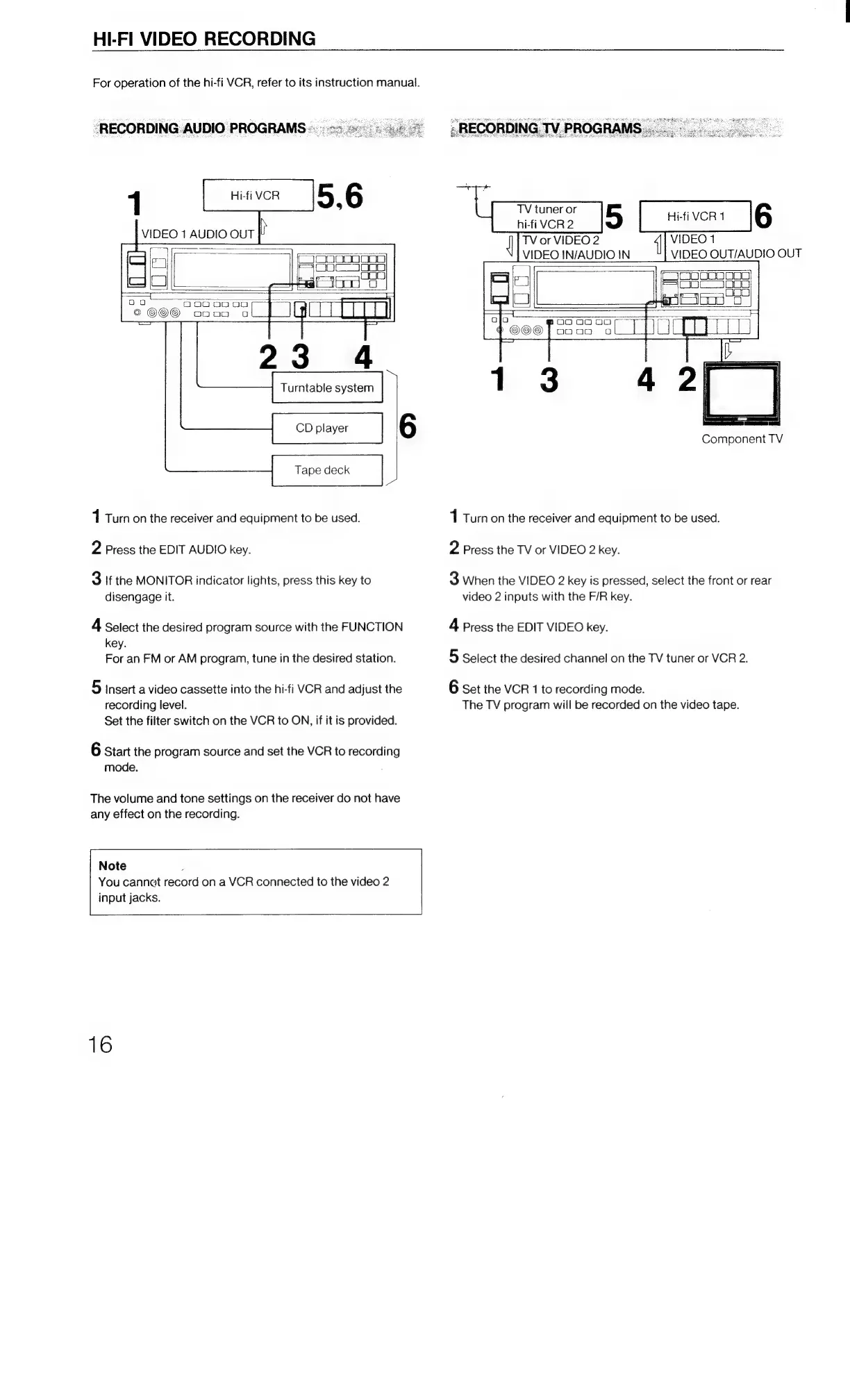
“RECORDING
AUDIO
PROGRAMS-..
i
o0
Qo0o0
ce)
oo0o0
oa
Turntable
system
CD
player
Tape
deck
1
Turn
on
the
receiver
and
equipment
to
be
used.
2
Press
the
EDIT
AUDIO
key.
3
If
the
MONITOR
indicator
lights,
press
this
key
to
disengage
it.
4
Select
the
desired
program
source
with
the
FUNCTION
key.
For
an
FM
or
AM
program,
tune
in
the
desired
station.
5
insert
a
video
cassette
into
the
hi-fi
VCR
and
adjust
the
recording
level.
Set
the
filter
switch
on
the
VCR
to
ON,
if it
is
provided.
6
Start
the
program
source
and
set
the
VCR
to
recording
mode.
The
volume
and
tone
settings
on
the
receiver
do
not
have
any
effect
on
the
recording.
Note
You
cannat
record
on
a
VCR
connected
to
the
video
2
input
jacks.
16
»
RECORDING
TV.
PROGRAMS
VIDEO
1
VIDEO
OUT/AUDIO
OUT
TV
or
VIDEO
2
VIDEO
IN/AUDIO
IN
a
=
OO
O00
Component
TV
1
Turn
on
the
receiver
and
equipment
to
be
used.
2
Press
the
TV
or
VIDEO
2
key.
3
When
the
VIDEO
2
key
is
pressed,
select
the
front
or
rear
video
2
inputs
with
the
F/R
key.
4
Press
the
EDIT
VIDEO
key.
5
Select
the
desired
channel
on
the
TV
tuner
or
VCR
2.
6
Set
the
VCR
1
to
recording
mode.
The
TV
program
will
be
recorded
on
the
video
tape.

Related product manuals