EasyManua.ls Logo

Sony STR-AV780 - To Receive FM;AM Broadcast; Sasha Danethyaatbeuntetuendeupsqedcantte a Tenates Direct Access Tuning

Sony STR-AV780
32 pages
Print Icon
To Next Page IconTo Next Page
To Previous Page IconTo Previous Page
Loading...
TO
RECEIVE
FM/AM
BROADCAST
Before
tuning,
select
the
speaker
system
with
the
SPEAKERS
selectors.
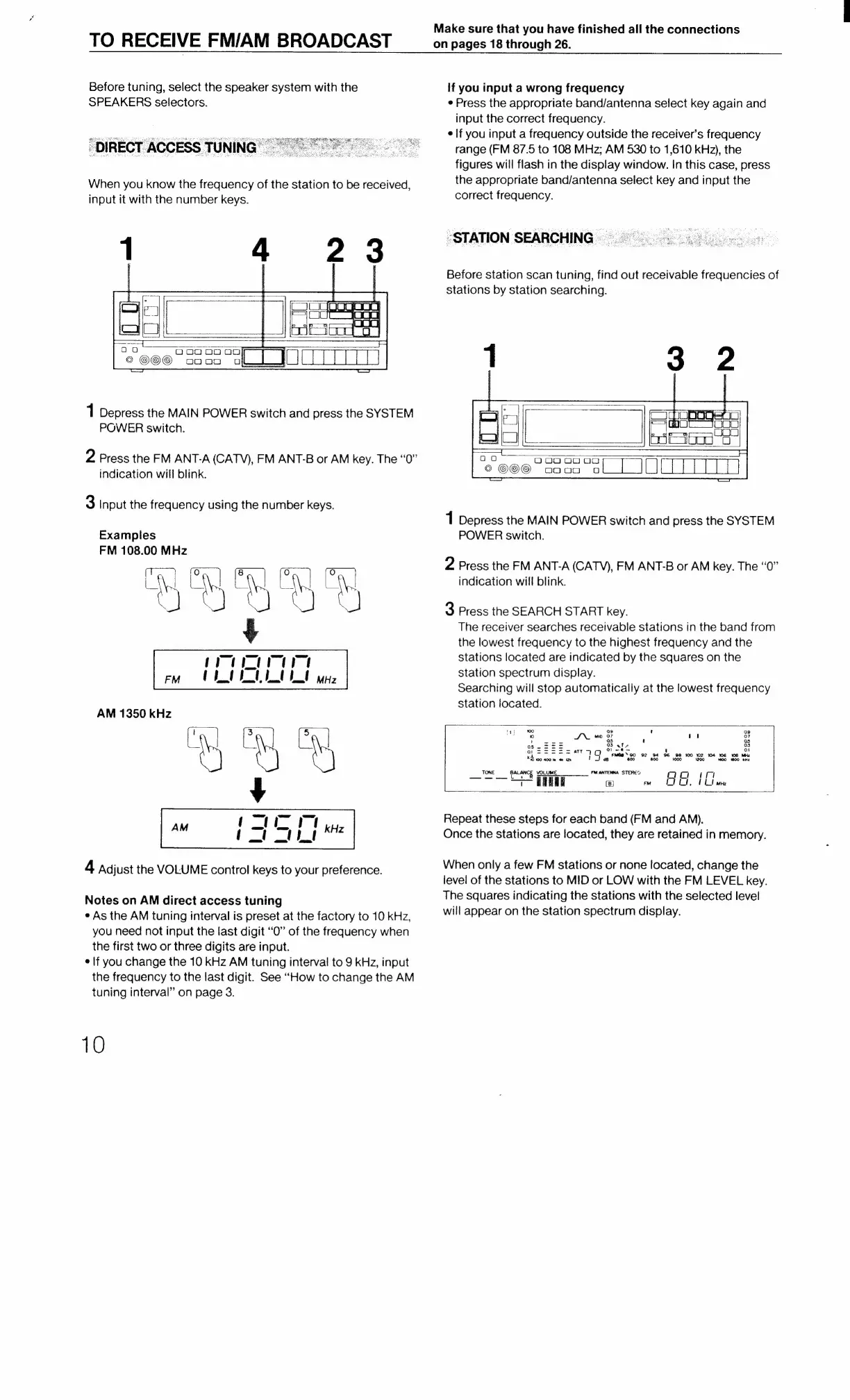
"DIRECT
ACCESS
TUNING’
When
you
know
the
frequency
of
the
station
to
be
received,
input
it
with
the
number
keys.
1
Depress
the
MAIN
POWER
switch
and
press
the
SYSTEM
POWER
switch.
2
Press
the
FM
ANT-A
(CATV),
FM
ANT-B
or
AM
key.
The
“0”
indication
will
blink.
3
Input
the
frequency
using
the
number
keys.
Examples
FM
108.00
MHz
ay
“i
¢
}
M
mara
FM
(
a
|
te
a
i
MHz
AM
1350
kHz
BB
¥
Ceca
4
Adjust
the
VOLUME
control
keys
to
your
preference.
ea
=
=,
Cae
.
CY
=
Notes
on
AM
direct
access
tuning
e
As
the
AM
tuning
interval
is
preset
at
the
factory
to
10
kHz,
you
need
not
input
the
last
digit
“O”
of
the
frequency
when
the
first
two
or
three
digits
are
input.
¢
If
you
change
the
10
kHz
AM
tuning
interval
to
9
KHz,
input
the
frequency
to
the
last
digit.
See
“How
to
change
the
AM
tuning
interval”
on
page
3.
10
Make
sure
that
you
have
finished
all
the
connections
on
pages
18
through
26.
if
you
input
a
wrong
frequency
¢
Press
the
appropriate
band/antenna
select
key
again
and
input
the
correct
frequency.
¢
if
you
input
a
frequency
outside
the
receiver's
frequency
range
(FM
87.5
to
108
MHz;
AM
530
to
1,610
kHz),
the
figures
will
flash
in
the
display
window.
In
this
case,
press
the
appropriate
band/antenna
select
key
and
input
the
correct
frequency.
“STATION
SEARCHING
Before
station
scan
tuning,
find
out
receivable
frequencies
of
stations
by
station
searching.
2
|
On
on
oOo
o0
oO
©
opo00
Oo
1
Depress
the
MAIN
POWER
switch
and
press
the
SYSTEM
POWER
switch.
2
Press
the
FM
ANT-A
(CATV),
FM
ANT-B
or
AM
key.
The
“0”
indication
will
blink.
3
Press
the
SEARCH
START
key.
The
receiver
searches
receivable
stations
in
the
band
from
the
lowest
frequency
to
the
highest
frequency
and
the
stations
located
are
indicated
by
the
squares
on
the
station
spectrum
display.
Searching
will
stop
automatically
at
the
lowest
frequency
station
located.
1
wo
09
t
09
0
tes)
JN
MI
207
:
a)
or
Os
2S
S:=
03
ate
os
OP
SSS
SS
arr
iG,
See
!
a
xt
H
g
FMGB™90
92
94
96
98
100
102
104
16
108
MH:
10
100
400
4m
1a 38
600
800
+000 1200
00
00
ki
TK
FM
ANTENNA
EC
NES
BALANCE
VOLUME
STEREO
qQ
Cc
qm
7
Wa
(8)
m
LIC,
tL
me
Repeat
these
steps
for
each
band
(FM
and
AM).
Once
the
stations
are
located,
they
are
retained
in
memory.
When
only
a
few
FM
stations
or
none
located,
change
the
level
of
the
stations
to
MID
or
LOW
with
the
FM
LEVEL
key.
The
squares
indicating
the
stations
with
the
selected
level
will
appear
on
the
station
spectrum
display.

Related product manuals