EasyManua.ls Logo

Sony STR-AV780 - To Listen to Program Sources Other than Broadcasts; Spiasdbatbidiashaa Cele Ausaottancaaveanlemtes Tt Acatacs Preset Tuning

Sony STR-AV780
32 pages
Print Icon
To Next Page IconTo Next Page
To Previous Page IconTo Previous Page
Loading...
PRESET
TUNING
You
can
receive
a
station
only
by
pressing
one
of
the
number
keys
to
which
the
station
has
been
memorized.
Memory
of
the
last
station
received
This
receiver
includes
a
memory
circuit
to
remember
the
station
being
received
just
before
the
power
was
turned
off.
The
station
will
be
automatically
tuned
in
when
the
power
is
turned
on
again.
MEMORY
SCANNING
This
function
allows
you
to
quickly
hear
what
kind
of
programs
are
being
broadcast
by
the
memorized
stations.
When
you
press
the
MEMORY
SCAN
key,
the
memorized
stations
are
automatically
tuned
in
for
several
seconds
each.
To
stop
scanning,
press
the
appropriate
number
key.
12
TO
LISTEN
TO
PROGRAM
SOURCES
OTHER
THAN
BROADCASTS
For
details
on
connections,
see
the
connection
diagrams
on
pages
19
through
23.
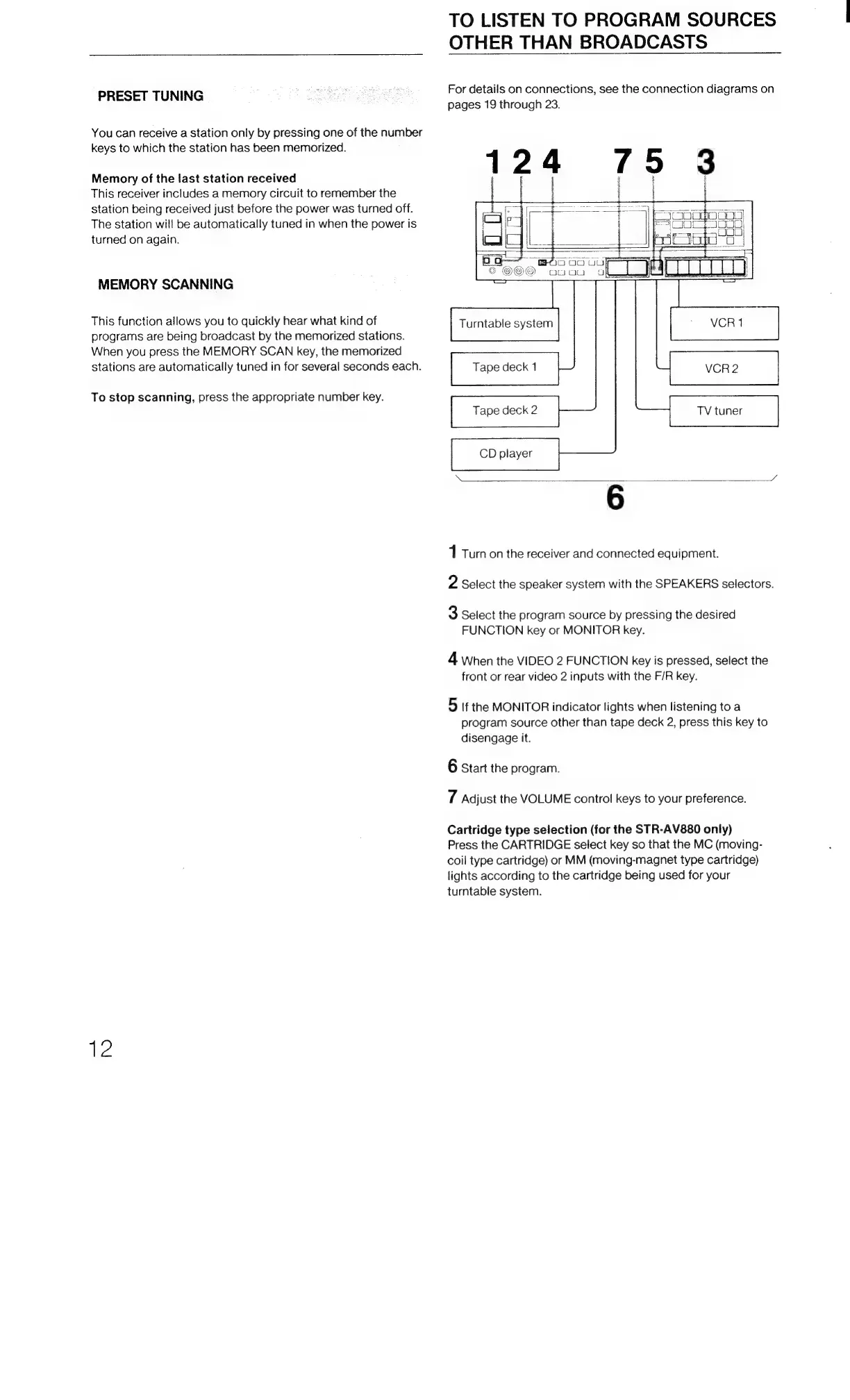
124
795
3
Perec
il
Caeeenere
| |
Jessie
Turntable
system
©
VCR1
Tape
deck
1
VCR2
CD
player
6
1
Turn
on
the
receiver
and
connected
equipment.
2
Select
the
speaker
system
with
the
SPEAKERS
selectors.
3
Select
the
program
source
by
pressing
the
desired
FUNCTION
key
or
MONITOR
key.
4
When
the
VIDEO
2
FUNCTION
key
is
pressed,
select
the
front
or
rear
video
2
inputs
with
the
F/R
key.
5
If
the
MONITOR
indicator
lights
when
listening
to
a
program
source
other
than
tape
deck
2,
press
this
key
to
disengage
it.
6
Start
the
program.
vA
Adjust
the
VOLUME
control
keys
to
your
preference.
Cartridge
type
selection
(for
the
STR-AV880
only)
Press
the
CARTRIDGE
select
key
so
that
the
MC
(moving-
coil
type
cartridge)
or
MM
(moving-magnet
type
cartridge)
lights
according
to
the
cartridge
being
used
for
your
turntable
system.

Related product manuals