EasyManua.ls Logo

Sony STR-AV780 - AM Antenna CONNECHION Uo; Antenna Ground CONNECTION; CATV Cable CONNECTION

Sony STR-AV780
32 pages
Print Icon
To Next Page IconTo Next Page
To Previous Page IconTo Previous Page
Loading...
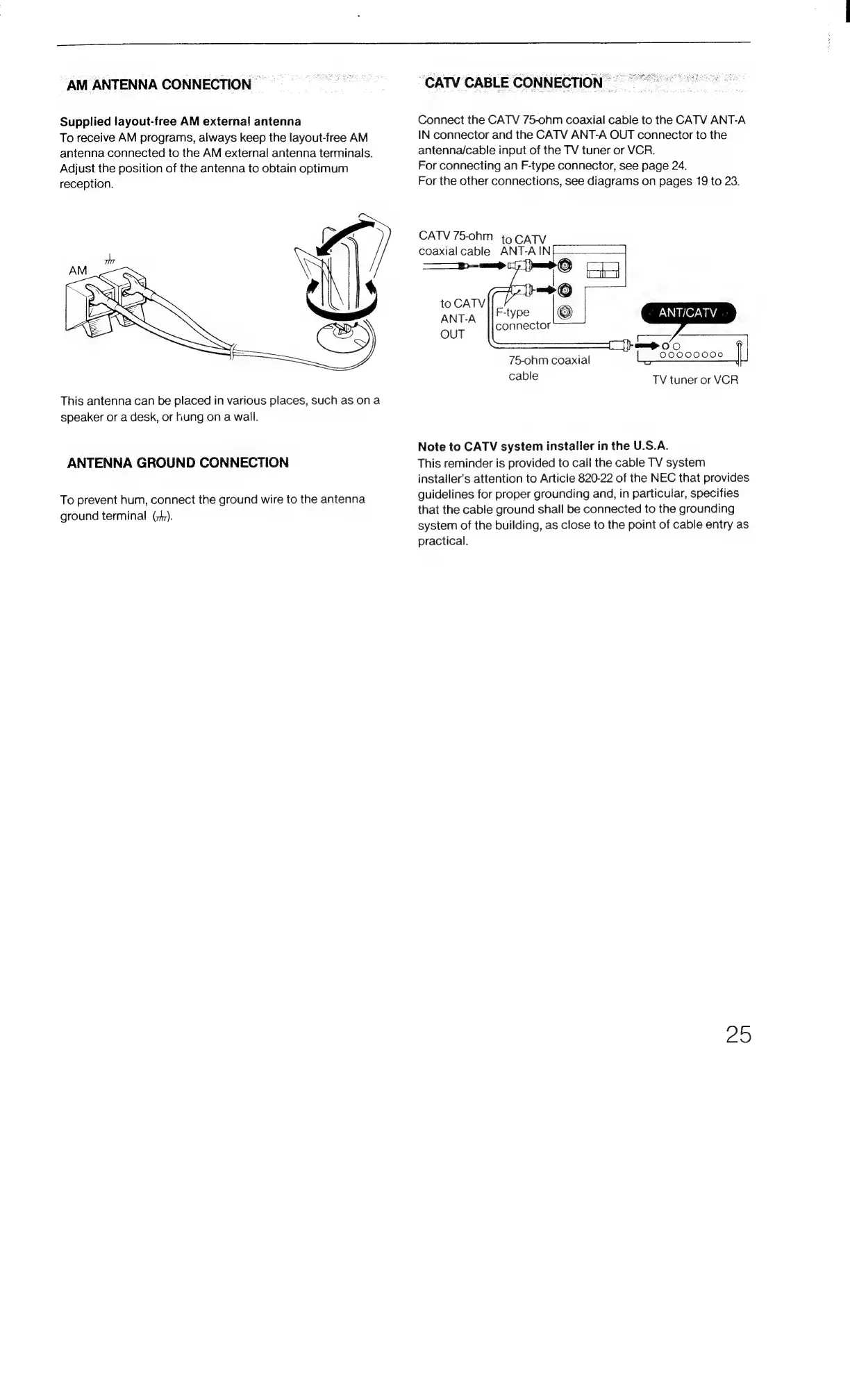
AM
ANTENNA
CONNECTION
|
Supplied
layout-free
AM
externa!
antenna
To
receive
AM
programs,
always
keep
the
layout-free
AM
antenna
connected
to
the
AM
external
antenna
terminals.
Adjust
the
position
of
the
antenna
to
obtain
optimum
reception.
This
antenna
can
be
placed
in
various
places,
such
as
ona
speaker
or
a
desk,
or
Fung
on
a
wall.
ANTENNA
GROUND
CONNECTION
To
prevent
hum,
connect
the
ground
wire
to
the
antenna
ground
terminal
(t).
CATV
CABLE
CONNECTION
=
Connect
the
CATV
75-ohm
coaxial
cable
to
the
CATV
ANT-A
IN
connector
and
the
CATV
ANT-A
OUT
connector
to
the
antenna/cable
input
of
the
TV
tuner
or
VCR.
For
connecting
an
F-type
connector,
see
page
24.
For
the
other
connections,
see
diagrams
on
pages
19
to
23.
CATV
75-ohm
to
CATV
coaxial
cable
ANT-AIN
F-type
connector
75-ohm
coaxial
cable
TV
tuner
or
VCR
Note
to
CATV
system
installer
in
the
U.S.A.
This
reminder
is
provided
to
call
the
cable
TV
system
installer’s
attention
to
Article
820-22
of
the
NEC
that
provides
guidelines
for
proper
grounding
and,
in
particular,
specifies
that
the
cable
ground
shall
be
connected
to
the
grounding
system
of
the
building,
as
close
to
the
point
of
cable
entry
as
practical.
ZO

Related product manuals