EasyManua.ls Logo

Sony STR-AV780 - Antennalcable CONNMECHION 0; FM Antenna CONNECTION

Sony STR-AV780
32 pages
Print Icon
To Next Page IconTo Next Page
To Previous Page IconTo Previous Page
Loading...
ANTENNA/CABLE
CONNECTION
FM
ANTENNA
CONNECTION
To
get
the
optimum
sound
of
FM
broadcasts,
install
a
suitable
outdoor
FM
antenna.
The
supplied
ribbon
antenna
may
be
useful
until
you
install
a
more
suitable
antenna.
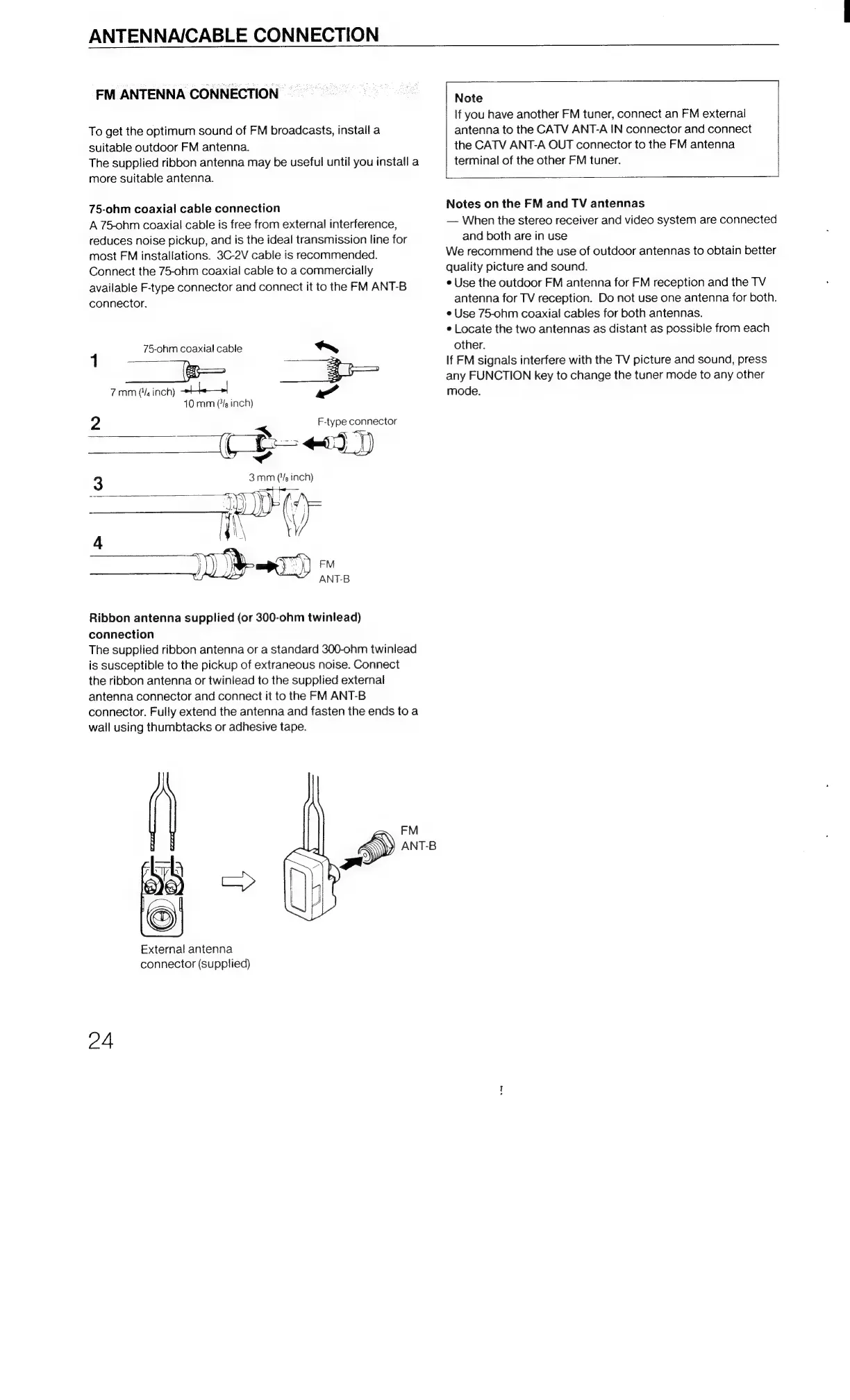
75-ohm
coaxial
cable
connection
A
75-ohm
coaxial
cable
is
free
from
external
interference,
reduces
noise
pickup,
and
is
the
ideal
transmission
line
for
most
FM
installations.
3C-2V
cable
is
recommended.
Connect
the
75-ohm
coaxial
cable
to
a
commercially
available
F-type
connector
and
connect
it
to
the
FM
ANT-B
connector.
75-ohm
coaxial
cable
40
mm
(/s
inch)
2
F-type
connector
((
p13)
3mm
(
teed
inch)
|
wa
Ribbon
antenna
supplied
(or
300-ohm
twinlead)
connection
The
supplied
ribbon
antenna
or
a
standard
300-ohm
twinlead
is
susceptible
to
the
pickup
of
extraneous
noise.
Connect
the
ribbon
antenna
or
twinlead
to
the
supplied
external
antenna
connector
and
connect
it
to
the
FM
ANT-B
connector.
Fully
extend
the
antenna
and
fasten
the
ends
toa
wall
using
thumbtacks
or
adhesive
tape.
I
ia
=
fh
External
antenna
connector
(Supplied)
f-)
24
Note
If
you
have
another
FM
tuner,
connect
an
FM
external
antenna
to
the
CATV
ANT-A
IN
connector
and
connect
the
CATV
ANT-A
OUT
connector
to
the
FM
antenna
terminal
of
the
other
FM
tuner.
Notes
on
the
FM
and
TV
antennas
When
the
stereo
receiver
and
video
system
are
connected
and
both
are
in
use
We
recommend
the
use
of
outdoor
antennas
to
obtain
better
quality
picture
and
sound.
e
Use
the
outdoor
FM
antenna
for
FM
reception
and
the
TV
antenna
for
TV
reception.
Do
not
use
one
antenna
for
both.
e
Use
75-ohm
coaxial
cables
for
both
antennas.
e
Locate
the
two
antennas
as
distant
as
possible
from
each
other.
If
FM
signals
interfere
with
the
TV
picture
and
sound,
press
any
FUNCTION
key
to
change
the
tuner
mode
to
any
other
mode.

Related product manuals