EasyManua.ls Logo

Sony STR-AV780 - Page 31

Sony STR-AV780
32 pages
Print Icon
To Next Page IconTo Next Page
To Previous Page IconTo Previous Page
Loading...
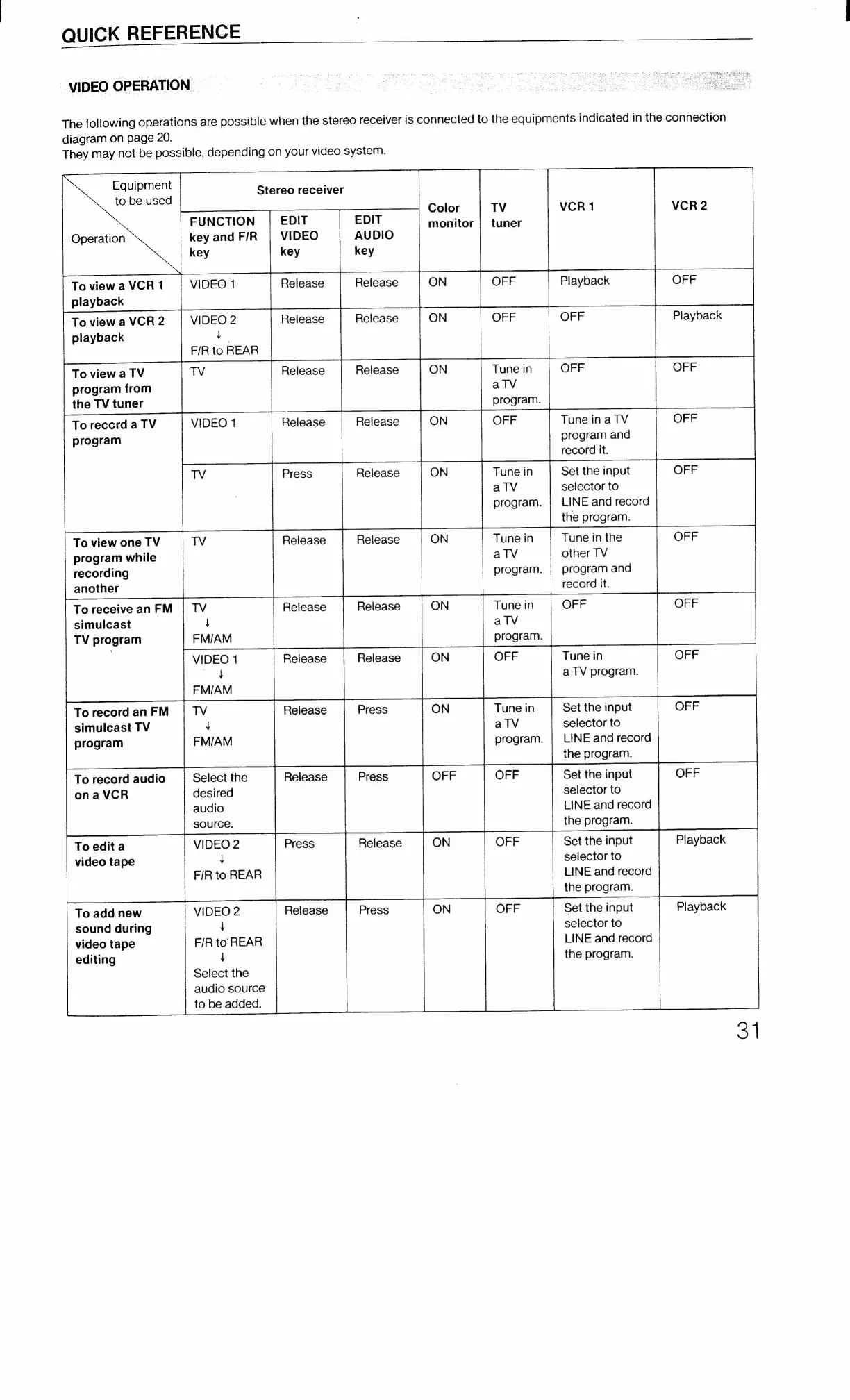
QUICK
REFERENCE
VIDEO
OPERATION
The
following
operations
are
possible
when
the
stereo
receiver
is
connected
to
the
equipments
indicated
in
the
connection
diagram
on
page
20.
They
may
not
be
possible,
depending
on
your
video
system.
Equipment
to
be
used
FUNCTION
key
and
F/R
key
Operation
VIDEO
1
To
view
a
VCR
1
playback
To
view
a
VCR
2
playback
VIDEO
2
4
F/R
to
REAR
ToviewaTV
TV
program
from
the
TV
tuner
ToreccrdaTV
VIDEO
1
program
TV
To
view
one
TV
TV
program
while
recording
another
To
receive
an
FM
simulcast
TV
program
To
record
an
FM
simulcast
TV
program
To
record
audio
Select
the
onaVCR
desired
audio
source.
VIDEO
2
4
F/R
to
REAR
To
edit
a
video
tape
VIDEO
2
4
F/R
to
REAR
To
add
new
sound
during
video
tape
editing
Stereo
receiver
VIDEO
key
Release
Release
Release
Press
Release
Release
EDIT
AUDIO
key
Release
Release
Release
Release
Release
Release
VIDEO
1
Release
Release
oy
FM/AM
TV
Release
Press
ON
t
FM/AM
ain
Release
Press
ON
1
Select
the
audio
source
to
be
added.
Color
monitor
ON
OFF
Tune
in
alV
Tune
in
alV
Tune
in
alV
Tune
in
aTlV
Tune
in
alV
program.
program.
program.
program.
program.
Playback
OFF
Tune
ina
TV
program
and
record
it.
Set
the
input
selector
to
LINE
and
record
the
program.
Tune
in
the
other
TV
program
and
record
it.
Tune
in
a
TV
program.
Set
the
input
selector
to
LINE
and
record
the
program.
Set
the
input
selector
to
LINE
and
record
the
program.
Set
the
input
selector
to
LINE
and
record
the
program.
Set
the
input
selector
to
LINE
and
record
the
program.
OFF
Playback
OFF
OFF
F
OFF
OFF
OFF
Playback
31

Related product manuals