EasyManua.ls Logo

Sony STR-AV970X - Audio Recording; Recording to Tape;DAT Deck; Tape Dubbing

Sony STR-AV970X
43 pages
Print Icon
To Next Page IconTo Next Page
To Previous Page IconTo Previous Page
Loading...
PANT
lfoe
a
(lero)
cel
late,
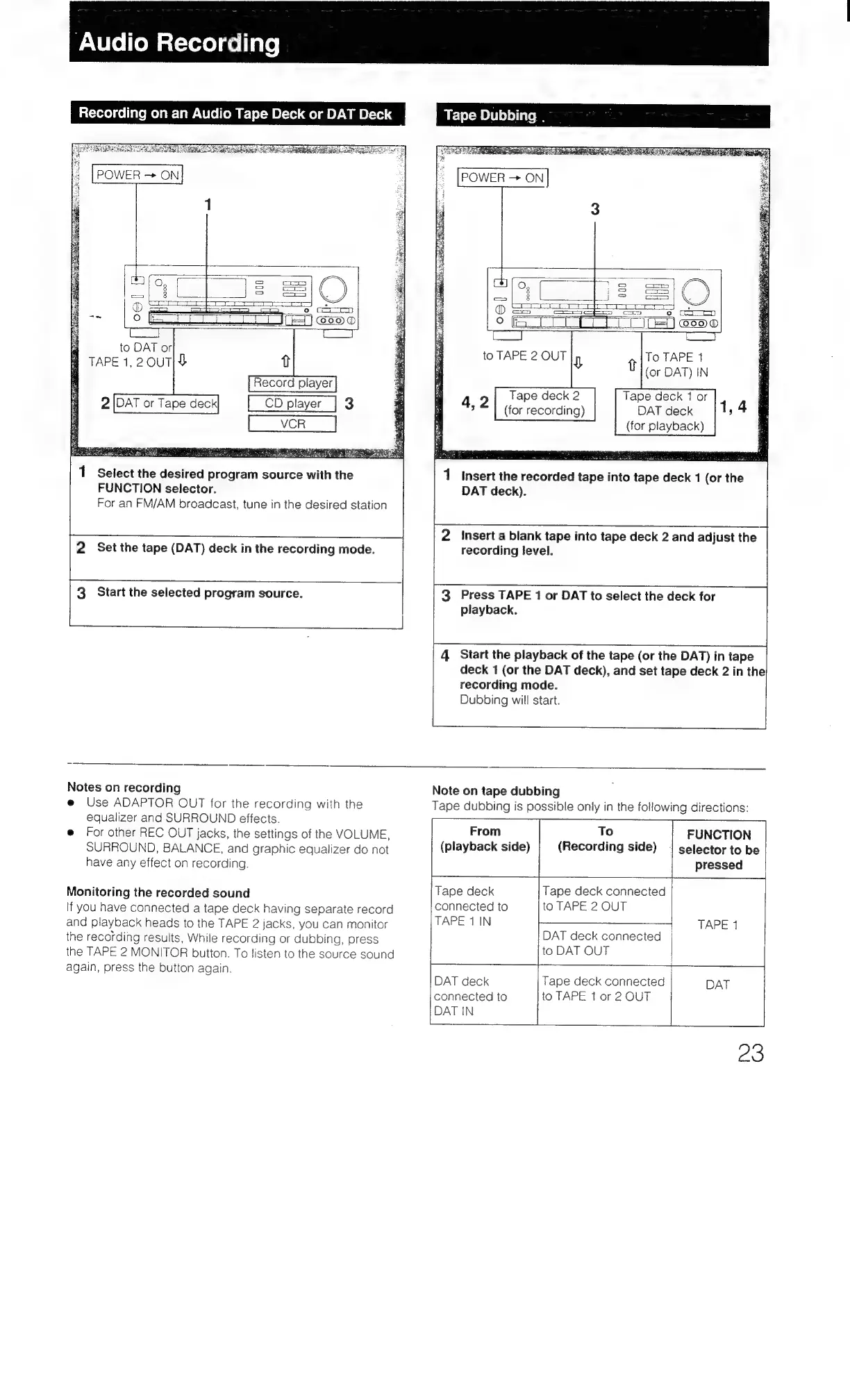
Recording
on
an
Audio
Tape
Deck
or
DAT
Deck
1
Select
the
desired
program
source
with
the
FUNCTION
selector.
For
an
FM/AM
broadcast,
tune
in
the
desired
station
2
Set
the
tape
(DAT)
deck
in
the
recording
mode.
3
Start
the
selected
program
source.
POWER
ON
To
TAPE
1
(or
DAT)
IN
Tape
deck
2
Tape
deck
1
or
(for
recording)
DAT
deck
(for
playback)
insert
the
recorded
tape
into
tape
deck
1
(or
the
DAT
deck).
Insert
a
blank
tape
into
tape
deck
2
and
adjust
the
recording
level.
Press
TAPE
1
or
DAT
to
select
the
deck
for
playback.
Start
the
playback
of
the
tape
(or
the
DAT)
in
tape
deck
1
(or
the
DAT
deck),
and
set
tape
deck
2
in
the
recording
mode.
Dubbing
will
start.
Notes
on
recording
e@
Use
ADAPTOR
OUT
for
the
recording
with
the
equalizer
and
SURROUND
effects.
@
For
other
REC
OUT
jacks,
the
settings
of
the
VOLUME,
SURROUND,
BALANCE,
and
graphic
equalizer
do
not
have
any
effect
on
recording.
Monitoring
the
recorded
sound
If
you
have
connected
a
tape
deck
having
separate
record
and
playback
heads
to
the
TAPE
2
jacks,
you
can
monitor
the
recording
results,
While
recording
or
dubbing,
press
the
TAPE
2
MONITOR
button.
To
listen
to
the
source
sound
again,
press
the
button
again.
Note
on
tape
dubbing
Tape
dubbing
is
possible
only
in
the
following
directions:
From
To
FUNCTION
i
(playback
side)
(Recording
side)
|
selector
to
be
pressed
ml
Tape
deck
Tape
deck
connected
connected
to to
TAPE
2
OUT
TAPE
1
IN
4
TAPE
1
DAT
deck
connected
to
DAT
OUT
DAT
deck
Tape
deck
connected
DAT
connected
to
to
TAPE
1
or
2
OUT
DAT
IN
23

Table of Contents

Related product manuals