EasyManua.ls Logo

Sony STR-AV970X - Remote Learning Function; Programming Control Signals

Sony STR-AV970X
43 pages
Print Icon
To Next Page IconTo Next Page
To Previous Page IconTo Previous Page
Loading...
How
to
Use
the
Learning
Function
(STR-AV1070X
only)
Programming
Signals
of
Other
Audio/Video
Equipment
with
Programmable
System
Commander
RM-P311
USER
STD
SONY
oa
|
LEARN
—y
2
Other
manufacturer's
remote
LEARN
commander
indicator
Approx.
5
cm
(2
inches)
Programmable
commander
RM-P311
4
USER
STD
SONY
[tm
.
aa
[[I}]
|
LEARN
“pom
34
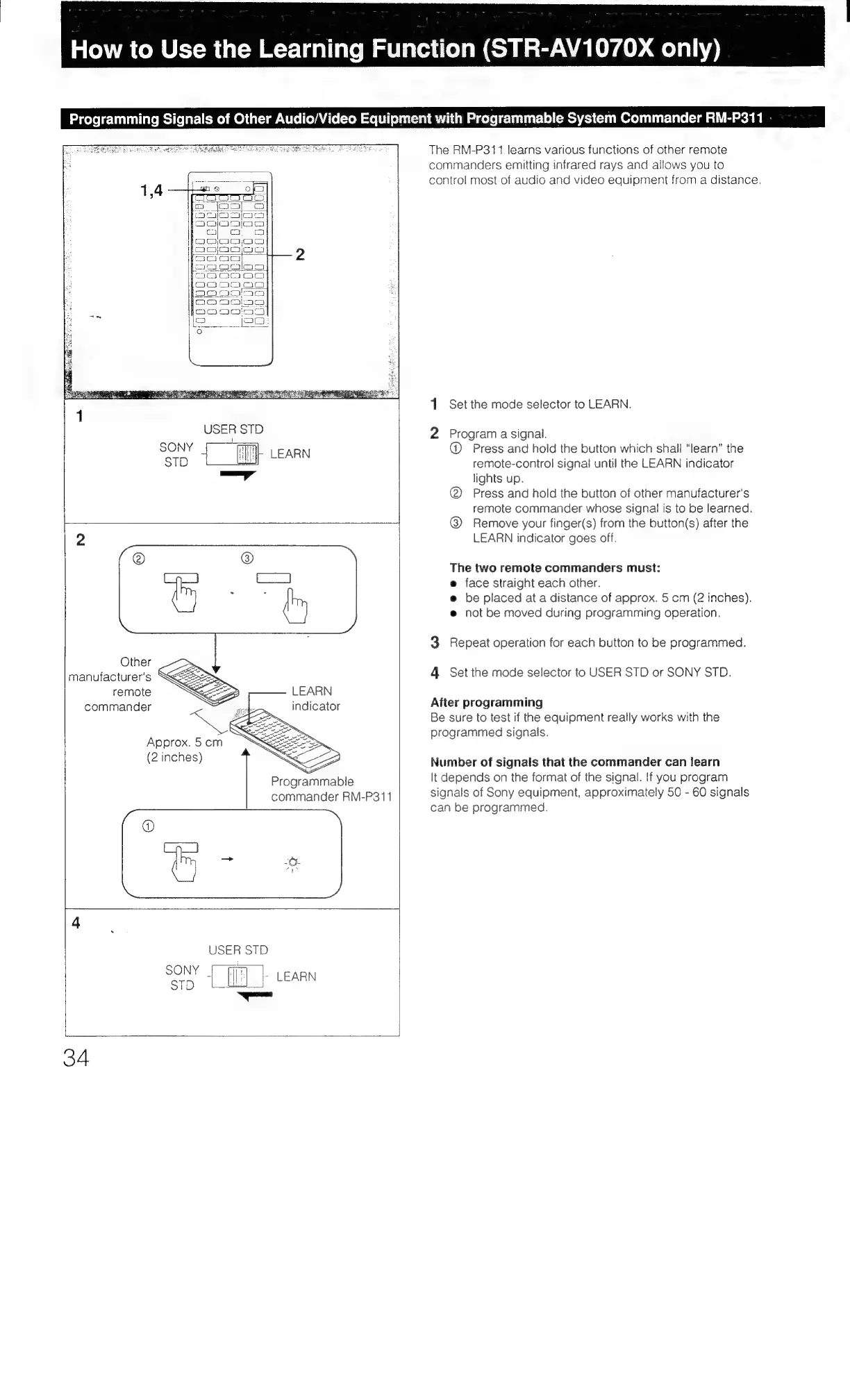
The
RM-P311
learns
various
functions
of
other
remote
commanders
emitting
infrared
rays
and
allows
you
to
control
most
of
audio
and
video
equipment
from
a
distance.
1
Set
the
mode
selector
to
LEARN.
2
Program
a
signal.
@
Press
and
hold
the
button
which
shall
“learn”
the
remote-control
signal
until
the
LEARN
indicator
lights
up.
@
Press
and
hold
the
button
of
other
manufacturer's
remote
commander
whose
signal
is
to
be
learned.
@)
Remove
your
finger(s)
from
the
button(s)
after
the
LEARN
indicator
goes
off.
The
two
remote
commanders
must:
e
face
straight
each
other.
e@
be
placed
at
a
distance
of
approx.
5
cm
(2
inches).
e
not
be
moved
during
programming
operation.
3
Repeat
operation
for
each
button
to
be
programmed.
4
Set
the
mode
selector
to
USER
STD
or
SONY
STD.
After
programming
Be
sure
to
test
if
the
equipment
really
works
with
the
programmed
signals.
Number
of
signals
that
the
commander
can
learn
It
depends
on
the
format
of
the
signal.
If
you
program
signals
of
Sony
equipment,
approximately
50
-
60
signals
can
be
programmed.

Table of Contents

Related product manuals