EasyManua.ls Logo

Sony STR-AV970X - Adding Sound During Video Editing

Sony STR-AV970X
43 pages
Print Icon
To Next Page IconTo Next Page
To Previous Page IconTo Previous Page
Loading...
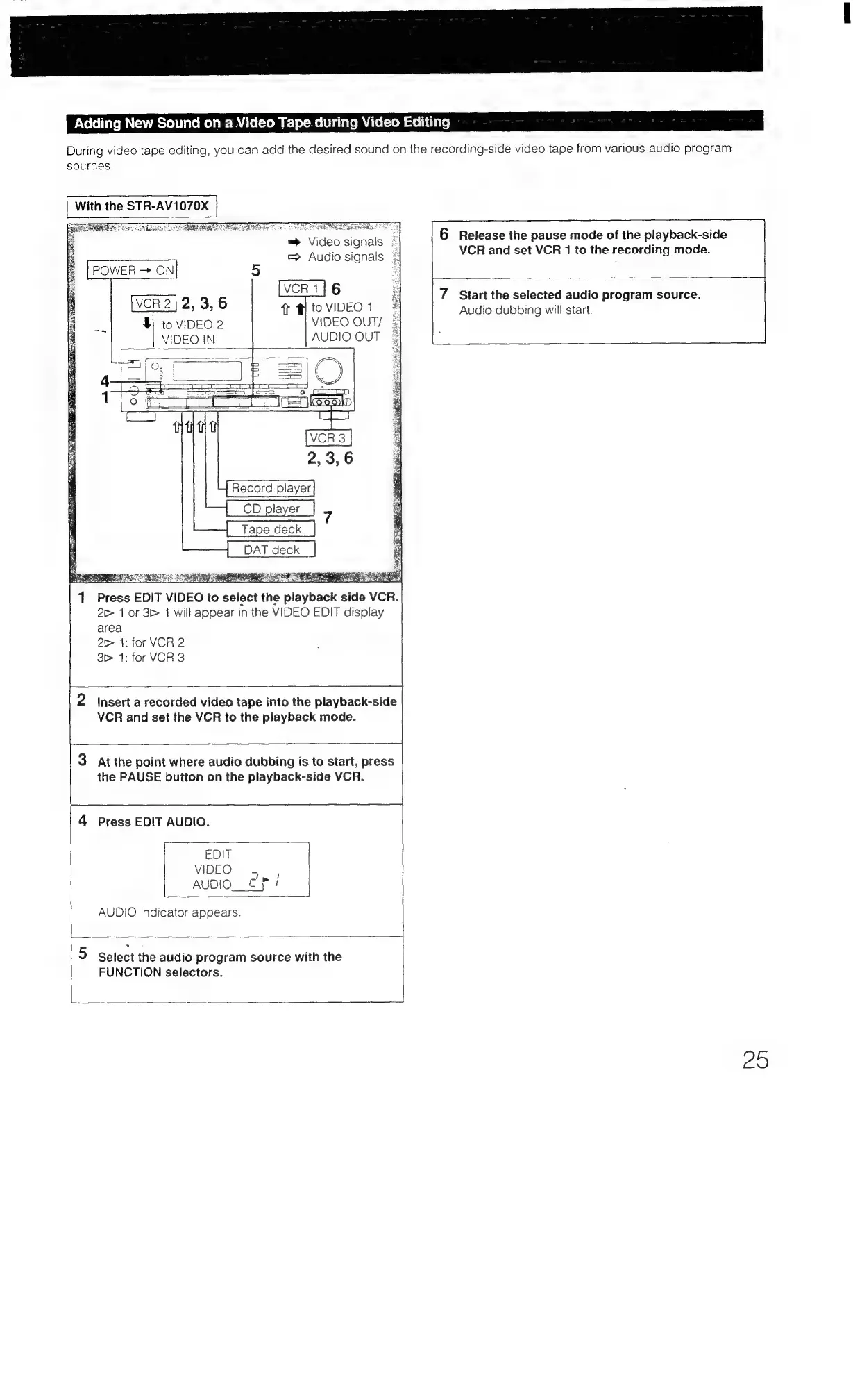
Adding
New
Sound
on
a
Video
Tape.
during
Video
Editing
During
video
tape
editing,
you
can
add
the
desired
sound
on
the
recording-side
video
tape
from
various
audio
program
sources.
With
the
STR-AV1070X
|
OS
ORREN
S
Da
De
disk
RE
es
GD
2,
3,6
$
to
VIDEO
2
VIDEO
IN
6
Release
the
pause
mode
of
the
playback-side
|
vos
Eigtg.
Se?
Pg
=
Vid
ignals
=
y
fepea
wala
VCR
and
set
VCR
1
to
the
recording
mode.
=
Audio
signals
=
.
T
PtoVIDEO1
#
VIDEO
OUT/
=
AUDIO
OUT
|
6
Ee
2
7
Start
the
selected
audio
program
source.
|
Audio
dubbing
will
start.
Riess
SRN
CR
REE
1
Press
EDIT
VIDEO
to
select
the
playback
side
VCR.
2c
1
or
3>
1
will
appear
in
the
VIDEO
EDIT
display
area
2>
1:
for
VCR
2
3
1:
for
VCR
3
2
Insert
a
recorded
video
tape
into
the
playback-side
VCR
and
set
the
VCR
to
the
playback
mode.
3
Atthe
point
where
audio
dubbing
is
to
start,
press
the
PAUSE
button
on
the
playback-side
VCR.
4
Press
EDIT
AUDIO.
EDIT
VIDEO
_
AUDIO.
Cf!
AUDIO
indicator
appears.
)
Select
the
audio
program
source
with
the
FUNCTION
selectors.
Zo

Table of Contents

Related product manuals