EasyManua.ls Logo

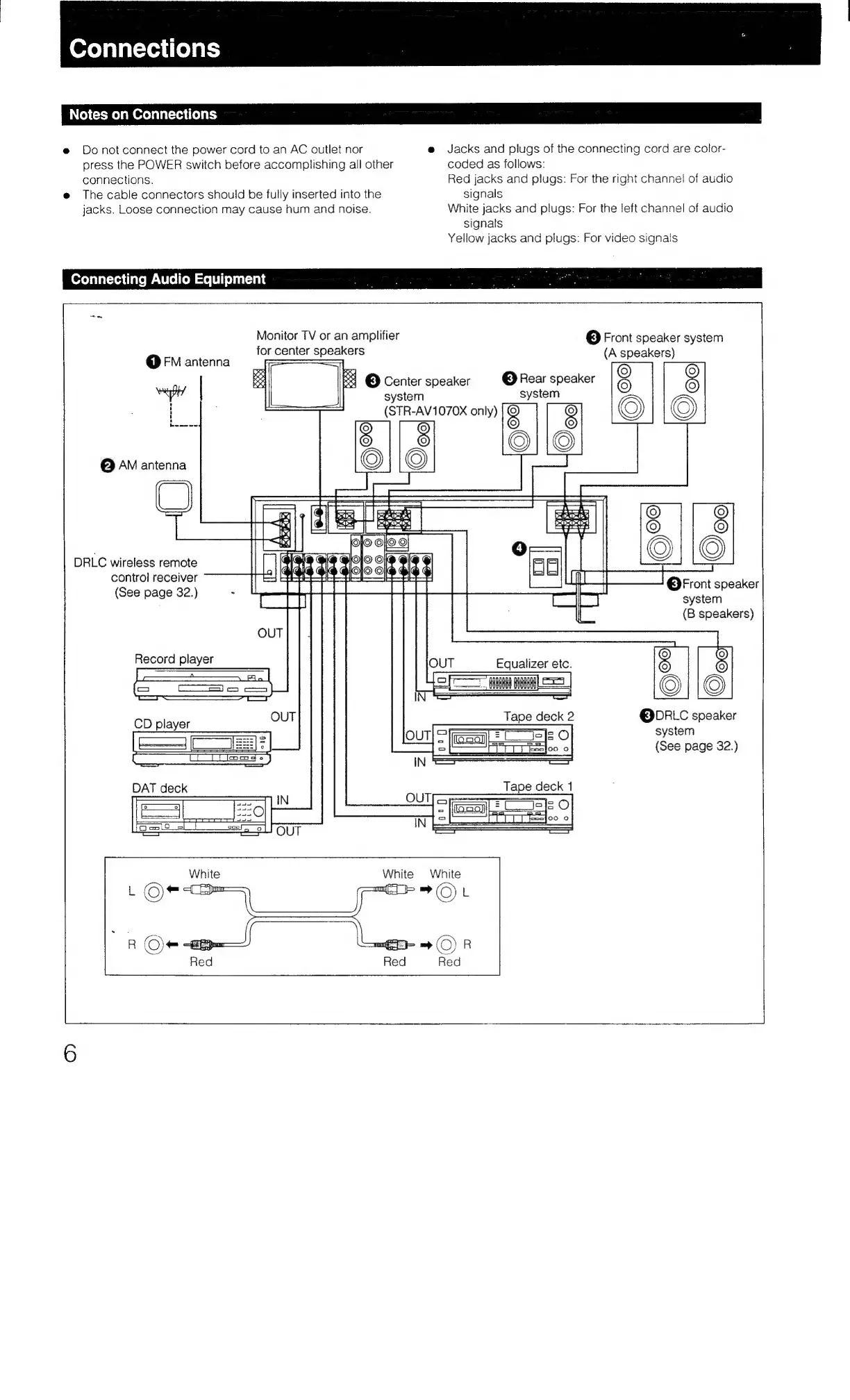
Sony STR-AV970X - Connections; Connection Notes; Audio Equipment Connections

Sony STR-AV970X
43 pages
Print Icon
To Next Page IconTo Next Page
To Previous Page IconTo Previous Page
Loading...
Connections
Notes
on
Connections
@
Donot
connect
the
power
cord
to
an
AC
outlet
nor
press
the
POWER
switch
before
accomplishing
all
other
connections.
e
The
cable
connectors
should
be
fully
inserted
into
the
jacks.
Loose
connection
may
cause
hum
and
noise.
e
Jacks
and
plugs
of
the
connecting
cord
are
color-
coded
as
follows:
Red
jacks
and
plugs:
For
the
right
channel!
of
audio
signals
White
jacks
and
plugs:
For
the
left
channel
of
audio
signals
Yellow
jacks
and
plugs:
For
video
signals
Connecting
Audio
Equipment
Monitor
TV
or
an
amplifier
for
center
speakers
@
FM
antenna
@
AM
antenna
|
©
Front
speaker
system
(A
speakers)
<
3
©
Center
speaker
system
©
Rear
speaker
Q
Q
system
© ©
(STR-AV1070X
only)
DRLC
wireless
remote
control
receiver
(See
page
32.)
©
©
©
[fd
©
Front
speaker
system
(B
speakers)
OUT
Equalizer
etc.
8
|
aes
|
=
mae
Tape
deck
2
@DRLC
speaker
——
system
(See
page
32.)

Table of Contents

Related product manuals