EasyManua.ls Logo

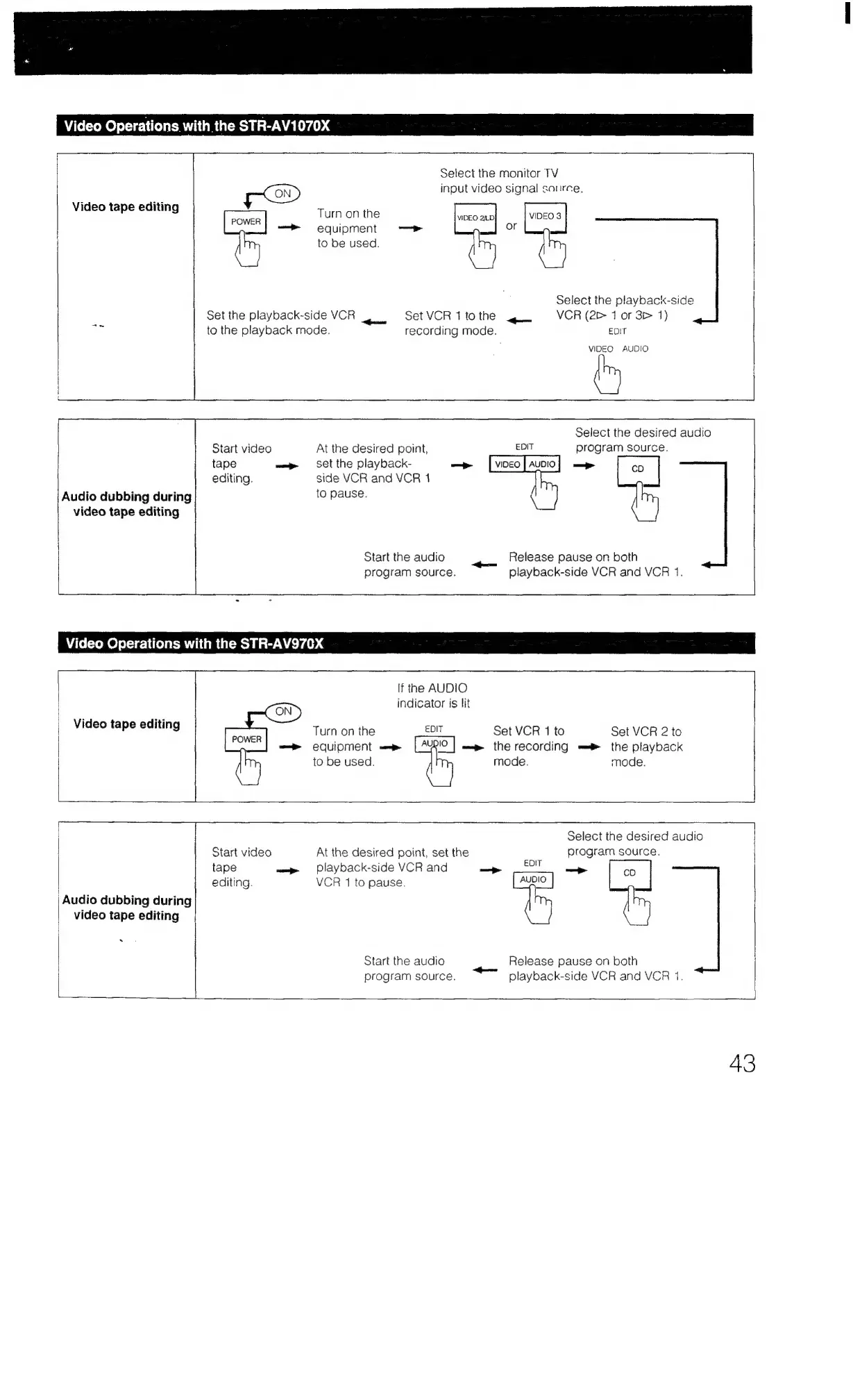
Sony STR-AV970X - Video Operations (STR-AV1070 X); Video Tape Editing (STR-AV1070 X); Audio Dubbing During Editing (STR-AV1070 X); Video Operations (STR-AV970 X)

Sony STR-AV970X
43 pages
Print Icon
To Previous Page IconTo Previous Page
Loading...
Video
Operations
with
the
STR-AV1070X
Video
tape
editing
Turn
on
the
—>
equipment
to
be
used.
ie
Set
the
playback-side
VCR
to
the
playback
mode.
=
video
tape
editing
r
Start
video
At
the
desired
point,
tape
wp
Set
the
playback-
editing.
side
VCR
and
VCR
1
Audio
dubbing
during
to
pause.
Start
the
audio
program
source.
Set
VCR
1
tothe
4
recording
mode.
=
Select
the
monitor
TV
input
video
signal
saurce,
VIDEO
2.D
VIDEO
3
—p
or
Select
the
playback-side
VCR
(2
1
or
3>
1)
EDIT
VIDEO
AUDIO
Select
the
desired
audio
EDIT
program
source.
Release
pause
on
both
playback-side
VCR
and
VCR
1.
:
Video
Operations
with
the
STR-AV970X
Video
tape
editing
a
If
the
AUDIO
CON)
indicator
is
lit
Turn
on
the
EDIT
Set
VCR
1
to
Set
VCR
2
to
equipment
———»
LAYOIO
|
ap
the
recording
—®
the
playback
Ur
to
be
used.
mode
mode
.
Audio
dubbing
during
video
tape
editing
Start
video
At
the
desired
point,
set
the
tape
wap
playback-side
VCR
and
editing.
VCR
1
to
pause.
Start
the
audio
program
source.
——
Select
the
desired
audio
program
source,
EDIT
cD
AUDIO
Release
pause
on
both
playback-side
VCR
and
VCR
1.
43

Table of Contents

Related product manuals