EasyManua.ls Logo

Sony STR-D2090 - Chapter 2 Basic Operations; Operating with the Remote Commander; Changing FUNCTION Button Settings

Sony STR-D2090
51 pages
Print Icon
To Next Page IconTo Next Page
To Previous Page IconTo Previous Page
Loading...
Chapter
2
Basic
Operations
Operating
with
the
Remote
Commander
Before
operating
the
equipments
with
the
remote
commander,
be
sure
to
set
the
receiver
to
the
desired
mode
by
pressing
one
of
the
FUNCTION
buttons.
The
FUNCTION
buttons
are
factory
set
in
the
following
list.
FUNCTION
to
be
Operating
equipment
pressed
DAT
c
*
When
VIDEO
1,
2
or
3
is
pressed,
the
power
of
the
selected
video
equipment
and
TV
is
turned
on.
Operating
the
equipment
1
Press
the
desired
FUNCTION.
2
Press
<4
(only
for
tape
deck)
or
»
to
start
playback.
Changing
the
Settings
of
the
FUNCTION
Buttons
With
the
SELECT
button,
you
can
replace
the
functions
stored
in
the
FUNCTION
buttons.
To
change
the
settings
of
the
FUNCTION
buttons
1
Press
one
of
the
FUNCTION
buttons
to
be
stored.
2
Press
SELECT.
3
Press
the
1
to
9
button
to
select
the
desired
function
within
30
seconds.
4
Press
ENTER.
To
operate
other
unit
temporarily
without
changing
the
settings
of
FUNCTION
1
Press
SELECT.
2
Press
the
1
to
9
button
to
select
the
function.
3
Press
the
desired
button.
After
operating
the
unit,
the
receiver
enters
the
previous
mode.
Operative
buttons:
POWER,
<<4/m>,
</>,
</>,
II,
@REC,
D.SKIP,
TVVIDEO,
ANT
TV/VTR,
CH/PRESET
+/-,
SHIFT,
INDEX.
Example:
To
record
the
program
source
on
DECK
A
in
the
CD
mode
1
Press
SELECT.
2
Press
3
(DECK
A).
3
While
pressing
@,
press
REV
or
FWD.
After
operating
DECK
A,
the
receiver
enters
the
CD
mode
automatically.
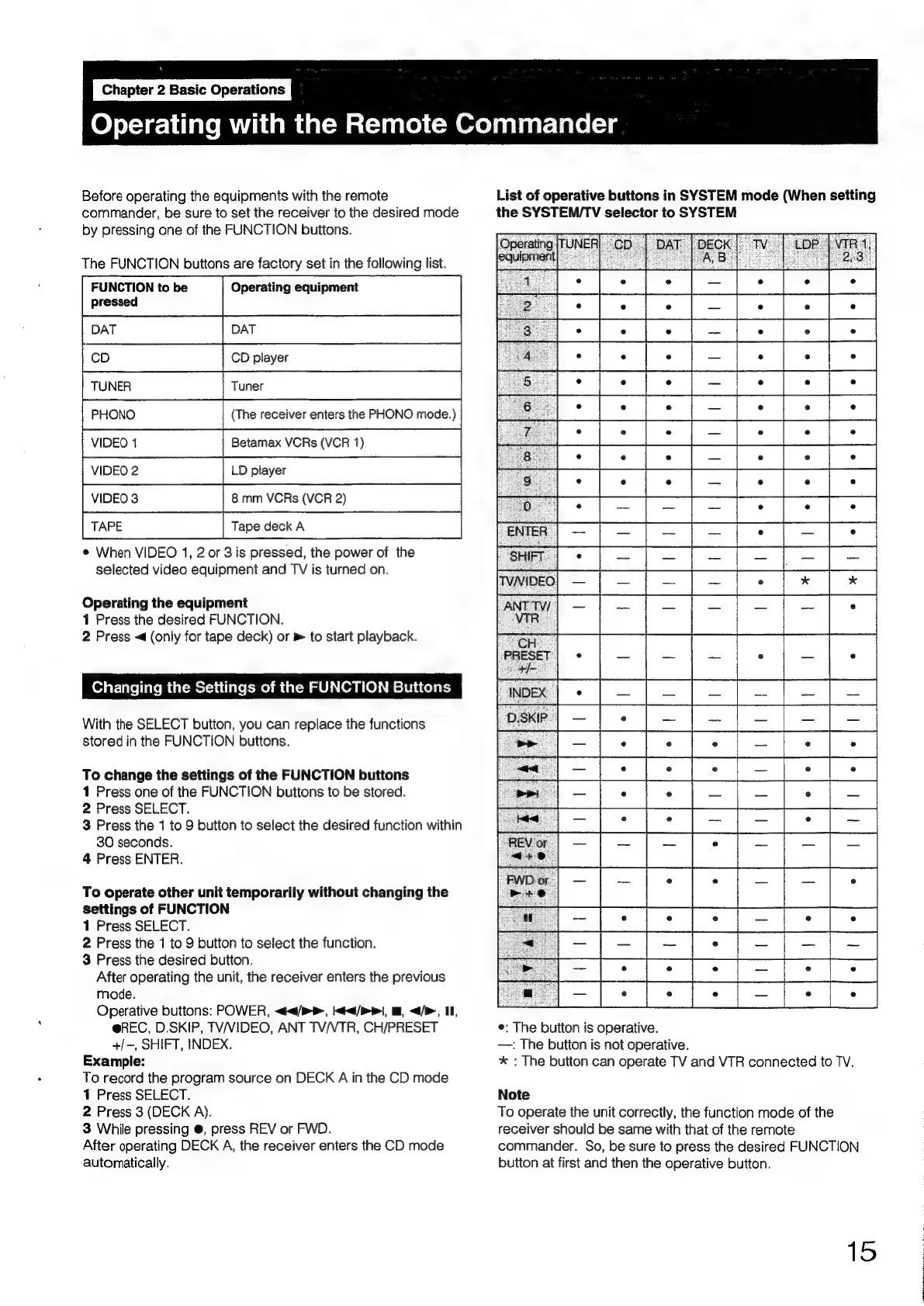
List
of
operative
buttons
in
SYSTEM
mode
(When
setting
the
SYSTEM/TV
selector
to
SYSTEM
e:
The
button
is
operative.
—:
The
button
is
not
operative.
*
:
The
button
can
operate
TV
and
VTR
connected
to
TV.
Note
To
operate
the
unit
correctly,
the
function
mode
of
the
receiver
should
be
same
with
that
of
the
remote
commander.
So,
be
sure
to
press
the
desired
FUNCTION
button
at
first
and
then
the
operative
button.
15

Table of Contents

Related product manuals