EasyManua.ls Logo

Sony STR-D2090 - Hooking Up the System; Antenna Connections

Sony STR-D2090
51 pages
Print Icon
To Next Page IconTo Next Page
To Previous Page IconTo Previous Page
Loading...
Hooking
Up
the
System
At
first,
this
section
describes
about
the
antenna
connection
and
then
the
connection
with
the
other
equipment.
After
that,
it
shows
about
the
speaker
connection
and
about
the
AC
outlet.
The
STR-D2090
has
the
AMP
MODE
selector
and
the
SURROUND
OUT
jacks
on
the
rear
panel.
The
illustrations
described
on
the
connections
are
the
STR-D2090.
*
Do
not
connect
the
power
cord
to
an
AC
outlet
nor
press
the
POWER
switch
before
accomplishing
all
other
connections.
¢
The
cable
connectors
should
be
fully
inserted
into
the
jacks.
Loose
connection
may
cause
hum
and
noise.
e
Jacks
and
plugs
of
the
connecting
cord
are
color-coded
as
follows:
Red
jacks
and
plugs:
For the
right
channel
of
audio
signals
White
jacks
and
plugs:
For
the
left
channel
of
audio
signals
Yellow
jacks
and
plugs:
For
video
signals
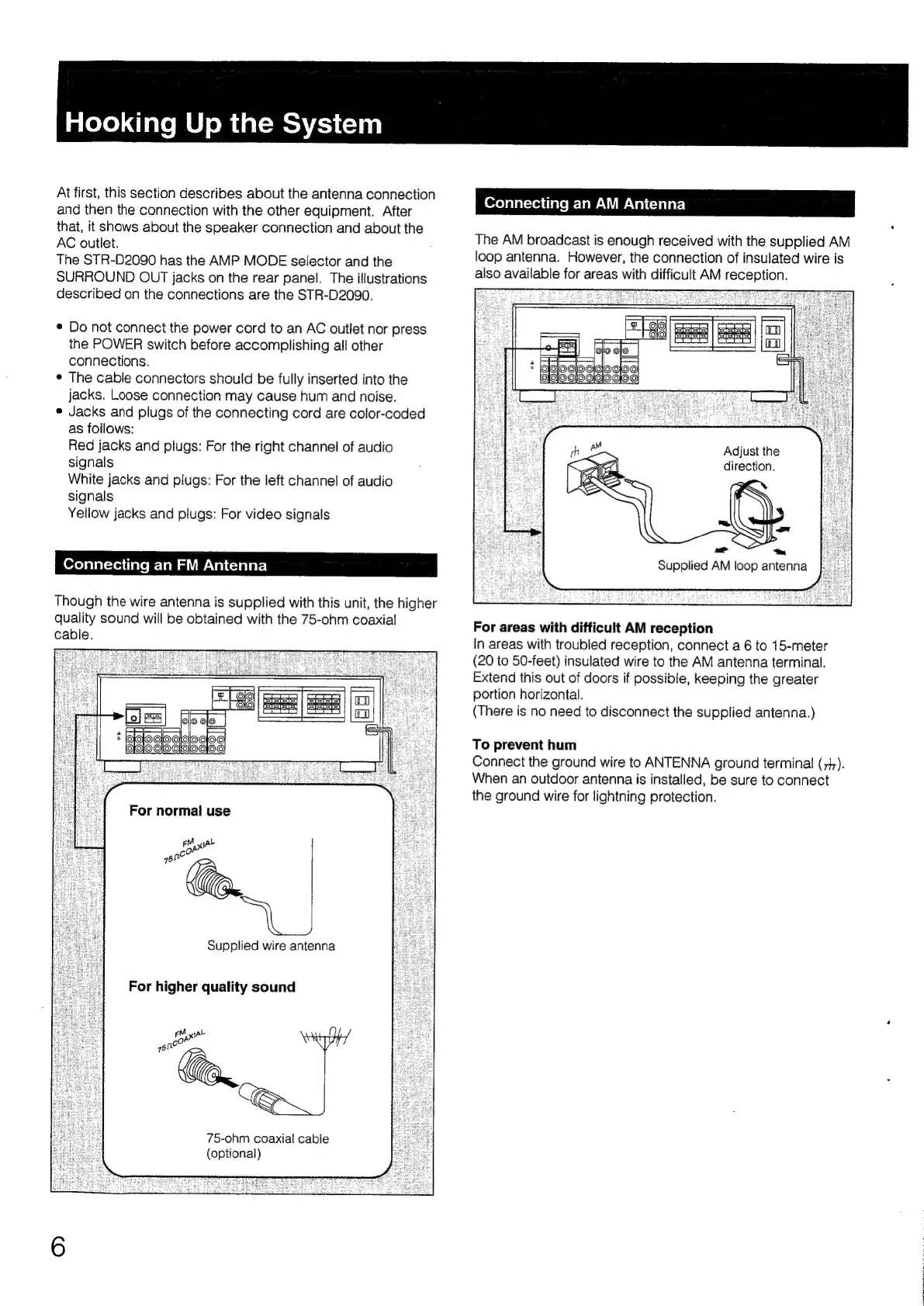
Connecting
an
FM
Antenna
Though
the
wire
antenna
is
supplied
with
this
unit,
the
higher
quality
sound
will
be
obtained
with
the
75-ohm
coaxial!
cable.
Supplied
wire
antenna
For
higher
quality
sound
Le
wou"
yt
75-ohm
coaxial
cable
(optional)
Connecting
an
AM
Antenna
The
AM
broadcast
is
enough
received
with
the
supplied
AM
loop
antenna.
However,
the
connection
of
insulated
wire
is
also
available
for
areas
with
difficult
AM
reception.
Adjust
the
direction.
Supplied
AM
loop
antenna
For
areas
with
difficult
AM
reception
In
areas
with
troubled
reception,
connect
a6
to
15-meter
(20
to
50-feet)
insulated
wire
to
the
AM
antenna
terminal.
Extend
this
out
of
doors
if
possible,
keeping
the
greater
portion
horizontal.
(There
is
no
need
to
disconnect
the
supplied
antenna.)
To
prevent
hum
Connect
the
ground
wire
to
ANTENNA
ground
terminal
(74).
When
an
outdoor
antenna
is
installed,
be
sure
to
connect
the
ground
wire
for
lightning
protection.

Table of Contents

Related product manuals