EasyManua.ls Logo

Sony STR-D2090 - Receiving Broadcasts; Direct Tuning

Sony STR-D2090
51 pages
Print Icon
To Next Page IconTo Next Page
To Previous Page IconTo Previous Page
Loading...
1
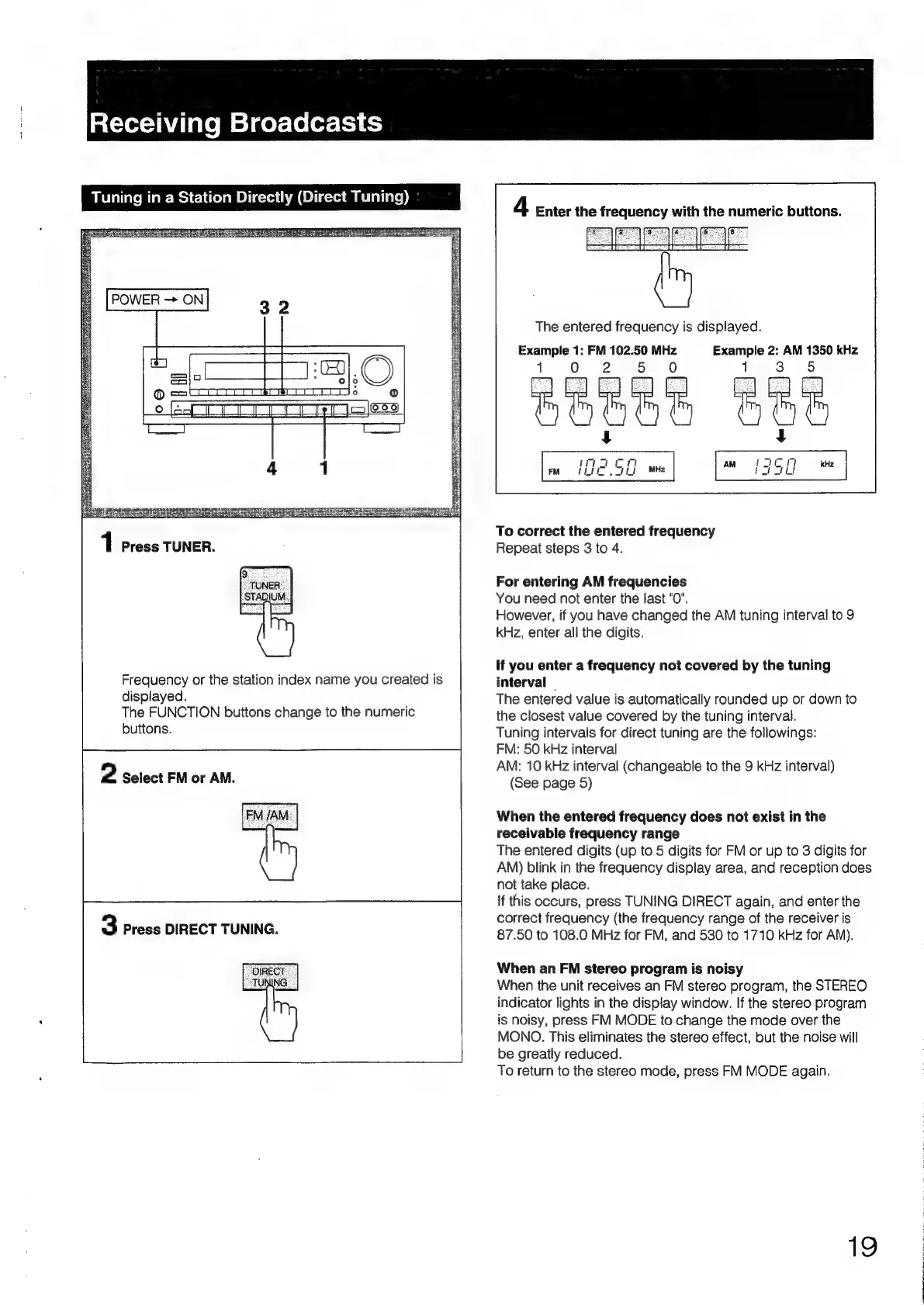
Press
TUNER.
Frequency
or
the
station
index
name
you
created
is
displayed.
The
FUNCTION
buttons
change
to
the
numeric
buttons.
2
Select
FM
or
AM.
3
Press
DIRECT
TUNING.
4
Enter
the
frequency
with
the
numeric
buttons.
)
fB
eed
[Pes
The
entered
frequency
is
displayed.
Example
1:
FM
102.50
MHz
Example
2:
AM
1350
kHz
2
To
correct
the
entered
frequency
Repeat
steps
3
to
4.
For
entering
AM
frequencies
You
need
not
enter
the
last
"0".
However,
if
you
have
changed
the
AM
tuning
interval
to
9
kHz,
enter
all
the
digits.
If
you
enter
a
frequency
not
covered
by
the
tuning
interval
|
The
entered
value
is
automatically
rounded
up
or
down
to
the
closest
value
covered
by
the
tuning
interval.
Tuning
intervals
for
direct
tuning
are
the
followings:
FM:
50
kHz
interval
AM:
10
kHz
interval
(changeable
to
the
9
kHz
interval)
(See
page
5)
When
the
entered
frequency
does
not
exist
in
the
receivable
frequency
range
The
entered
digits
(up
to
5
digits
for
FM
or
up
to
3
digits
for
AM)
blink
in
the
frequency
display
area,
and
reception
does
not
take
place.
if
this
occurs,
press
TUNING
DIRECT
again,
and
enter
the
correct
frequency
(the
frequency
range
of
the
receiver
is
87.50
to
108.0
MHz
for
FM,
and
530
to
1710
kHz
for
AM).
When
an
FM
stereo
program
is
noisy
When
the
unit
receives
an
FM
stereo
program,
the
STEREO
indicator
lights
in
the
display
window.
If
the
stereo
program
is
noisy,
press
FM
MODE
to
change
the
mode
over
the
MONO.
This
eliminates
the
stereo
effect,
but
the
noise
will
be
greatly
reduced.
To
return
to
the
stereo
mode,
press
FM
MODE
again.
19

Table of Contents

Related product manuals