EasyManua.ls Logo

Sony STR-D2090 - Labeling Program Sources

Sony STR-D2090
51 pages
Print Icon
To Next Page IconTo Next Page
To Previous Page IconTo Previous Page
Loading...
T=]
(Toi
tale
me
Maa
celele-larmeselelger=)
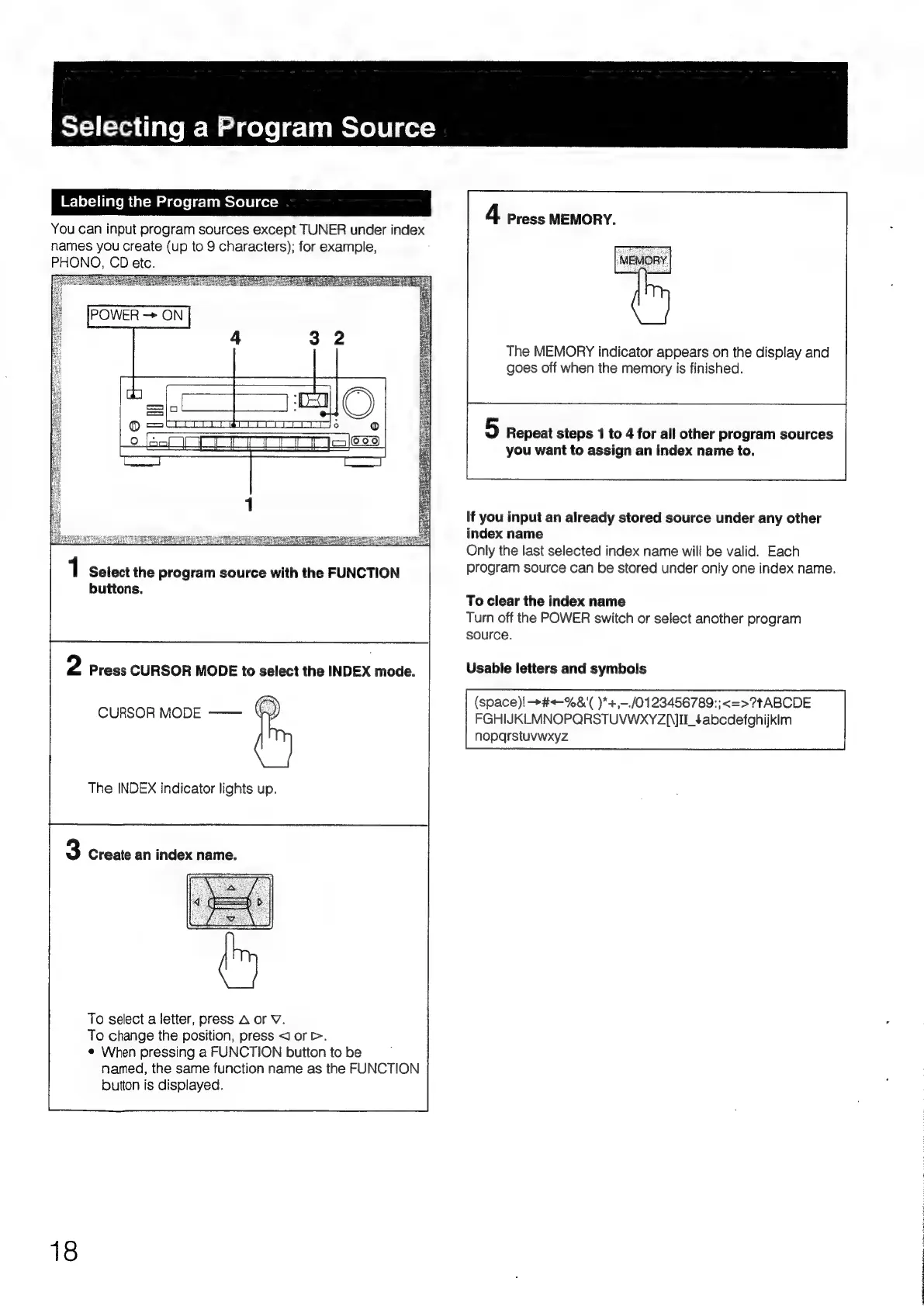
Labeling
the
Program
Source
You
can
input
program
sources
except
TUNER
under
index
names
you
create
(up
to
9
characters);
for
example,
PHONO,
CD
et
4
Press
MEMORY.
POWER
ON
The
MEMORY
indicator
appears
on
the
display
and
goes
off
when
the
memory
is
finished.
5
Repeat
steps
1
to
4
for
all
other
program
sources
you
want
to
assign
an
index
name
to.
If
you
input
an
already
stored
source
under
any
other
index
name
Only
the
last
selected
index
name
will
be
valid.
Each
1
Select
the
program
source
with
the
FUNCTION
program
source
can
be
stored
under
only
one
index
name.
buttons.
To
clear
the
index
name
Turn
off
the
POWER
switch
or
select
another
program
source.
2
Press
CURSOR
MODE
to
select
the
INDEX
mode.
Usable
letters
and
symbols
(space)!
+#+-%&'(
)*+,-./0123456789:;<=>?tABCDE
CURSOR
MODE
——
FGHIJKLMNOPQRSTUVWXYZ{II_¢abcdefghijklm
noparstuvwxyz
The
INDEX
indicator
lights
up.
|
3
Create
an
index
name.
To
select
a
letter,
press
A
or
V.
To
change
the
position,
press
J
ore.
¢
When
pressing
a
FUNCTION
button
to
be
named,
the
same
function
name
as
the
FUNCTION
button
is
displayed.
18

Table of Contents

Related product manuals