16
US
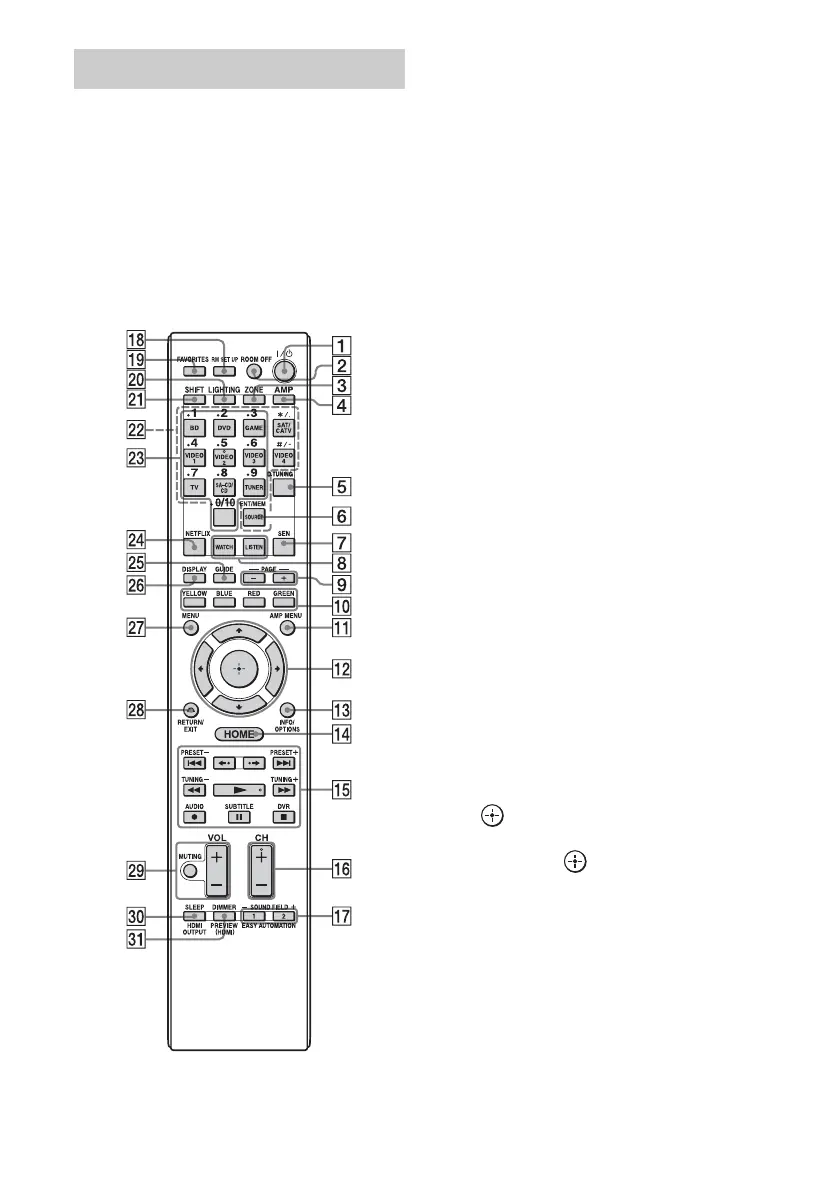
Use the supplied remote control to operate this
receiver and other equipment.
Note
Do not expose the remote sensor to direct sunlight or
lighting apparatuses. Doing so may cause a
malfunction.
Tip
When the receiver no longer responds to the remote
control, replace all the batteries with new ones.
A ?/1 (on/standby)
Turns the receiver on or off.
B ROOM OFF
Turns all the connected devices in the
room on or off.
C ZONE (page 72)
D AMP
Activates the receiver operation for the
main zone.
E D.TUNING (page 56)
Press SHIFT (wa), then press D.TUNING
to enter direct tuning mode.
F ENT/MEM
Press SHIFT (wa), then press ENT/MEM
to enter the value or track using the
numeric buttons (wd), or press ENT/
MEM, then press the numeric buttons
(wd) to select a preset number to which a
station is stored during tuner operation.
G SEN
Accesses the home page of the Sony
Entertainment Network (SEN), a network
service provided by Sony.
H WATCH, LISTEN (page 49)
I PAGE +/– (page 65)
Allows you to scroll quickly through lists
of media.
J Color buttons
Works according to the guide on the TV
screen.
K AMP MENU (page 112)
L V/v/B/b
Press V/v/B/b to select the menu items.
Then press to enter the selection.
M INFO/OPTIONS (page 48, 55, 58)
Displays and selects items from the
options menu.
The INFO button is mapped to an info
function for certain devices.
N HOME (page 48)
Displays the home menu on the TV
screen.
Remote control (RM-AAU155)















 To Next Page