13
STR-DA3200ES/DG1000
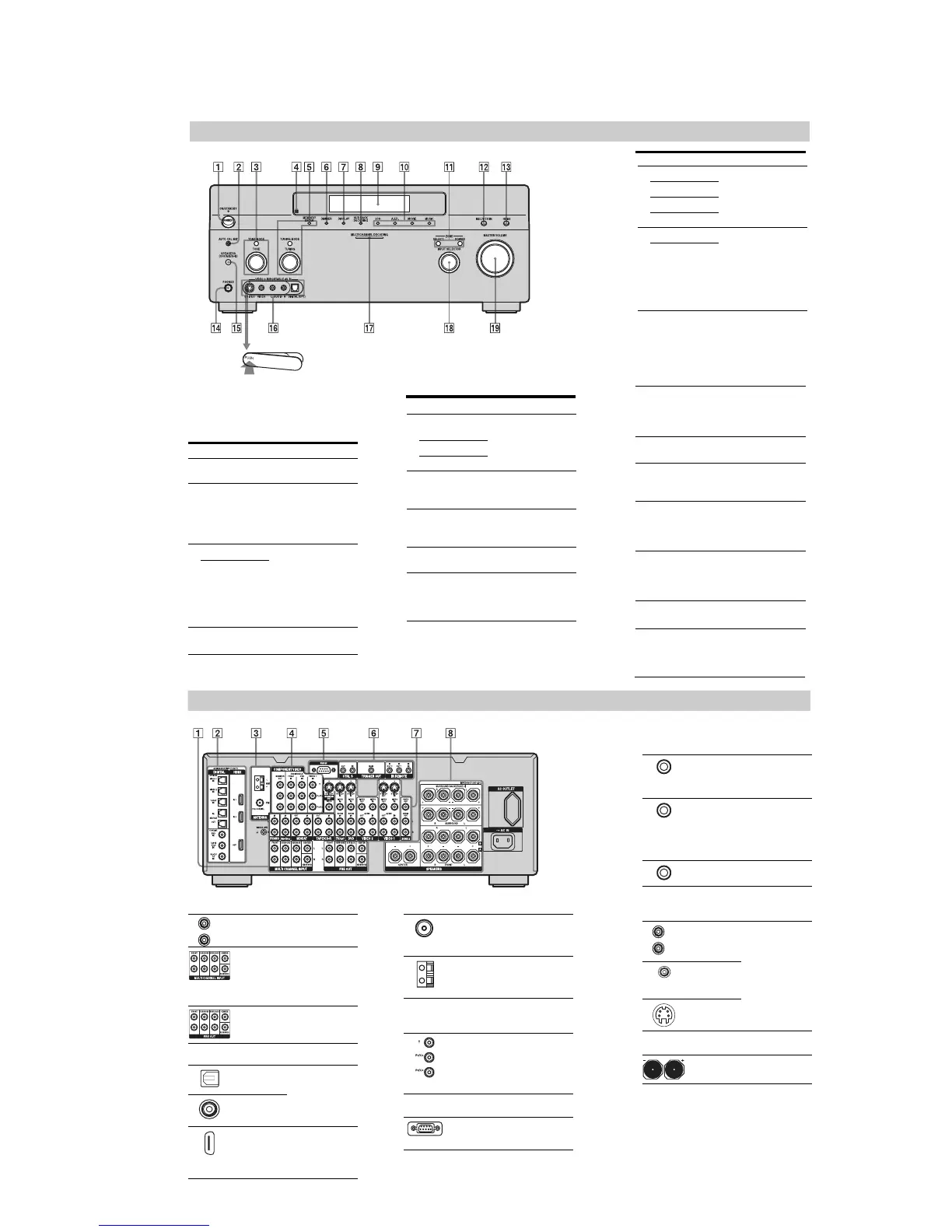
To remove the cover
Press PUSH.
When you remove the cover, keep it out of
reach from children.
Front panel
Name Function
A POWER Press to turn the
receiver on or off.
B AUTO CAL MIC
jack
Connects to the
supplied optimizer
microphone for the
Digital Cinema Auto
Calibration function.
Name Function
C TONE MODE Adjusts FRONT BASS
and FRONT TREBLE.
Press TONE MODE
repeatedly to select
BASS or TREBLE,
then turn TONE to
adjust the level.
TONE
E MEMORY/
ENTER
Press to operate a tuner
(FM/AM).
TUNING MODE
TUNING
F DIMMER Press to adjust
brightness of the
display.
G DISPLAY Press to select
information displayed
on the display.
H SUR BACK
DECODING
Press to activate SB
DECODING
L MULTI CH IN Press to select the audio
input signal from the
component connected
to the MULTI
CHANNEL INPUT
jack.
M HDMI Press to select input
source from the
component connected
to the HDMI IN jack.
N PHONES jack Connects to
headphones.
O SPEAKERS
(OFF/A/B/A+B)
Press to select A, B,
A+B, OFF of the front
speakers.
P VIDEO 3 IN/
PORTABLE AV
IN jack
Connect to a portable
audio/video component
such as a camcorder or
video game.
Q MULTI
CHANNEL
DECODING
lamp
Lights up when multi-
channel audio signals
are decoded.
R INPUT
SELECTOR
Turn to select the input
source to play back.
S MASTER
VOLUME
Turn to adjust the
volume level of all
speakers at the same
time.
Name Function
J 2CH Press to select sound
field.
A.F.D.
MOVIE
MUSIC
K POWER Press POWER (ZONE)
to enable operations in
zone 2. Then press
SELECT, then INPUT
SELECTOR
(qk)
to
select a source input
into zone 2.
SELECT
D Remote sensor Receives signals from
remote commander.
I Display
window
The current status of
the selected component
or a list of selectable
items appears here.
Rear panel
A AUDIO INPUT/OUTPUT section
AUDIO IN/
OUT jacks
Connects to a tape
deck, MD deck or
DAT player, etc.
MULTI
CHANNEL
INPUT jacks
Connects to a Super
Audio CD player or
DVD player with an
analog audio jack for
7.1 channel or 5.1
channel sound.
PRE OUT jacks Connects to an
external power
amplifier.
B DIGITAL INPUT/OUTPUT section
OPTICAL IN/
OUT jacks
Connects to a DVD
player, Super Audio
CD player, etc. The
COAXIAL jack
provides a better
quality sound.
COAXIAL IN
jacks
HDMI IN/OUT
jacks
Connects to a DVD
player, or a satellite
tuner. An image and
the sound are output
to TV or a projector.
L
R
C ANTENNA section
FM ANTENNA
jack
Connects to the FM
wire antenna (aerial)
supplied with this
receiver.
AM
ANTENNA
jack
Connects to the AM
loop antenna (aerial)
supplied with this
receiver.
D COMPONENT VIDEO INPUT/
OUTPUT section
COMPONENT
VIDEO (Y, P
B
/
C
B
, P
R
/C
R
)
INPUT/
OUTPUT
jacks*
Connects to a DVD
player, TV, or a
satellite tuner.
E RS-232C jack
Used for
maintenance and
service.
*You can watch the selected input image when you
connect the MONITOR OUT jack to a TV.
Yo u ca n a ls o display certain menu settings and the
sound field on the monitor when you press ON
SCREEN on the remote
F Control jack for Sony equipment
and other external components
CTRL S IN/
OUT jacks
Connects to Sony
TV, DVD player or
VCR with
CONTROL S jack.
TRIGGER
OUT jack
Connects to interlock
on/off of the power
supply of other 12V
TRIGGER
compliant
components.
IR REMOTE
IN/OUT jacks
Connects an IR
repeater.
G VIDEO/AUDIO INPUT/OUTPUT
section
AUDIO IN/
OUT jacks
Connects to a VCR
or a DVD player etc.
VIDEO IN/
OUT jacks*
S VIDEO IN/
OUT jacks*
H SPEAKERS section
Connects to speakers
L
R
(DA3200ES: AEP, UK, Taiwan models)















 To Next Page