a)
See the table for information on the buttons that
you can use to control each component.
b)
The tactile dot is attached to these buttons (H,
PRESET+). Use as a mark of operation.
Notes
•Some functions explained in this section may not
work depending on the model.
•The above explanation is intended to serve as an
example only. Therefore, depending on the
component, the above operation may not be
possible or may operate differently than described.
V RETURN/
EXIT O
Press to return to the previous
menu or exit the menu while the
menu or on-screen guide of the
VCR, DVD player, or satellite
tuner is displayed on the TV
screen.
W ON SCREEN Press to display the receiver
status. Then, if you press
MENU (qd), the menus of the
receiver appear.
X CLEAR Press to
–clear a mistake when you
press the incorrect numeric
button.
–return to continuous
playback, etc. of the satellite
tuner or DVD player.
>10 Press to select
–track numbers over 10 of the
VCR, satellite tuner, CD
player or MD deck.
–channel numbers of the
Digital CATV terminal.
D.TUNING Press to enter direct tuning
mode.
Y SHIFT Press to light up the button. It
changes the remote button
function to activate the buttons
with pink printing.
Z A.DIRECT Press to switch the audio of the
selected input to analog signal
without any adjustment.
wj TV Press to enable TV operation.
wk RM SET UP Press to set up the remote.
Name Function
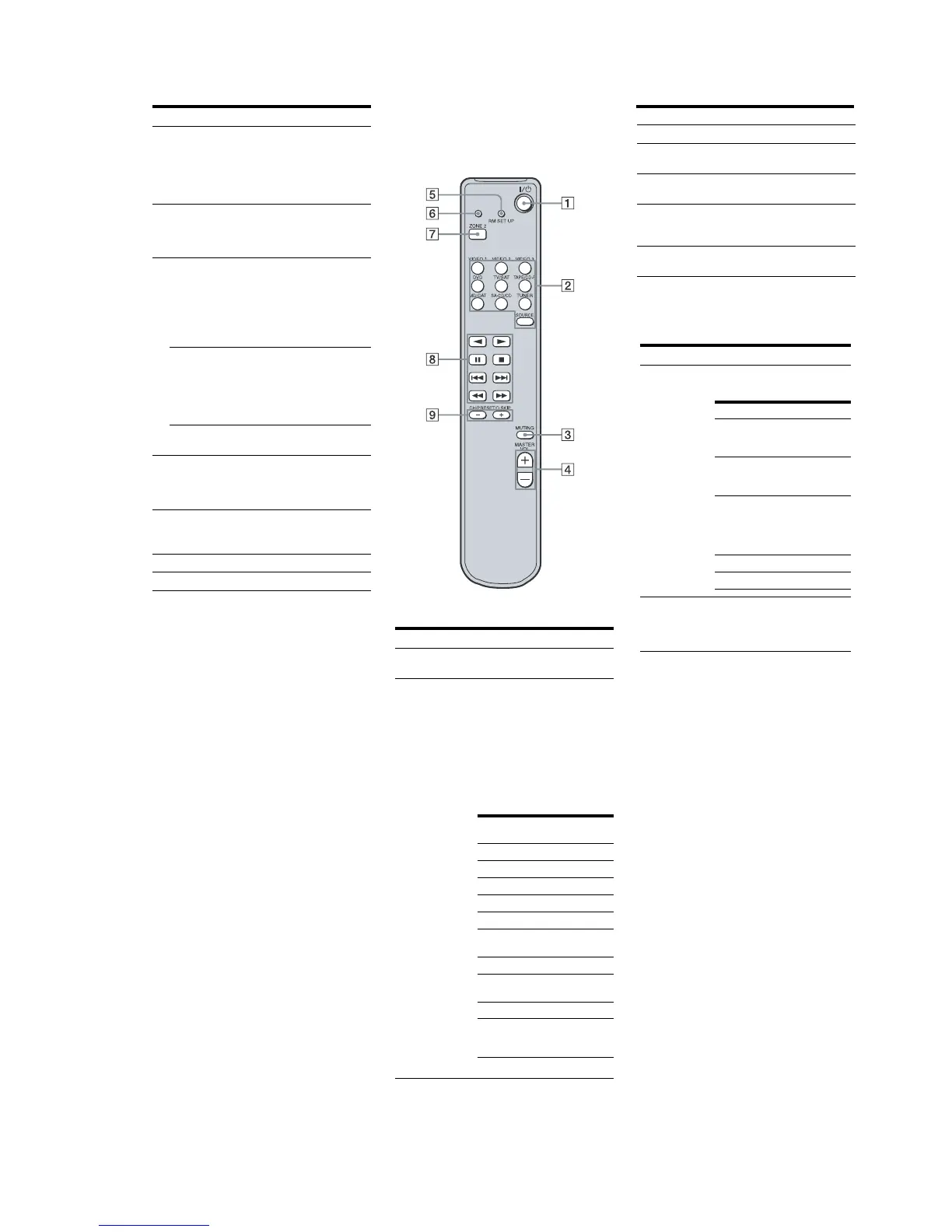
RM-AAU008
This remote is only for zone 2 operations.
You cannot control the main receiver
directly with this remote.
C MUTING Press to mute the sound.
D MASTER
VOL +/–
Press to adjust the volume level
for multi zone output.
E RM SET UP Press to change the category of
the buttons.
F RM SET UP
indicator
Lights up when data is being
sent or when the remote button
assignment is being preset.
G ZONE 2 Press to select the command
mode of the remote.
Operating the main receiver from
zone 2
Name Function
A ?/1
(on/standby)
Press to turn a receiver in zone 2
on or off.
B Input
buttons
Press one of the buttons to
select the component you want
to use. When you press any of
the input buttons, the receiver
turns on. The buttons are
factory assigned to control Sony
components as follows. You can
change the button assignments
following the steps in
“Changing button assignments
(RM-AAU008 only)”.
*The setting cannot be changed.
Button Assigned Sony
component
VIDEO 1 VCR (VTR mode 3)
VIDEO 2 VCR (VTR mode 1)
VIDEO 3 VCR (VTR mode 2)
DVD DVD player
TV/SAT TV tuner
TAPE/CD-
R
Tape deck B
MD/DAT MD deck
SA-CD/CD Super Audio CD/CD
player
TUNER* Built-in tuner
SOURCE The current input
selected for the main
receiver
Name Function
Operating the components
connected to the main receiver
from zone 2
*The function of these buttons switches
automatically each time you press the input
buttons B. The above explanation is intended to
serve as an example only. Therefore, depending
on the component, the above operation may not
be possible or may operate differently than
described.
Name Function
H Operation
buttons*
The following table describes
the function of the buttons.
I CH/
PRESET/
D.SKIP
+/–*
Press repeatedly to select a
preset station or channel. When
using a multi-disc changer,
press to skip a disc.
Button(s) Function
N Starts play. (Starts play
on the front side of the
cassette.)
n Starts play on the
reverse side of the
cassette.
X Pauses play or
recording, and starts
recording when the
component is in
recording standby.
x Stops play.
./> Skips tracks.















 To Next Page