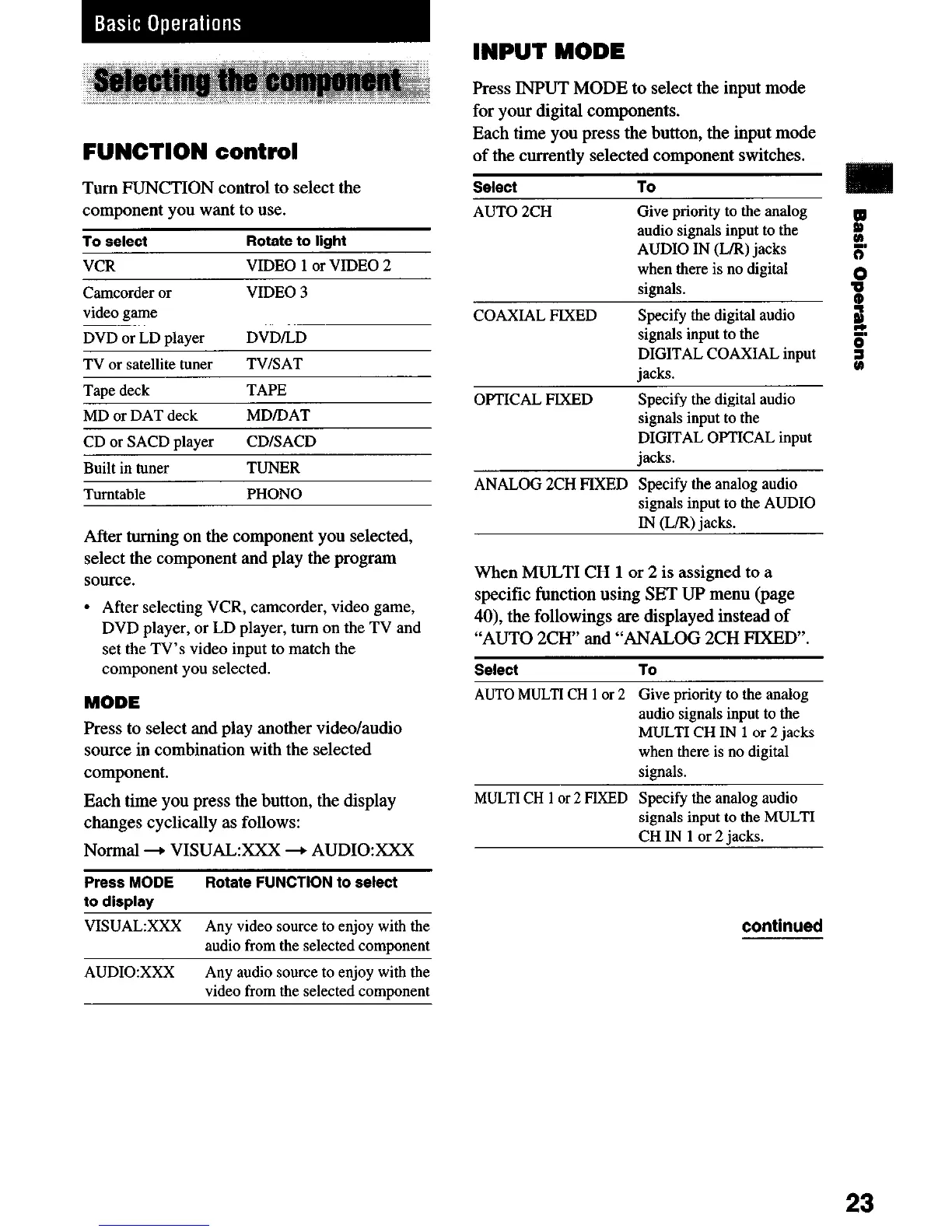
FUNCTION control
Turn FUNCTION control to select the
component you want to use.
To select
Rotate to
liaht
VCR VIDEO 1 or VIDEO 2
Camcorder or
video same
VIDEO 3
DVD or LD player
DVD/LD
TV or satellite tuner TV/SAT
Tane deck TAPE
MD or DAT deck
CD or SACD player
MDIDAT
CDISACD
Built in tuner TUNER
Turntable PHONO
After turning on the component you selected,
select the component and play the program
source.
l
After selecting VCR, camcorder, video game,
DVD player, or LD player, turn on the TV and
set the TV’s video input to match the
component you selected.
MODE
Press to select and play another video/audio
source in combination with the selected
component.
Each time you press the button, the display
changes cyclically as follows:
Normal + VISUAL:XXX + AUDIOXXX
Press MODE
Rotate
FUNCTION to select
to display
VISUAL:XXX Any video source to enjoy with the
audio from the selected comuonent
INPUT MODE
Press INPUT MODE to select the input mode
for your digital components.
Each time you press the button, the input mode
of the currently selected component switches.
Select
AUTO 2CH
COAXIAL PIXED
To
Give priority to the analog
audio signals input to the
AUDIO IN (L/R) jacks
k
mm
when there is no digital
signals.
P
tD
Specify the digital audio
J
signals input to the
C
DIGITAL COAXIAL input
iacks.
OPTICAL PIXED
Specify the digital audio
signals input to the
DIGITAL OPTICAL input
jacks.
ANALOG 2CH PIXBD Specify the analog audio
signals input to the AUDIO
IN (L/R) jacks.
When MULTI CH 1 or 2 is assigned to a
specific function using SET UP menu (page
40), the followings are displayed instead of
“AUTO 2CH” and “ANALOG 2CH PIXED”.
Select To
AUTO MULTI CH 1 or 2 Give priority to the analog
audio signals input to the
MULTI CH IN 1 or 2 jacks
when there is no digital
signals.
MULTI CH 1 or 2 PIXBD Specify the analog audio
signals input to the MULTI
CH IN 1 or 2 jacks.
continued
AUDIO:XXX Any audio source to enjoy with the
video from the selected comuonent
23


 To Next Page