‘_
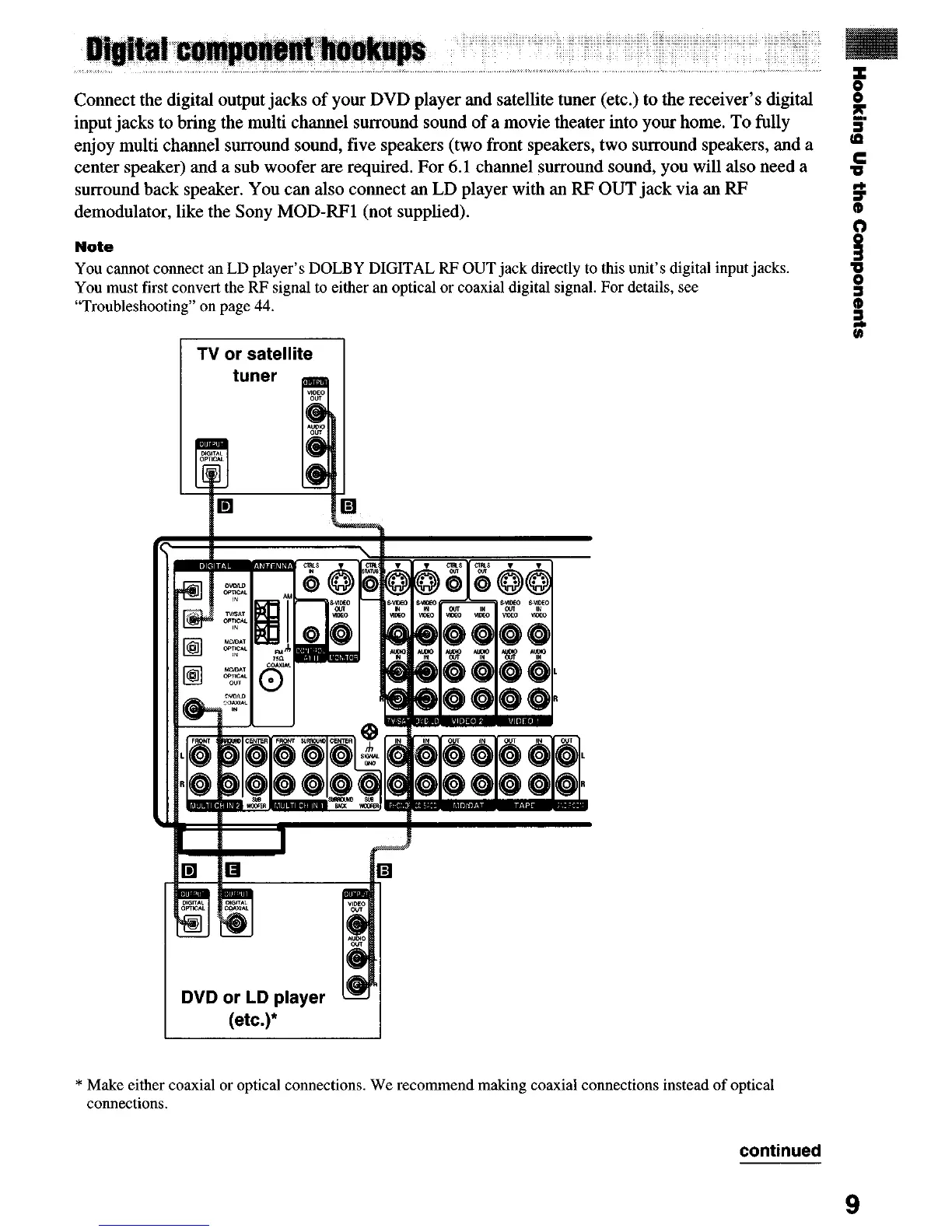
Connect the digital output jacks of your DVD player and satellite tuner (etc.) to the receiver’s digital
input jacks to bring the multi channel surround sound of a movie theater into your home. To fully
g
J
enjoy multi channel surround sound, five speakers (two front speakers, two surround speakers, and a
m
center speaker) and a sub woofer are required. For 6.1 channel surround sound, you will also need a
5
surround back speaker. You can also connect an LD player with an RF OUT jack via an RF
demodulator, like the Sony MOD-RF1 (not supplied).
?
Note
s
3
You cannot connect an LD player’s DOLBY DIGITAL RF OUT jack directly to this unit’s digital input jacks.
You must first convert the RF signal to either au optical or coaxial digital signal. For details, see
3
“Troubleshooting” on page 44. a
3
(ID
DVD or LD player
* Make either coaxial or optical connections. We recommend making coaxial connections instead of optical
connections.
continued
9


 To Next Page