16
GB
Hooking Up and Setting Up the Speaker System
* These parameters ar e not available when “Sur round
speaker size” is set to “NO”.
45°
90°
20°
B
B
A
A
Multi Channel Surround Setup
z
About speaker sizes (LARGE and SMALL)
Internally, the LARGE and SMALL settings for each speaker
determine whether or not the internal sound processor will cut
the bass signal from that channel. When the bass is cut from a
channel the bass redirection circuitry sends the corresponding
bass frequencies to the sub woofer or other “LARGE” speaker.
However, since bass sounds have a certain amount of
directionality it best not to cut them, if possible. Therefore, even
when using small speakers, you can set them to “LARGE” if you
want to output the bass frequencies from that speaker. On the
other hand, if you are using a large speaker, but prefer not to
have bass frequencies output from that speaker, set it to
“SMALL”.
If the overall sound level is lower than you prefer, set all speakers
to “LARGE”. If there is not enough bass, you can use BASS +/–
to boost the bass levels. To adjust the bass, see page 32.
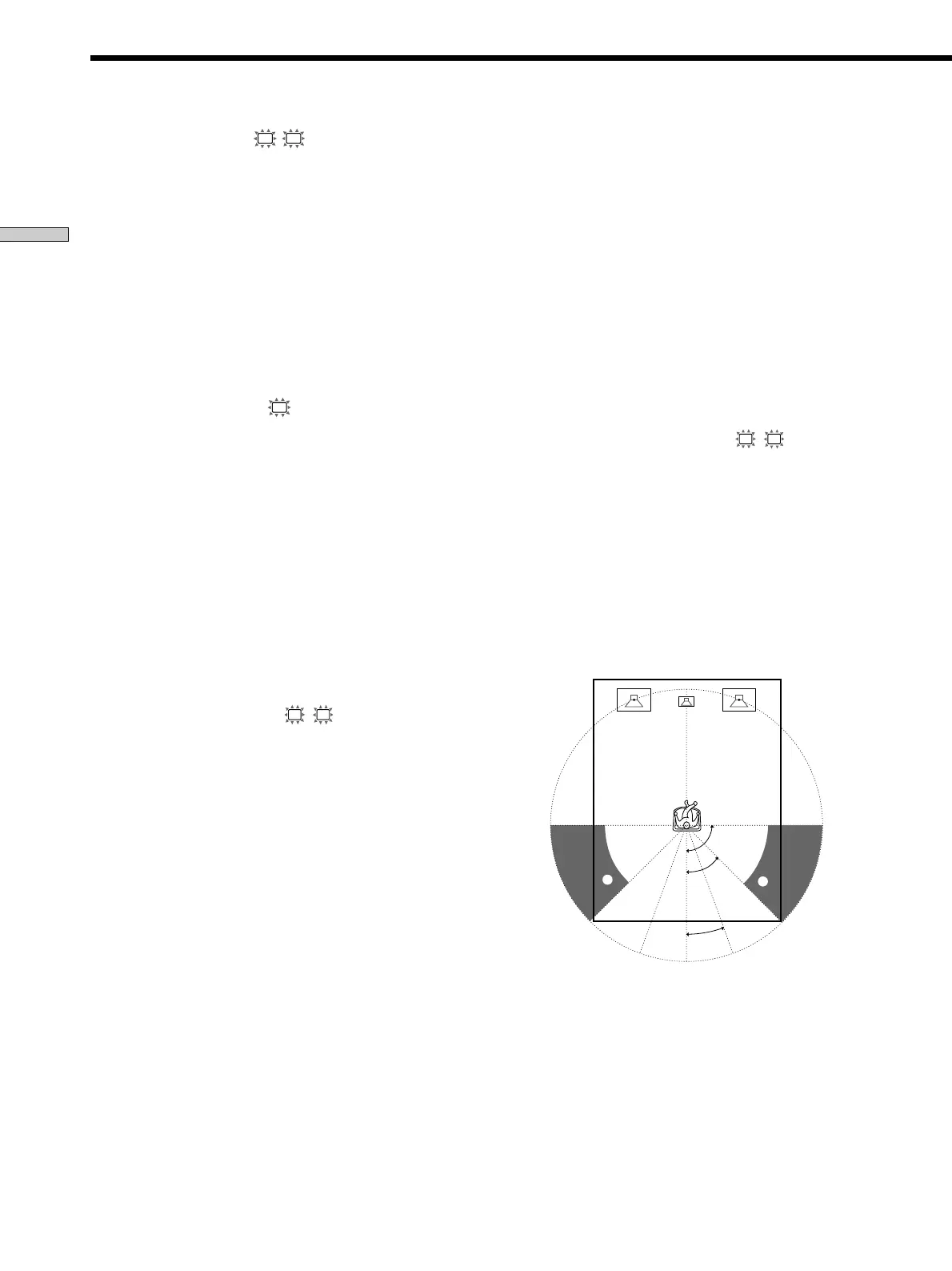
x Surround speaker position (
SL
SR
)*
Initial setting : PL. BEHD.
This parameter lets you specify the location of your
sur round speakers for pr oper implementation of the
Digital Cinema Sound sur round modes in the
“VIRTUAL” sound fields. Refer to the illustration below .
• Select “PL. SIDE” if the location of your sur round
speakers cor responds to section A.
• Select “PL. BEHD.” if the location of your sur round
speakers cor responds to section B.
This setting only ef fects the sur round modes in the
“VIRTUAL” sound fields.
x Front speaker size (
L
R
)
Initial setting : LARGE
• If you connect lar ge speakers that will ef fectively
repr oduce bass fr equencies, select “LARGE”. Nor mally ,
select “LARGE”.
• If the sound is distor ted, or you feel a lack of sur round
ef fects when using multi channel sur round sound,
select “SMALL” to activate the bass r edir ection cir cuitr y
and output the fr ont channel bass fr equencies fr om the
sub woofer .
• When the fr ont speaker is set to “SMALL”, the center
and sur round speakers ar e also automatically set to
“SMALL” (unless pr eviously set to “NO”).
p Center speaker size (
C
)
Initial setting : LARGE
• If you connect a lar ge speaker that will ef fectively
repr oduce bass fr equencies, select “LARGE”. Nor mally ,
select “LARGE”. However , if the fr ont speakers ar e set
to “SMALL”, you cannot set the center speaker to
“LARGE”.
• If the sound is distor ted, or you feel a lack of sur round
ef fects when using multi channel sur round sound,
select “SMALL” to activate the bass r edir ection cir cuitr y
and output the center channel bass fr equencies fr om the
front speakers (if set to “LARGE”) or sub woofer . *
1
• If you do not connect the center speaker , select “NO”.
The sound of the center channel will be output fr om the
front speakers.*
2
p Surround speaker size (
SL
SR
)
Initial setting : LARGE
• If you connect lar ge speakers that will ef fectively
repr oduce bass fr equencies, select “LARGE”. Nor mally ,
select “LARGE”. However , if the fr ont speakers ar e set
to “SMALL”, you cannot set the sur round speakers to
“LARGE”.
• If the sound is distor ted, or you feel a lack of sur round
ef fects when using multi channel sur round sound,
select “SMALL” to activate the bass r edir ection cir cuitr y
and output the sur round channel bass fr equencies fr om
the sub woofer or other “LARGE” speakers.
• If you do not connect sur round speakers, select “NO”.*
3
z
*1~*3 correspond to the following Dolby Pro Logic modes
*
1
NORMAL
*
2
PHANTOM
*
3
3 STEREO



 To Next Page