15
GB
Hooking Up and Setting Up the Speaker System
Specifying the speaker parameters
1 Press ?/1 to turn on the receiver.
2 Press SET UP.
3 Press MENU I/i to select the parameter you want
to adjust.
4 Press MENU +/– to select the setting you want.
The setting is stor ed automatically .
5 Repeat steps 3 and 4 until you have set all of the
parameters that follow.
z
Normal speaker and Micro Satellite speaker
Choose NORM. SP. if you’re using normal speakers and MICRO
SP. if you’re using Micro Satellite speakers. If you choose NORM.
SP., you can adjust the speaker size and the sub woofer selection
as mentioned below. However, if you choose MICRO SP., the
speaker size and the sub woofer selection has been configurated
as follows:
Speakers Settings
Front SMALL
Center SMALL
Surround SMALL
Sub Woofer YES
You cannot change the configuration if you choose MICRO SP.
For STR-K402, the speaker size and sub woofer selection has been
preset to MICRO SP. according to the supplied speaker system. If
you change the speaker system, choose NORM. SP. to adjust the
speaker size and sub woofer selection.
The setting for Micro Satellite speaker (MICRO SP.) has been
programmed to optimize the sound balance. If you use Sony’s
Micro Satellite speakers, select MICRO SP. When you use Micro
Satellite speaker and the speaker size is set to LARGE, you may
not obtain the correct soundstage. The speaker may also be
damaged at high volume position.
For STR-DE475, the speaker size and sub woofer selection has
been preset to NORM. SP.
The following speaker size setup is applicable for NORM. SP.
45°
90°
20°
A A
B
CC
45°
90°
20°
A A
B
CC
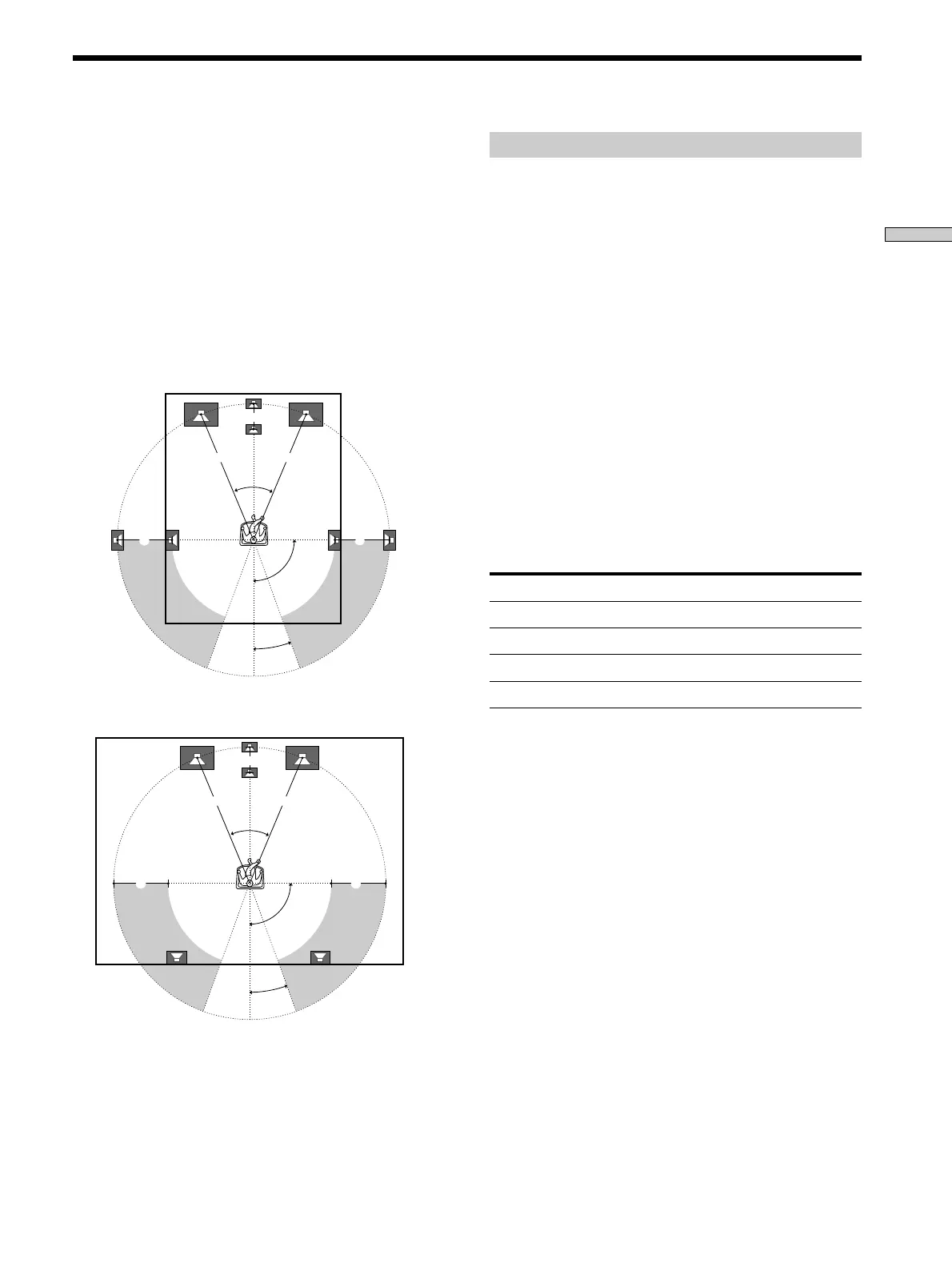
Multi Channel Surround Setup
For the best possible sur round sound all speakers should
be the same distance fr om the listening position ( A).
(However , this unit lets you to place the center speaker up
to 5 feet (1.5 meters) closer ( B) and the sur round speakers
up to 15 feet (4.5 meters) closer ( C) to the listening
position.
The fr ont speakers can be placed fr om 3 to 40 feet (1.0 to
12.0 meters) fr om the listening position ( A).)
You can place the sur round speakers either behind you or
to the side, depending on the shape of your r oom (etc.).
Note
Do not place the center speaker farther away from the listening
position than the front speakers.
When placing surround speakers to your side
When placing the surround speakers behind you



 To Next Page