22
GB
Location of Parts and Basic Operations
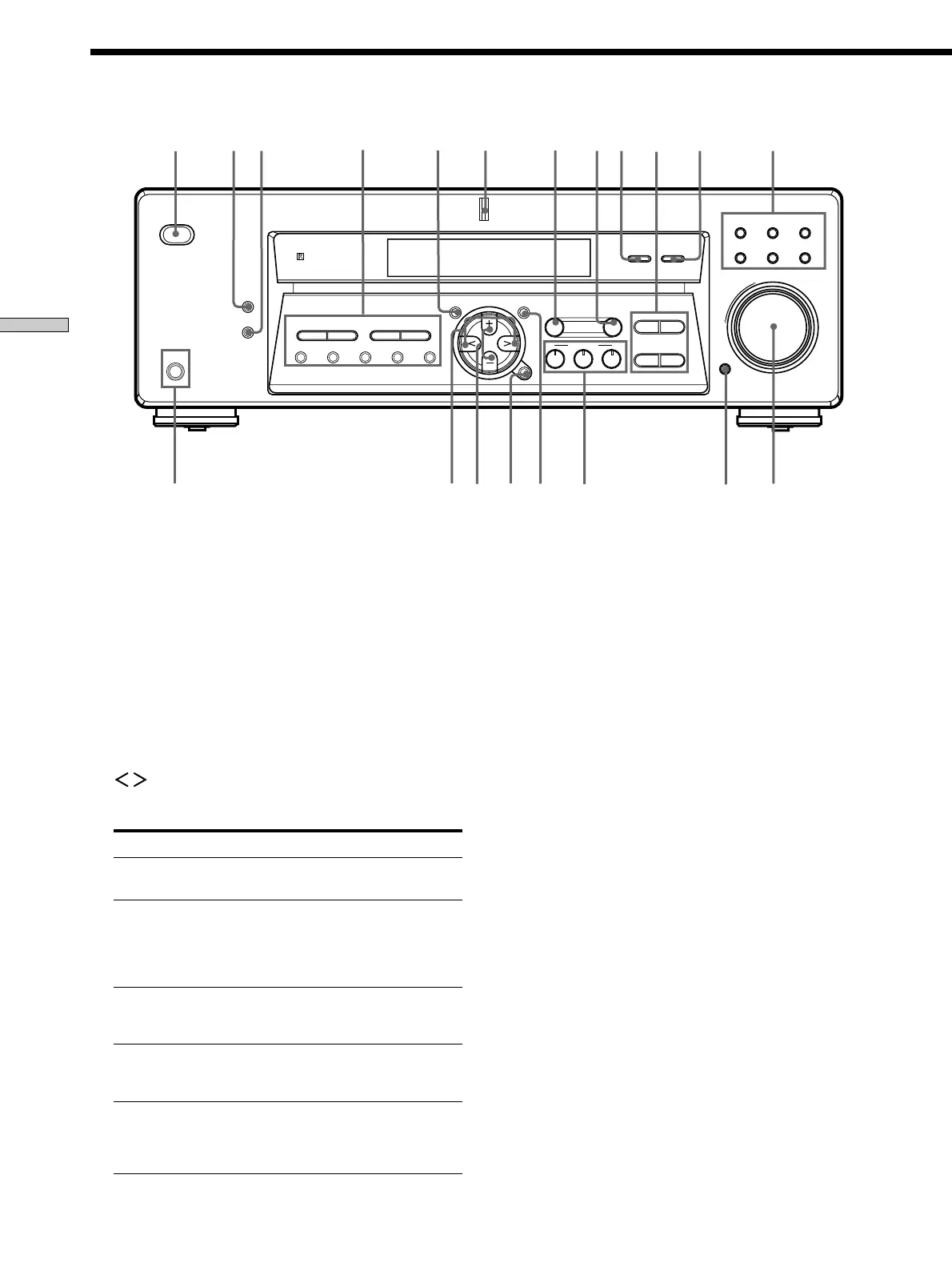
Front Panel Parts Description
MULTI CHANNEL DECODING
MASTER VOLUME
DISPLAY
–
+
MULTI CH IN INPUT MODE
BASS
MUTING
A.F.D.
ENTER
NAME
VIDEO DVD/LD TV/SAT
MD/TAPE CD TUNER
SET UP
MENU
LEVEL
SURR
SOUND CONTROL
SOUND FIELD
MODE 2CH
DIMMER
PHONES
? / 1
TREBLE
–
– +
TUNING
– +
PRESET
TUNING
MEMORY SHIFT FM MODE FM AM
– +
+
92 3 qa qs
4
1
80
6
7
5
qdqf
qgqhqj
qlw;
qk
FM MODE button
If “STEREO” flashes in the display and the FM ster eo
reception is poor , pr ess this button. Y ou will not have
the ster eo ef fect but the sound is impr oved.
FM button
Selects the FM band.
AM button
Selects the AM band.
5 SET UP button/indicator
Press to activate the setup mode, then use the MENU
/ buttons ( ql) to select any of the following
indications. Y ou can then make various settings using
the MENU +/– buttons ( qk ).
When you select You can
Speaker type Specify the type of speakers.
(page 15)
Speaker setup Specify the front, center,
surround speaker sizes, the
surround speaker position, and
whether or not you are using a
sub woofer. (page 15)
Speaker Distance Specify the front, center, and
surround speaker distances.
(page 17)
Dimmer range Specify the display to turn off
when you press the DIMMER
button several times. (page 47)
MULTI CH IN Specify the video input to be
video input used with the audio signals from
the MULTI CH IN jacks.
(page 47)
6 MULTI CHANNEL DECODING indicator
This indicator lights up when the unit is decoding
signals r ecor ded in a Multi Channel for mat.
7 LEVEL button / indicator
Press to activate the speaker level parameters (page
31). The indicator on the button lights up and you can
adjust the various speaker level parameters (fr ont
balance, sur round balance, etc.).
8 SURR button / indicator
Press to activate the sur round parameters (page 30).
The indicator on the button lights up and you can
adjust the various sur round parameters (ef fect level,
wall type, etc.).
9 MULTI CH IN button
Press to enjoy the audio sour ce connected to the
MULTI CH IN jacks with the video fr om the selected
component. Pr ess again to cancel MUL TI CH IN.
• When the MULTI CH IN is selected, the tone, sound field
and surround parameters do not function.
0 Tone buttons
TREBLE +/– button
Press this button to adjust the tone (tr eble) (page 32).
BASS +/– button
Press this button to adjust the tone (bass) (page 32).



 To Next Page