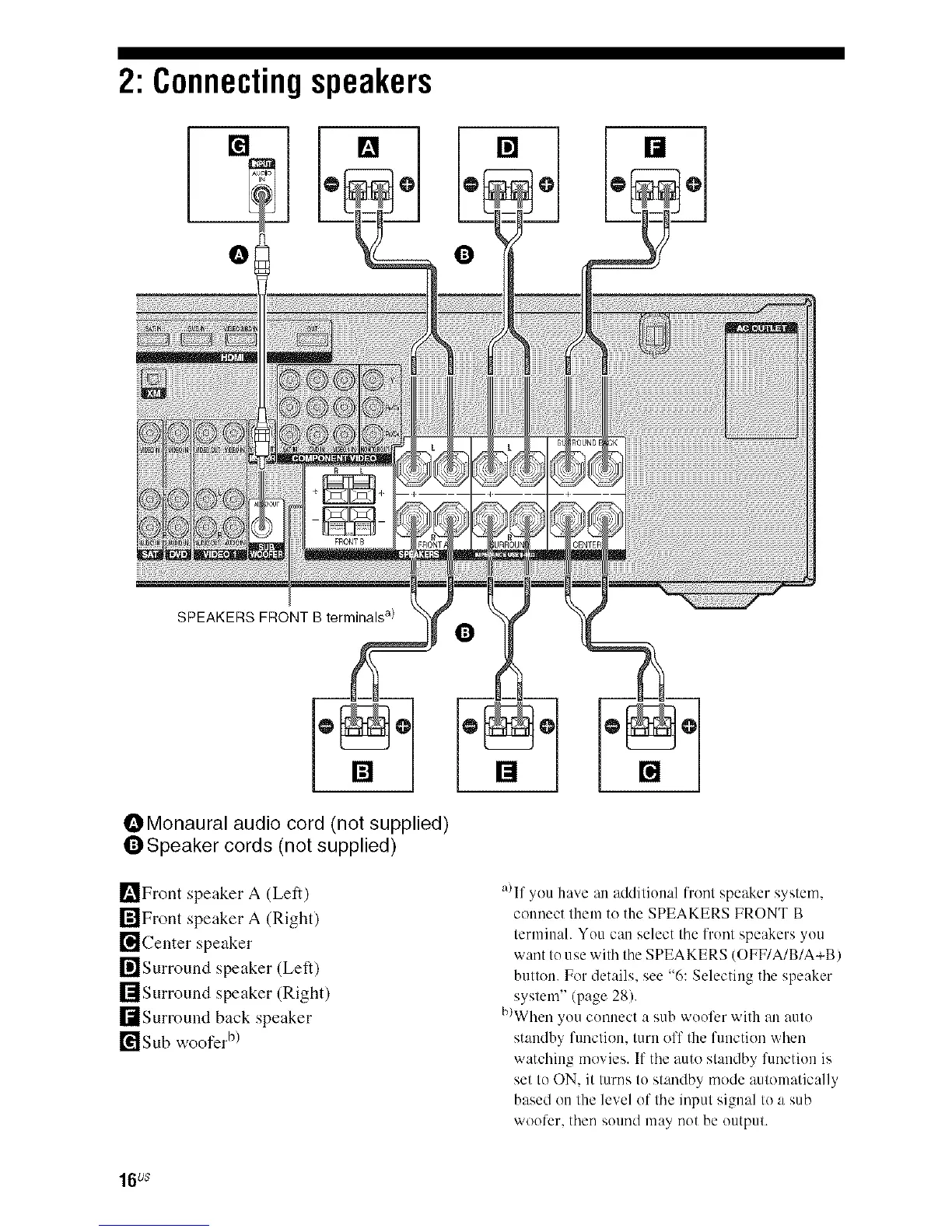
2: Connectingspeakers
[] [] [] []
SPEAKERS FRONT B terminals a)
OMonaural audio cord (not supplied)
QSpeaker cords (not supplied)
_'_Front speaker A (Left)
r_lFront speaker A (Right)
[]Center speaker
I_]Surround speaker (Left)
rlIsurround speaker (Right)
I[tSurround back speaker
[¥1 Sub woofer b)
[]
a)If you have an additional front speaker system.
counect them to the SPEAKERS FRONT B
terminah You can select tile front speakers you
want to use with tile SPEAKERS (OFF/A/B/A+B)
button. For details, see "6: Selecting tile speaker
system" (page 28).
b)When you connect a sub woofer with an auto
standby function, turn off the function when
watching movies. If tile auto standby function is
set to ON. it turns to standby mode automatically
based on the level of tile input signal to a sub
woofer, then sound may not be output.
16us



 To Next Page