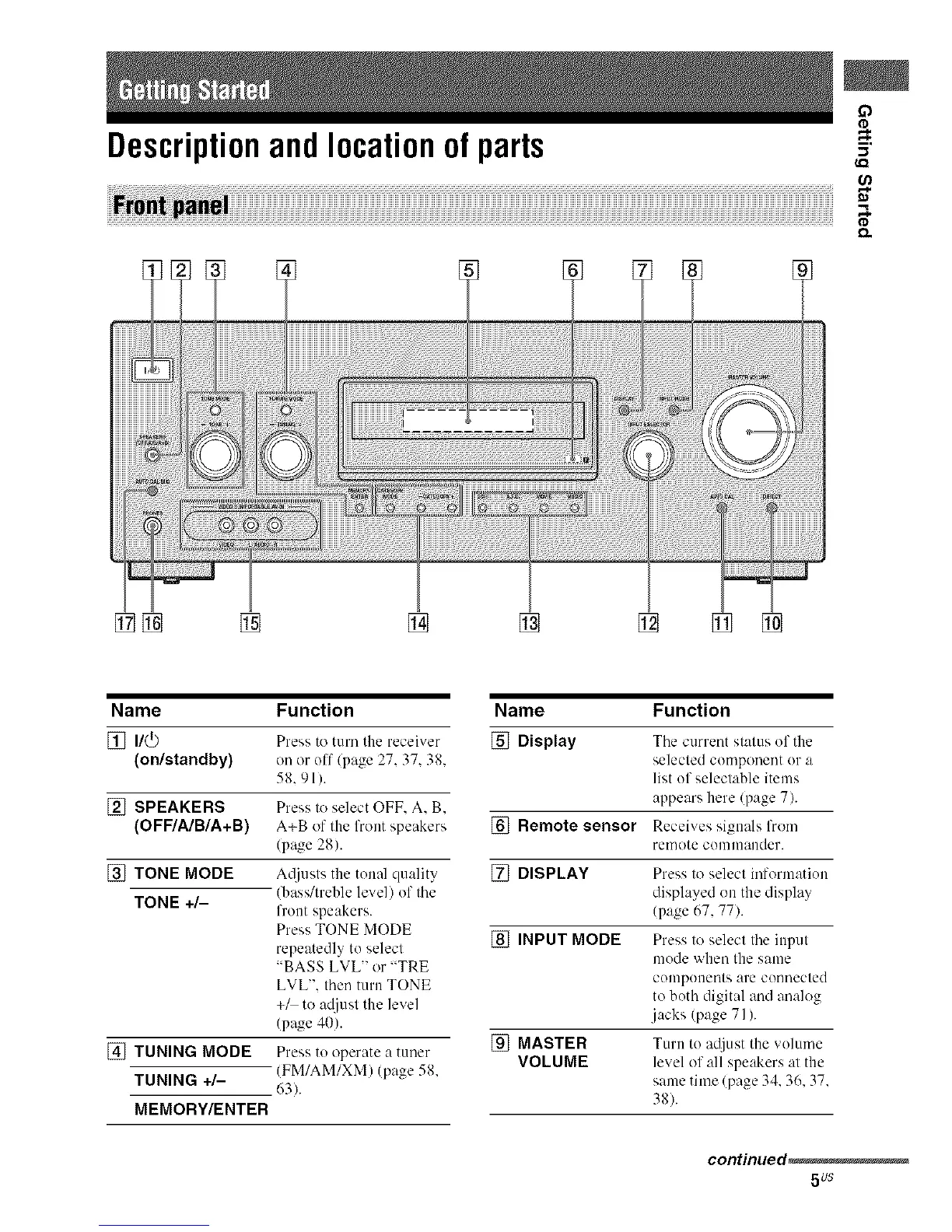
Descriptionandlocationof parts
(,Q
[] []
Name Function
[] n/_
(on/standby)
[] SPEAKERS
(OFF/A/B/A+B)
[] TONE MODE
TONE +/-
[_ITUNING MODE
TUNING +/-
MEMORY/ENTER
Press to turn the receiver
on or off/page 27.37. 38.
58.91).
Press to select OFF. A. B.
A+B of the front speakers
(pa_ze 28).
A@lsts the tonal quality
(bass/treble level) of the
front speakers.
Press TONE MODE
repeatedly to select
"BASS LVL" or "TRE
LVL". then turn TONE
+_ to a_/iust the level
(page 40).
Press to operate a tuner
(FM/AM/XM) (page 58.
63).
Name Function
[] Display The current stat/lS of the
selected component or a
list of selectable items
appears here (page 7).
[] Remote sensor Receives signals from
remote conlnlander.
[] DISPLAY Press to select information
displayed on the display
(page 67, 77).
[] INPUT MODE Press to select the input
mode when the same
components are connected
to both digital and analog
jacks (page 71).
[] MASTER Turn to adjust the volume
VOLUME level of all speakers at the
same time (page 34. 36. 37.
38).
continued,
5us



 To Next Page