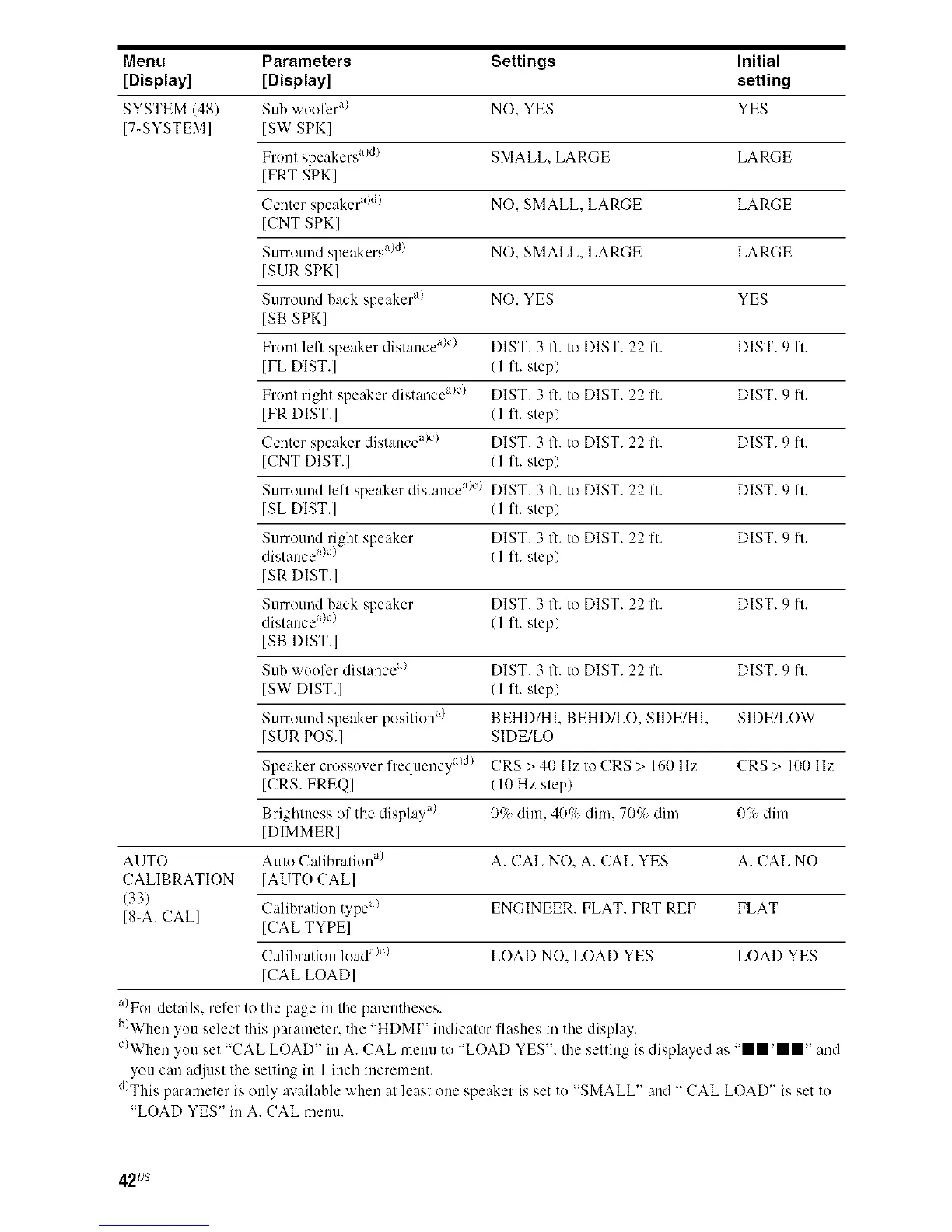
Menu Parameters Settings Initial
[Display] [Display] setting
SYSTEM (48) Sub 'a ool'cr"_ NO. YES YES
[7-SYSTEM] [ST SPK]
Front speakers a)d) SMALL. LARGE LARGE
[FRT SPK]
Center speaker a)d) NO. SMALL. LARGE LARGE
[CNT SPK]
Surround speakers a)dl NO. SMALL. LARGE LARGE
ISUR SPKI
Surround back speaker a/ NO. YES YES
ISB SPKI
Front left speaker distance a)c) DIST. 3 It. to DIST. 22 ft. DIST. 9 ft.
[FL DIST.] (I 1"1.step)
Front right speaker distance a>c) DIST. 3 It. to DIST. 22 ft. DIST. 9 ft.
[FR DIST.] (I 1"1.step)
Center speaker distance a/el DIST. 3 It. to DIST. 22 ft. DIST. 9 ft.
[CNT DIST.] (I ft. step)
Surround left speaker distance a/el DIST. 3 It. to DIST. 22 ft. DIST. 9 ft.
[SL DIST.] (I ft. step)
Surround right speaker DIST. 3 It. to DIST. 22 ft. DIST. 9 ft.
distance ale) (I ft. step)
ISR DIST.I
Surround back speaker DIST. 3 It. to DIST. 22 ft. DIST. 9 ft.
distance a/c) (I ft. step)
ISB DIST.I
Sub woofer distance a/ DIST. 3 It. to DIST. 22 ft. DIST. 9 ft.
[ST DIST.] (I ft. step)
Surround speaker position a_ BEHD/HI. BEHD/LO. SIDE/HI. SIDE/LOW
[SUR POS.] SIDE/LO
Speaker crossover frequency a)d} CRS > 40 Hz to CRS > 160 Hz CRS > 100 Hz
[CRS. FREQ] (I 0 Hz step)
Brightness of the display a/ ()r); dim, 40if, dim, 7()_7_dim 0_7_dim
[DIMMER]
AUTO Auto Calibration a/ A. CAL NO. A. CAL YES A. CAL NO
CALIBRATION [AUTO CAL]
(33)
[8-A. CALl Calibration type a) ENGINEER. FLAT. FRT REF FLAT
ICAL TYPE]
Calibration load a)c) LOAD NO. LOAD YES LOAD YES
ICAL LOAD]
a/For details, refer to the page in the parentheses.
b)When you select this parameter, the "HDMI" indicator flashes in the display.
C>When you set "CAL LOAD" in A. CAL menu to "LOAD YES". the setting is displayed as "ll'll" and
you can at[just the setting in 1 inch increment.
d)This parameter is only available when at least one speaker is set to "SMALL" and " CAL LOAD" is set to
"LOAD YES" in A. CAL menu.
42us



 To Next Page