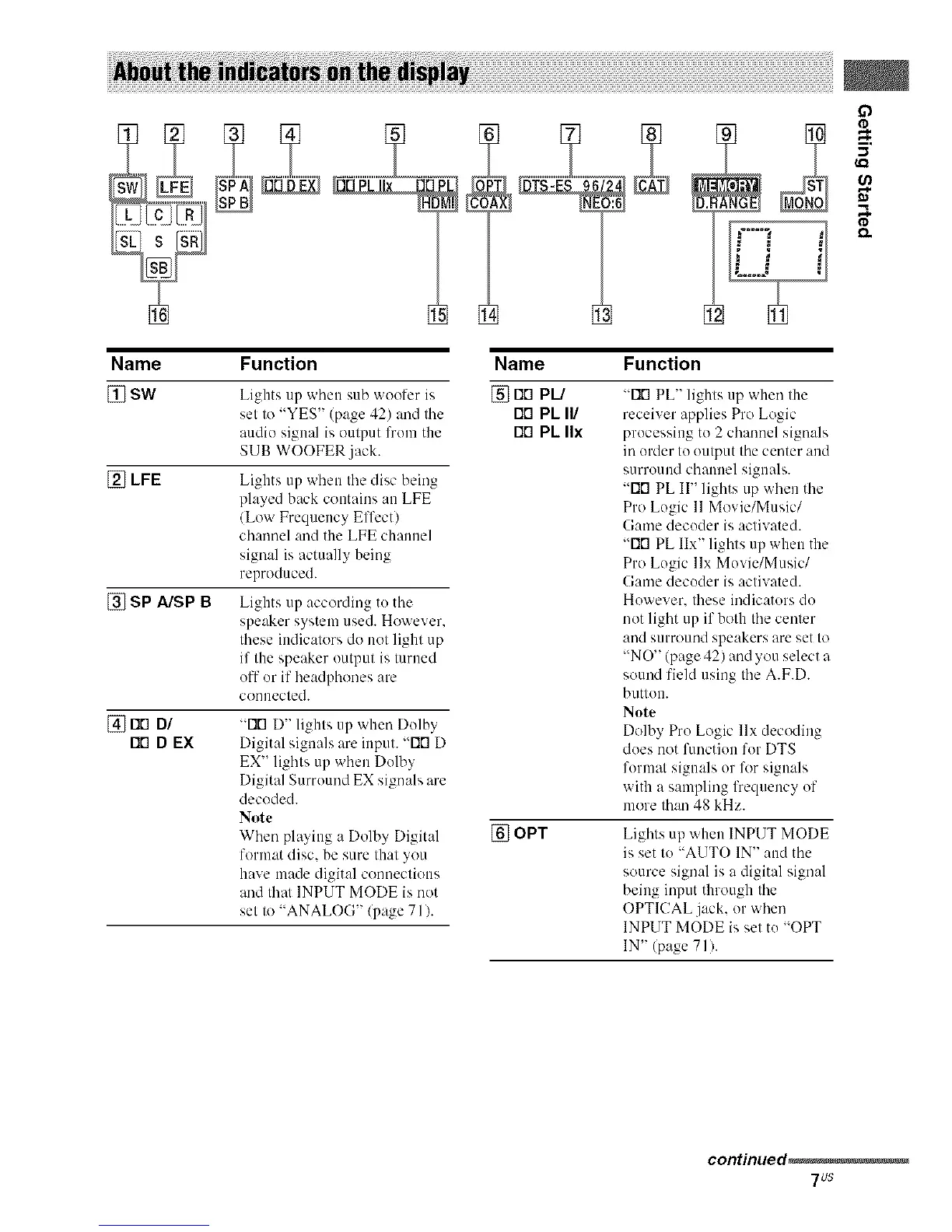
Name Function Name Function
[] SW Lights up when sub woofer is [] rID PL/
set to "YES" (page 42) and the Fit'1PL II/
audio signal is output lhom the rio PL IIx
SUB WOOFER .jack.
[] LFE
[] SP A/SP B
Lights up when the disc being
played back contains an LFE
(Low Frequency Effcctl
channel and the LFE channel
signal is actually being
reproduced.
Lights up according to the
speaker system used. However.
these indicators do not light up
if the speaker output is turned
off or if headphones are
connected.
[] FIO DI
I"10D EX
"FIG D" lights tip when Dolby
Digital signals are input. "FIG D
EX" lights up when Dolby
Digital Surround EX signals are
decoded.
Note
When playing a Dolby Digit:d
format disc. be sure that you
have made digital connections
and thai INPUT MODE is not
set to "ANALOG" (page 71/.
"FiG PL" lights up when the
receiver applies Pro Logic
processing to 2 channel signals
in order to output the center and
surround channel signals.
"Fir1 PL II" lights up when the
Pro Logic 11Movie/Music/
Game decoder is activated.
"Fifl PL IIx" lights up when the
Pro Logic llx Movie/Music/
Game decoder is activated.
However. these indicators do
not light up if both the center
and surround speakers are set to
"NO" (page 42) and you select a
sound field using the A.F.D.
button.
Note
Dolby Pro Logic llx decoding
does not fimction for DTS
format signals or for signals
with a sampling lhequency of
more than 48 kHz.
[] OPT Lights up when INPUT MODE
is set to "AUTO IN" and the
source signal is a digital signal
being input through the
OPTICAL jack, or when
INPUT MODE is set to "OPT
IN" (page 71).
continued_
7us



 To Next Page