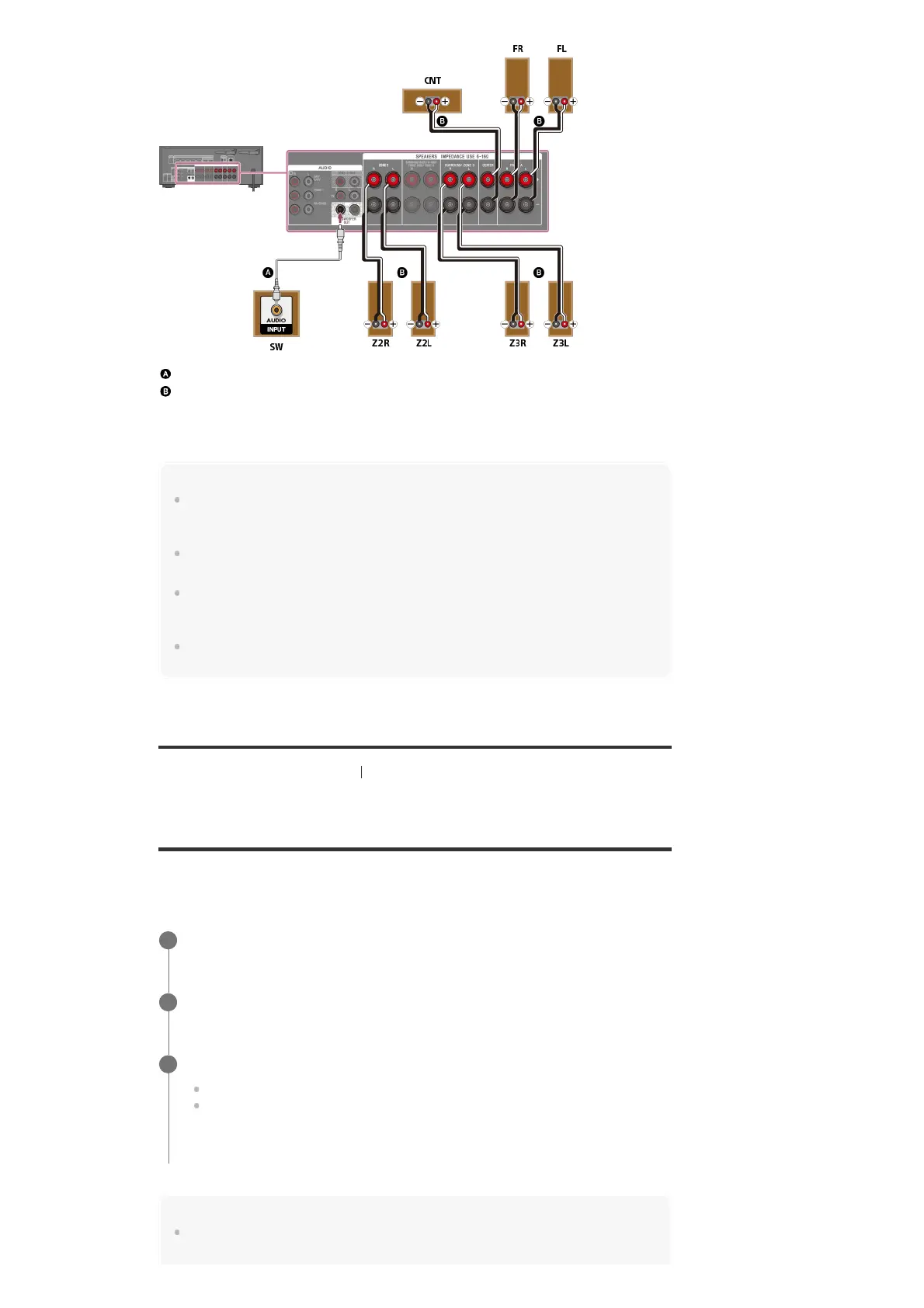
Monaural audio cable (not supplied)
Speaker cable (not supplied)
After you have connected the Zone 3 speakers, set [Surround Speaker Assign] to [Zone3] in
the [Speaker Settings] menu.
Note
You can only enable the SPEAKERS ZONE 2 terminals if you set [SURROUND BACK/ZONE2
Priority] to [ZONE2 Terminals] in the [Speaker Settings] menu, and set [Zone2 Power] to [On] in the
[Zone Controls] menu.
You can only set [Surround Speaker Assign] if the speaker pattern is set to a setting that does not
have surround speakers.
Only audio signals from [USB], [Bluetooth] (while in BLUETOOTH RX mode only), [Home Network],
[Music Services], [FM TUNER] and audio signals input from AUDIO IN jacks are output to the Zone
2 and Zone 3 speakers.
External digital input from OPTICAL IN, COAXIAL IN, HDMI IN jacks and Screen mirroring cannot be
output to Zone 2 and Zone 3.
[106] Using the Multi-Zone Features Enjoying sound from speakers located in other rooms
Setting the priority on the surround back speakers or
Zone 2 speakers (SURROUND BACK/ZONE2 Priority)
When speakers are connected to both the SPEAKERS SURROUND BACK/BI-AMP/FRONT
HIGH/FRONT B terminals and SPEAKERS ZONE 2 terminals, you can set which speakers are
given priority.
Note
When [Zone2 Power] is set to [Off], the SPEAKERS SURROUND BACK/BI-AMP/FRONT
HIGH/FRONT B terminals are enabled even if [ZONE2 Terminals] is selected.
Select [Setup] - [Speaker Settings] from the home menu.
1
Select [SURROUND BACK/ZONE2 Priority].
2
Select the setting you want.
ZONE2 Terminals: Priority is placed on the SPEAKERS ZONE 2 terminals.
SURROUND BACK Terminals: Priority is placed on the SURROUND BACK/BI-
AMP/FRONT HIGH/FRONT B terminals and the SPEAKERS ZONE 2 terminals are
disabled.
3



 To Next Page