18. Wireless LAN signal strength indicator
Lights up to show the strength of the wireless LAN signal.
: No signal.
: Weak signal.
: Moderate signal.
: Strong signal.
19. BT
Lights up when a BLUETOOTH device is connected. Flashes while connecting.
20. Wired LAN indicator
Lights up when a LAN cable is connected.
[5] Parts and Controls Receiver (STR-DN1060)
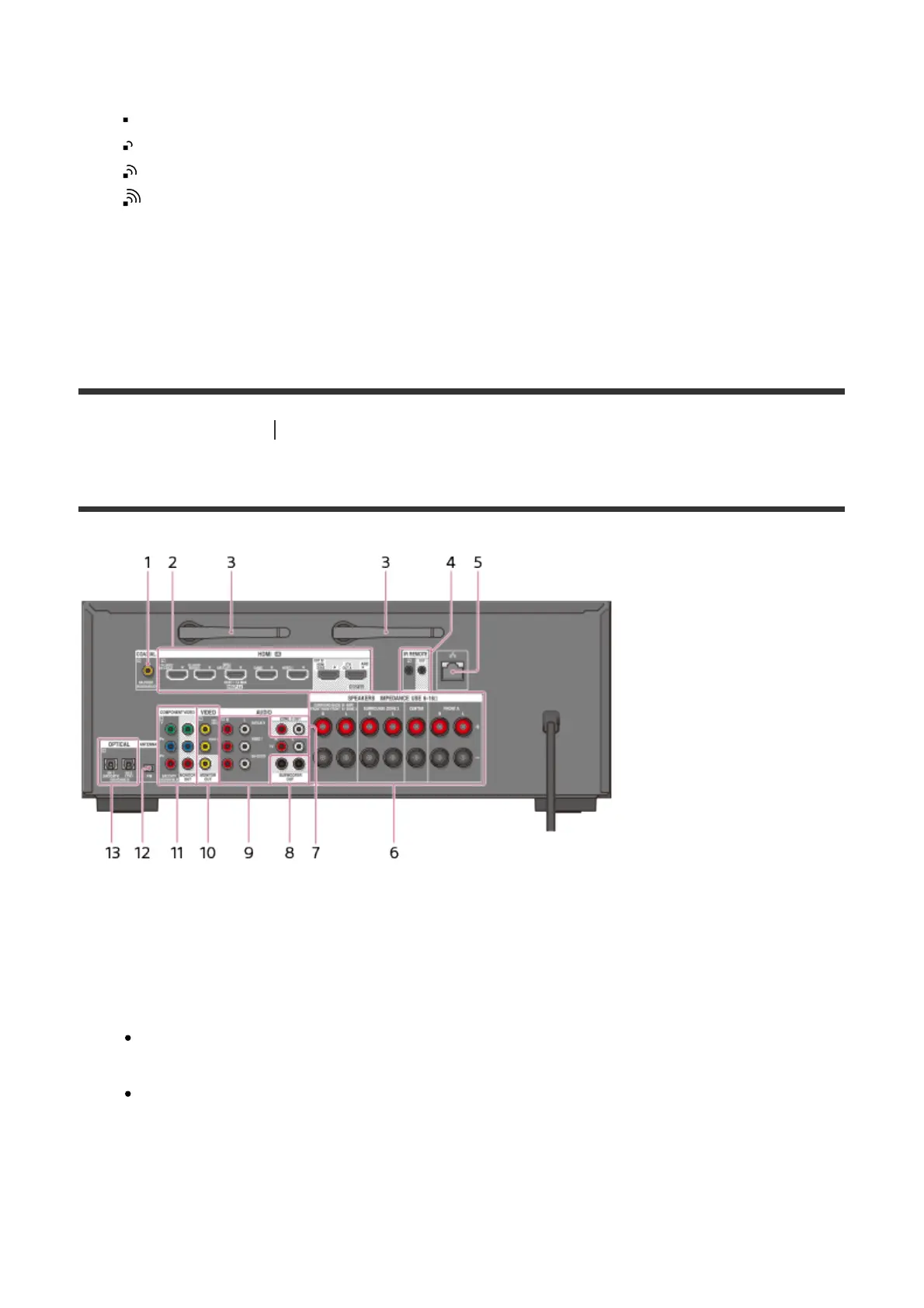
Rear panel (STR-DN1060)
1. COAXIAL IN jack
2. HDMI IN/OUT (*) jacks
3. Wireless LAN antenna
4. IR REMOTE IN/OUT jacks
You can control the receiver from a distance by connecting an IR repeater (not
supplied) to the IR REMOTE IN jack.
You can start or stop playback of devices such as a CD player connected to the
receiver by connecting an IR Blaster (not supplied) to the IR REMOTE OUT jack.
5. LAN port (**)
6. SPEAKERS terminals
7. ZONE 2 OUT jacks
8. SUBWOOFER OUT jacks



 To Next Page