When [Bluetooth Standby] is activated, the indicator only lights in amber when a device has
been paired with the receiver. If there are no devices paired with the receiver, the indicator turns
off when the receiver is in standby mode.
**
For USA, Canadian and Asia-Pacific models only.
[9] Parts and Controls Receiver (STR-DN860)
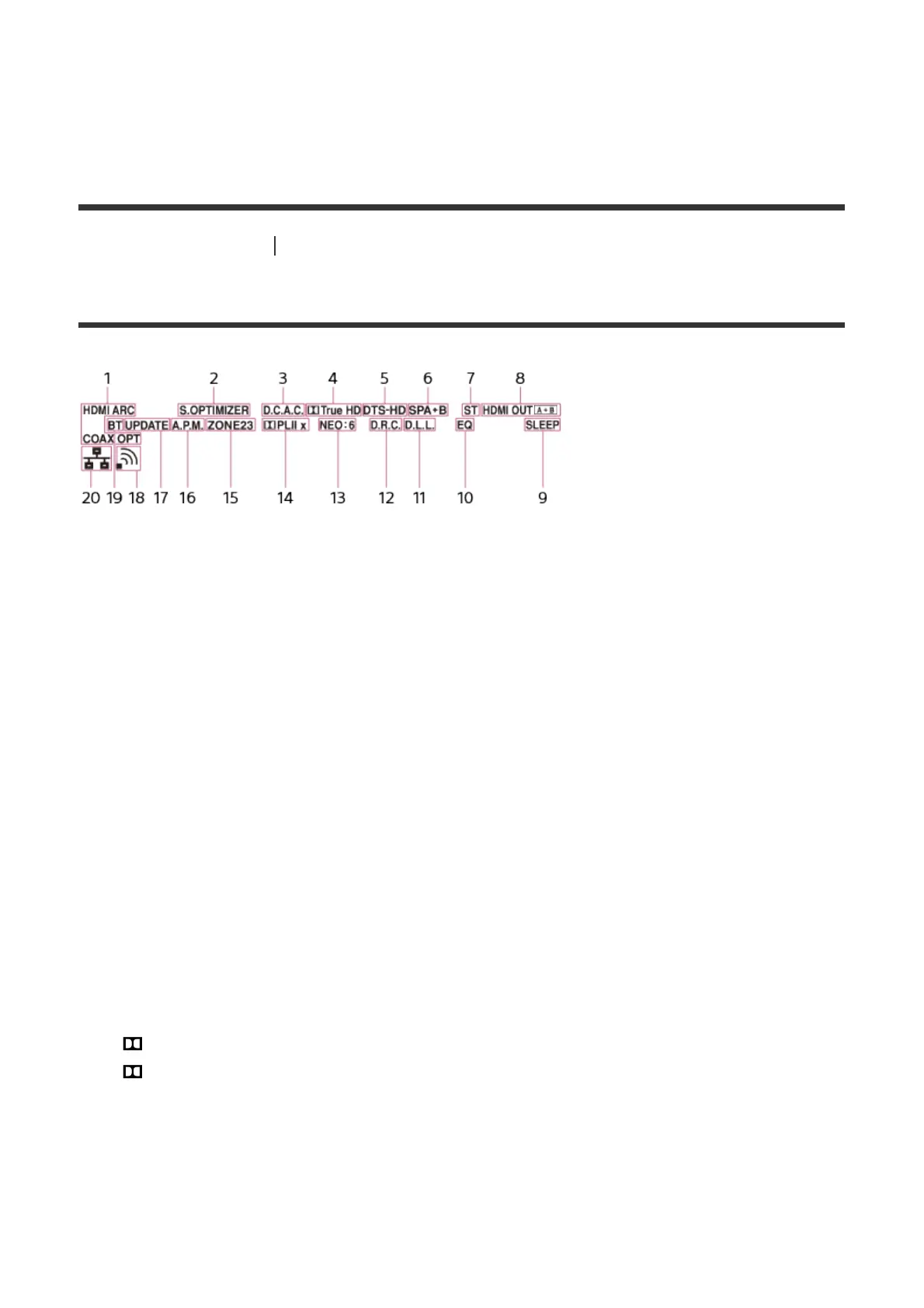
Indicators on the display panel
1. Input indicator
Lights up to indicate the current input.
HDMI
The receiver recognizes devices connected via an HDMI IN jack.
ARC
TV input is selected and Audio Return Channel (ARC) signals are detected.
COAX
Digital signals are input through the COAXIAL jack.
OPT
Digital signals are input through the OPTICAL jack.
2. S.OPTIMIZER
Lights up when the Sound Optimizer function is activated.
3. D.C.A.C.
Lights up when the measurement results of the Auto Calibration function are applied.
4. Dolby Digital Surround indicator
The applicable indicator lights up when the receiver is decoding the corresponding
Dolby Digital format signals.
: Dolby Digital
TrueHD: Dolby TrueHD
5. DTS(-HD) indicator
The applicable indicator lights up when the receiver is decoding the corresponding DTS
format signals.
DTS: DTS
DTS-HD: DTS-HD
6. Speaker system indicator



 To Next Page