EasyManua.ls Logo

Sony Trinitron KV-13VM20 - Turning the Cable Mode on or off; Eeees

Sony Trinitron KV-13VM20
97 pages
Print Icon
To Next Page IconTo Next Page
To Previous Page IconTo Previous Page
Loading...
Turning
the
Cable
Mode
On
or
Off
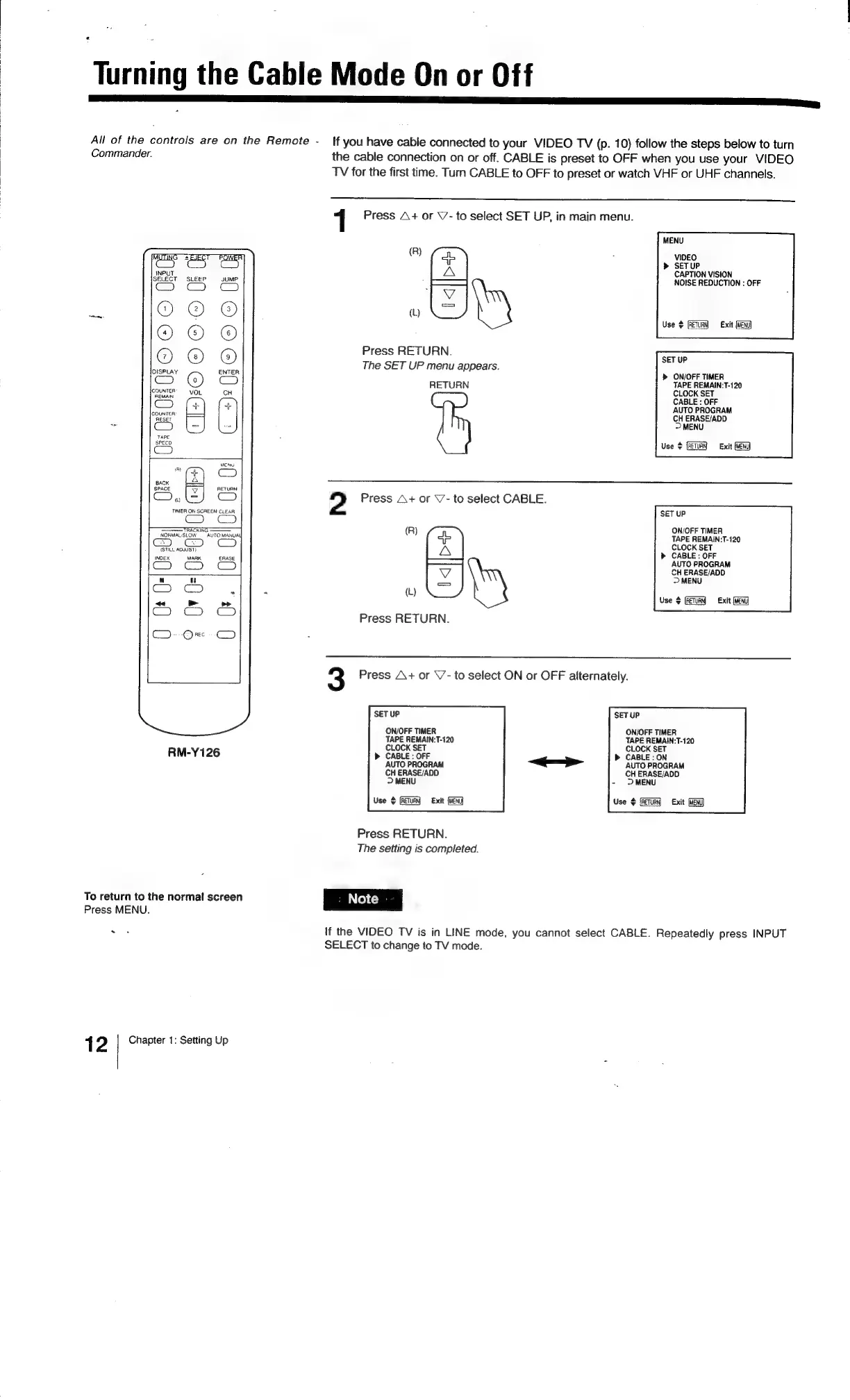
All
of
the
controls
are
on
the
Remote
-
Commander.
RETURN
wo
TIMER
ON
SCREEN
CLEAR
————=
TRACKING
——
NOKMAL:SLOW
AUTO
MANUAU
(STILL
ADJUST
INDEX
MARK
ERASE
er
RM-Y126
To
return
to
the
normal
screen
Press
MENU.
*
1
2
Chapter
1:
Setting
Up
if
you
have
cable
connected
to
your
VIDEO
TV
(p.
10)
follow
the
steps
below
to
turn
the
cable
connection
on
or
off.
CABLE
is
preset
to
OFF
when
you
use
your
VIDEO
TV
for
the
first
time.
Turn
CABLE
to
OFF
to
preset
or
watch
VHF
or
UHF
channels.
1
Press
A+
or
V7-
to
select
SET
UP,
in
main
menu.
MENU
(R}
ae
:
VIDEO
>
SETUP
A
CAPTION
VISION
——
NOISE
REDUCTION
:
OFF
(L)
es
RETURT
Exit
(MENU)
Press
RETURN.
—-
The
SET
UP
menu
appears.
>
ON/OFF
TIMER
RETURN
TAPE
REMAIN:T-120
CLOCK
SET
CABLE
:
OFF
AUTO
PROGRAM
CH
ERASE/ADD
>
MENU
Use
©
(RETURN
Exit
2
Press
A+
or
V-
to
select
CABLE.
SET
UP
(R)
ON/OFF
TIMER
ob
TAPE
REMAIN:T-120
A
CLOCK
SET
CABLE
:
OFF
AUTO
PROGRAM
CH
ERASE/ADD
>
MENU
L
(t)
Use
$
RETURN
Exit
Press
RETURN.
3
Press
A+
or
\/-
to
select
ON
or
OFF
alternately.
SET
UP
ON/OFF
TIMER
TAPE
REMAIN:T-120
CLOCK
SET
>
CABLE:
ON
SET
UP
ON/OFF
TIMER
TAPE
REMAIN:T-120
CLOCK
SET
>
CABLE
:
OFF
AUTO
PROGRAM
CH
ERASE/ADD
-
2MENU
AUTO
PROGRAM
CH
ERASE/ADD
>
MENU
Use
¢
(RETURN
Exit
(ven
Use
$
Exit
Press
RETURN.
The
setting
is
completed.
If
the
VIDEO
TV
is in
LINE
mode,
you
cannot
select
CABLE.
Repeatedly
press
INPUT
SELECT
to
change
to
TV
mode.

Related product manuals