EasyManua.ls Logo

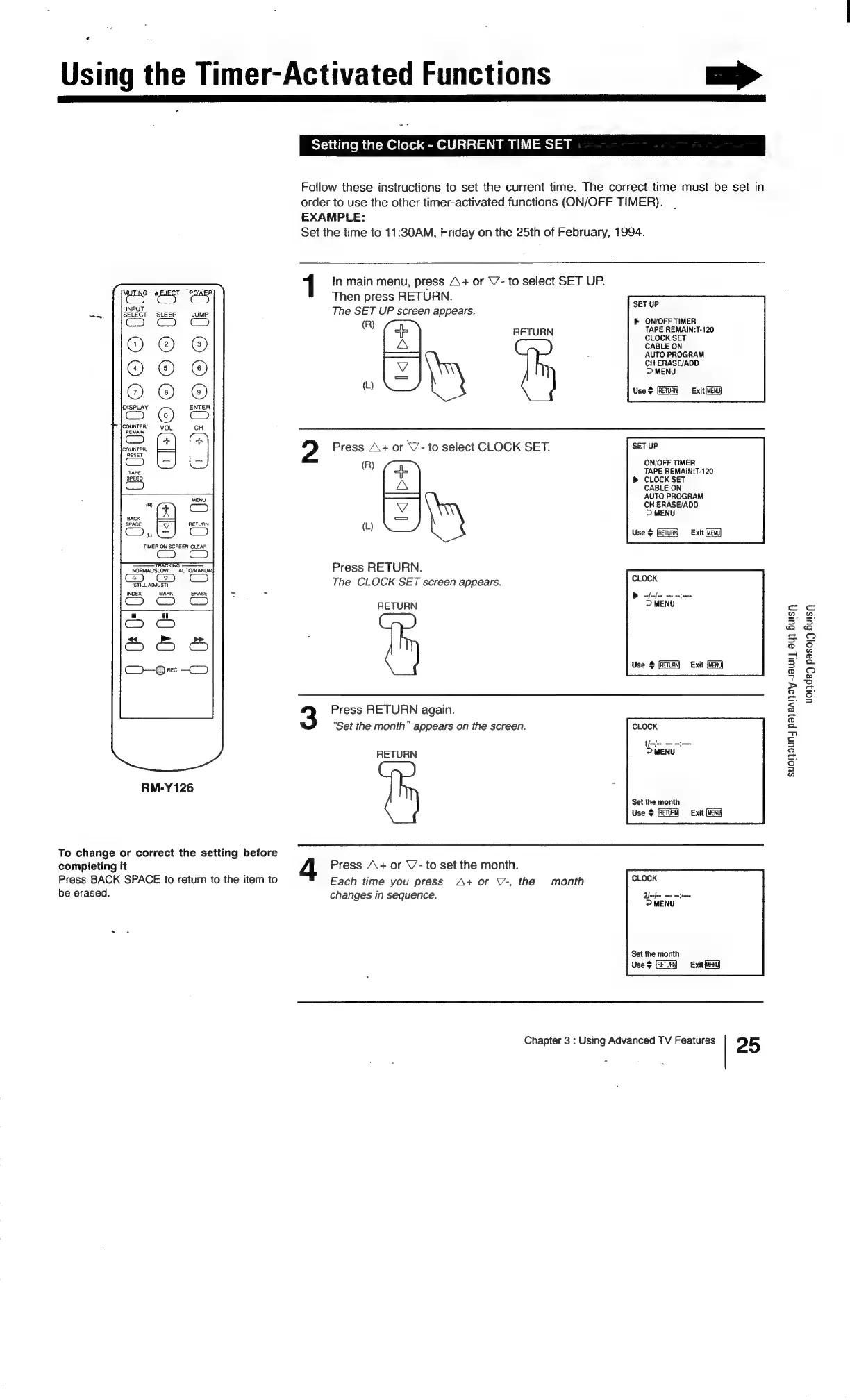
Sony Trinitron KV-13VM20 - Setting the Clock - CURRENT TIME SET

Sony Trinitron KV-13VM20
97 pages
Print Icon
To Next Page IconTo Next Page
To Previous Page IconTo Previous Page
Loading...
Using
the
Timer-Activated
Functions
>
Setting
the
Clock
-
CURRENT
TIME
SET
Follow
these
instructions
to
set
the
current
time.
The
correct
time
must
be
set
in
order
to
use
the
other
timer-activated
functions
(ON/OFF
TIMER).
EXAMPLE:
Set
the
time
to
11:30AM,
Friday
on
the
25th
of
February,
1994.
1
In
main
menu,
press
A+
or
V’-
to
select
SET
UP.
Then
press
RETURN.
The
SET
UP
screen
appears.
>
ON/OFF
TIMER
"
4p
RETURN
ie
REMAINT-120
jz
CABLE
ON
-—
:
AUTO
PROGRAM
CH
ERASE/ADD
>
MENU
)
Use
$
Exit
(MEK)
SET
UP
O®©®
I
m
4
m
2
c)
2
Press
A+
or
\7-
to
select
CLOCK
SET.
SETUP
ON/OFF
TIMER
(R)
TAPE
REMAIN:T-120
CLOCK
SET
G)
aA
CABLE
ON
a
AUTO
PROGRAM
a
CH
ERASE/ADD
&
ee
Vv
RETURN
tL
ae
Cc)
ty
Use
$
(ETRY
Exit
Ew)
TIMER
ON
SCREEN
CLEAR
RORMALALEN
AUTORAARUA
Press
RETURN.
QoS
CO
The
CLOCK
SET
screen
appears.
INDEX
MARK
ERASE
-
-
RETURN
Use
+
Exit
(MENG)
Press
RETURN
again.
“Set
the
month”
appears
on
the
screen.
RETURN
RM-Y126
>
Set
the
month
Use
¢
(RETURN
=
Exit
To
change
or
correct
the
setting
before
completing
it
Press
A+
or
V’-
to
set
the
month.
Press
BACK
SPACE
to
return
to
the
item
to
Each
time
you
press
A+
or
V-,
the
month
be
erased.
changes
in
sequence.
Set
the
month
Use
+
Exit
(MEN)
Chapter
3
:
Using
Advanced
TV
Features
2 5
uorde)
pasoy9
Suis
Suol]OUNJ
payeAioy-sawty
aul
Bulsy

Related product manuals