EasyManua.ls Logo

Sony Trinitron KV-13VM20 - CCC Cece Ees Eeteeeteetetees

Sony Trinitron KV-13VM20
97 pages
Print Icon
To Next Page IconTo Next Page
To Previous Page IconTo Previous Page
Loading...
Using
the
On-Screen
Menus
Ee
eer
ener
eee
ee
i
TI
IE
TR
iy
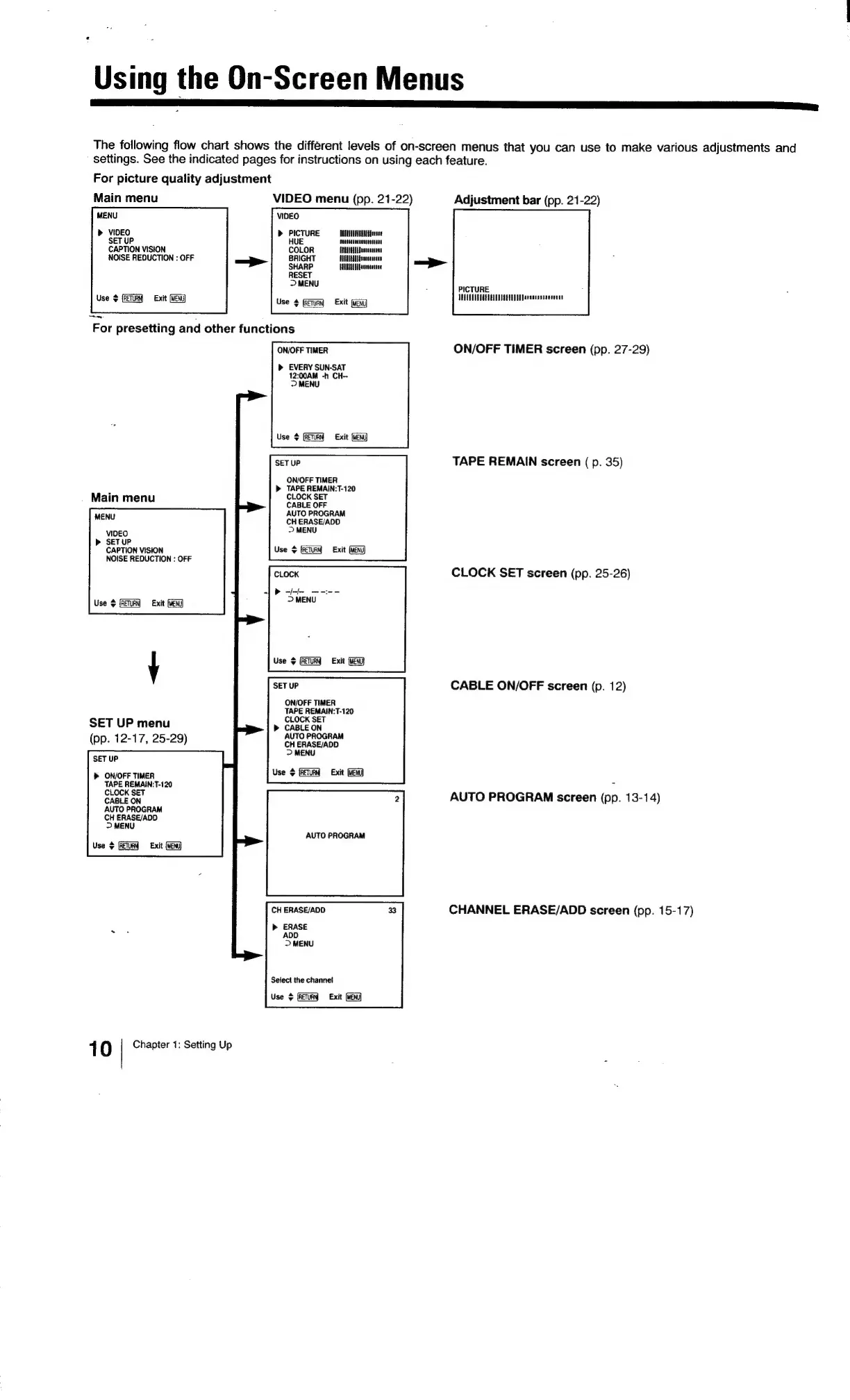
The
following
flow
chart
shows
the
different
levels
of
on-screen
menus
that
you
can
use
to
make
various
adjustments
and
settings.
See
the
indicated
pages
for
instructions
on
using
each
feature.
For
picture
quality
adjustment
Main
menu
VIDEO
menu
(pp.
21-22)
Adjustment
bar
(pp.
21-22)
MENU
VIDEO
»
VIDEO
SET
UP
CAPTION
VISION
b>
PICTURE
ALTE
Hesse
HUE
decesanocnen
cate
COLOR
ANTAL
Jestesnte
BRIGHT
HEE
ffressesstes
NOISE
REDUCTION
:
OFF
SHARP
HUNT
oeescentee
RESET
>
MENU
Use
Exit
iy
PICTURE
TALUUUTUATSSEUD
TET
Deeaecittsesener
Use
$
{RETURN
Exit
(MENU
For
presetting
and
other
functions
ON/OFF
TIMER
ON/OFF
TIMER
screen
(pp.
27-29)
»
EVERY
SUN-SAT
12:00AM
-h
CH-
>
MENU
Use
$
Exit
(MEN
TAPE
REMAIN
screen
(p.
35)
SET
UP
ON/OFF
TIMER
>
TAPE
REMAIN:T-120
i
CLOCK
SET
Main
menu
phork
Ser
AUTO
PROGRAM
MENU
CH
ERASE/ADD
>
MENU
VIDEO
SETUP
CAPTION
VISION
NOISE
REDUCTION
:
OFF
Use
+
Exit
(MENU
CLOCK
SET
screen
(pp.
25-26)
Use
$
Exit
(ENG
Use
$
Exit
(MEN
SET
UP
CABLE
ON/OFF
screen
(p.
12)
ON/OFF
TIMER
TAPE
REMAIN:T-120
CLOCK
SET
»
CABLE
ON
AUTO
PROGRAM
CH
ERASE/ADD
>
MENU
Use
>
(RETURN
Exit
(MENU)
Y
SET
UP
menu
(pp.
12-17,
25-29)
SET
UP
ON/OFF
TIMER
TAPE
REMAIN:T-120
CLOCK
SET
CABLE
ON
AUTO
PROGRAM
CH
ERASE/ADD
>
MENU
Use
©
(RETURN
Exit
(MEN)
2
AUTO
PROGRAM
screen
(pp.
13-14)
AUTO
PROGRAM
CH
ERASE/ADD
CHANNEL
ERASE/ADD
screen
(pp.
15-17)
b>
ERASE
ADD
>
MENU
Select
the
channel
Use
>
(RETRY
Exit
(Hen
1
8)
Chapter
1:
Setting
Up

Related product manuals