EasyManua.ls Logo

Sony Trinitron KV-13VM20 - Cee Ceeeeccrseceneeeseeeseeeeenseeeeneeees

Sony Trinitron KV-13VM20
97 pages
Print Icon
To Next Page IconTo Next Page
To Previous Page IconTo Previous Page
Loading...
|
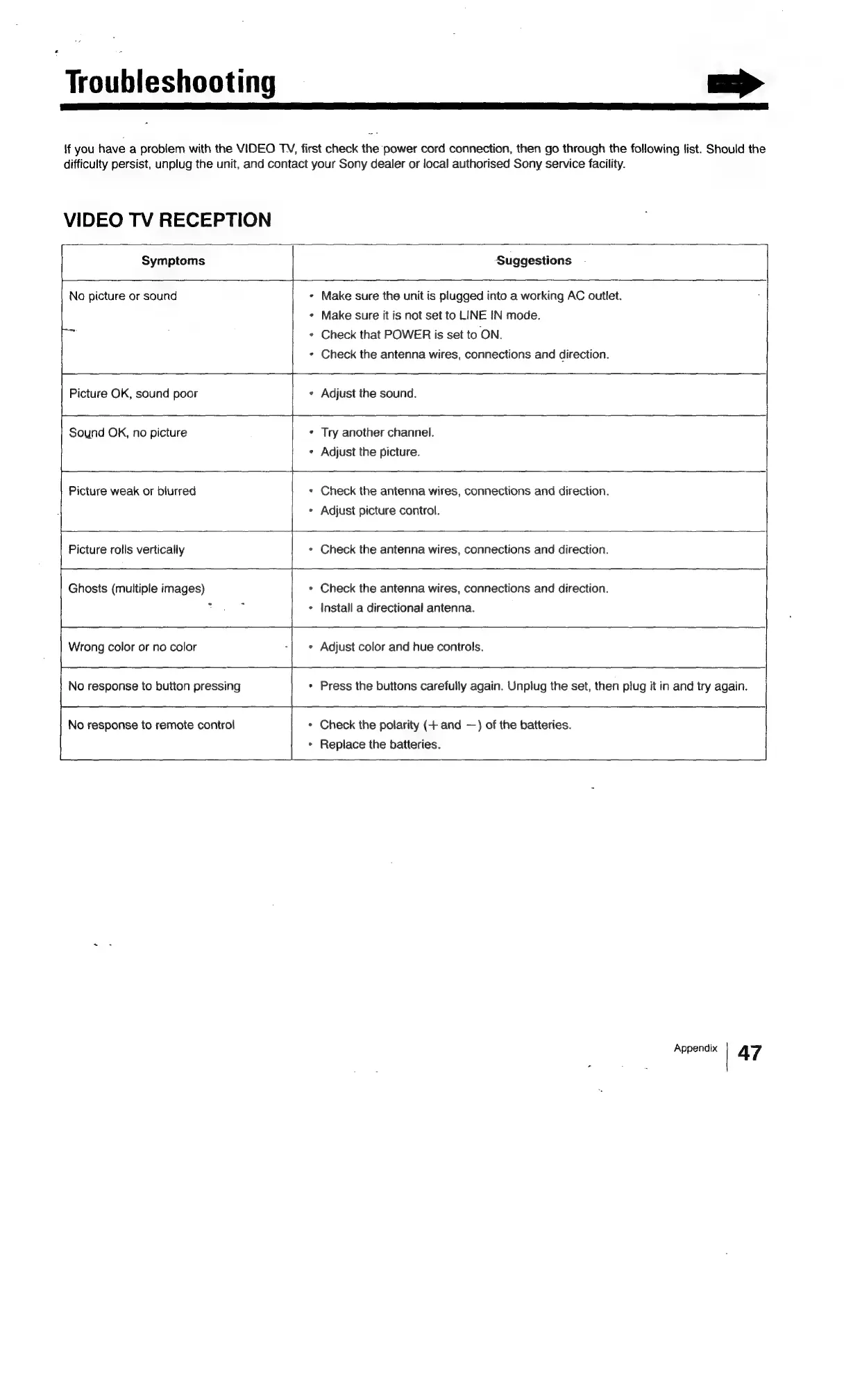
Troubleshooting
=
ff
you
have
a
problem
with
the
VIDEO
TV,
first
check
the
power
cord
connection,
then
go
through
the
following
list.
Should
the
difficulty
persist,
unplug
the
unit,
and
contact
your
Sony
dealer
or
local
authorised
Sony
service
facility.
VIDEO
TV
RECEPTION
Symptoms
Suggestions
No
picture
or
sound
ban
¢
Make
sure
the
unit
is
plugged
into
a
working
AC
outlet.
+
Make
sure
it
is
not
set
to
LINE
IN
mode.
*
Check
that
POWER
is
set
to
ON.
*
Check
the
antenna
wires,
connections
and
direction.
Picture
OK,
sound
poor
«
Adjust
the
sound.
Sound
OK,
no
picture
¢
Try
another
channel.
«
Adjust
the
picture.
i
Picture
weak
or
blurred
«
Check
the
antenna
wires,
connections
and
direction.
+
Adjust
picture
control.
Picture
rolls
vertically
«
Check
the
antenna
wires,
connections
and
direction.
Ghosts
(multiple
images)
«
-
Wrong
color
or
no
color
No
response
to
button
pressing
No
response
to
remote
control
*
Check
the
antenna
wires,
connections
and
direction.
¢
Install
a
directional
antenna.
*
Adjust
color
and
hue
controls.
+
Press
the
buttons
carefully
again.
Unplug
the
set,
then
plug
it
in
and
try
again.
*
Check
the
polarity
(+
and
—)
of
the
batteries.
*
Replace
the
batteries.
Appendix
47

Related product manuals