EasyManua.ls Logo

Sony Trinitron KV-13VM20 - Page 48

Sony Trinitron KV-13VM20
97 pages
Print Icon
To Next Page IconTo Next Page
To Previous Page IconTo Previous Page
Loading...
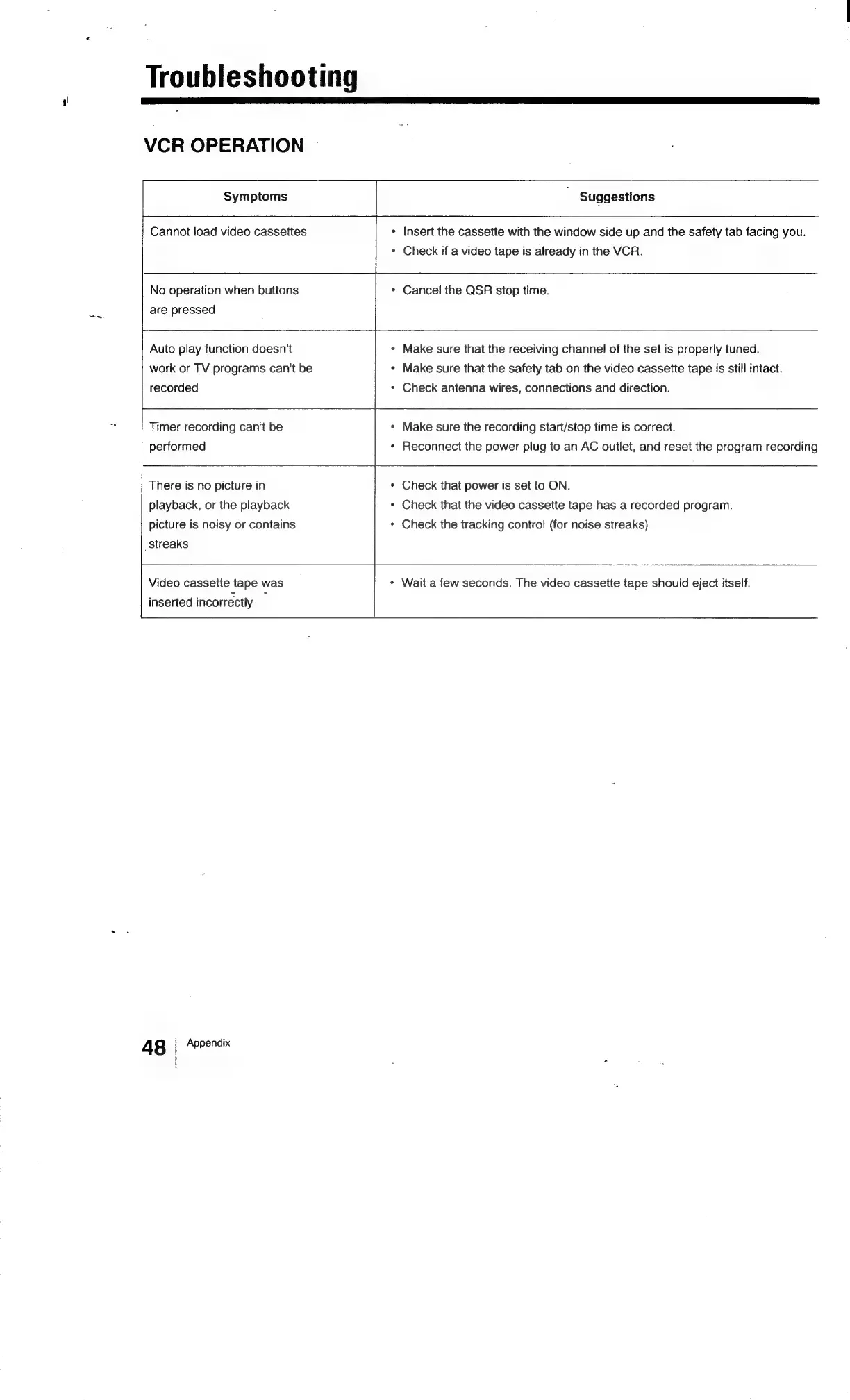
Troubleshooting
VCR
OPERATION
Symptoms
Suggestions
Cannot
load
video
cassettes
Insert
the
cassette
with
the
window
side
up
and
the
safety
tab
facing
you.
*
Check
if
a
video
tape
is
already
in
the
VCR.
No
operation
when
buttons
are
pressed
*
Cancel
the
QSR
stop
time.
Auto
play
function
doesn't
work
or
TV
programs
can't
be
recorded
+
Make
sure
that
the
receiving
channel
of
the
set
is
properly
tuned.
«
Make
sure
that
the
safety
tab
on
the
video
cassette
tape
is
still
intact.
Check
antenna
wires,
connections
and
direction.
Timer
recording
can't
be
performed
Make
sure
the
recording
start/stop
time
is
correct.
«
Reconnect
the
power
plug
to
an
AC
outlet,
and
reset
the
program
recording
There
is
no
picture
in
playback,
or
the
playback
picture
is
noisy
or
contains
streaks
*
Check
that
power
is
set
to
ON.
*
Check
that
the
video
cassette
tape
has
a
recorded
program.
*
Check
the
tracking
control
(for
noise
streaks)
Video
cassette
tape
was
inserted
incorrectly
«
Wait
a
few
seconds.
The
video
cassette
tape
should
eject
itself.
48
Appendix

Related product manuals