EasyManua.ls Logo

Sony Trinitron KV-13VM20 - Chapter 3: Using Advanced TV Features; Using Closed Caption; Cress Ceeeteeeeeneeniees

Sony Trinitron KV-13VM20
97 pages
Print Icon
To Next Page IconTo Next Page
To Previous Page IconTo Previous Page
Loading...
Chapter
3:
Using
Advanced
TV
Features
Using
Closed
Caption
24
me
2
S
rr
fn
ie}
g
HOO
0
©O©CO]
<
3
2
$
Gi
MENU
RETUAN
TIMER
ON
SCREEN
CLEAR
<TR
NORMAUSLOW
AUTO/MANUA\
(STILL
ADJUST)
INDEX
MARK
ERASE
RM-Y126
Chapter
3
:
Using
Advanced
TV
Features
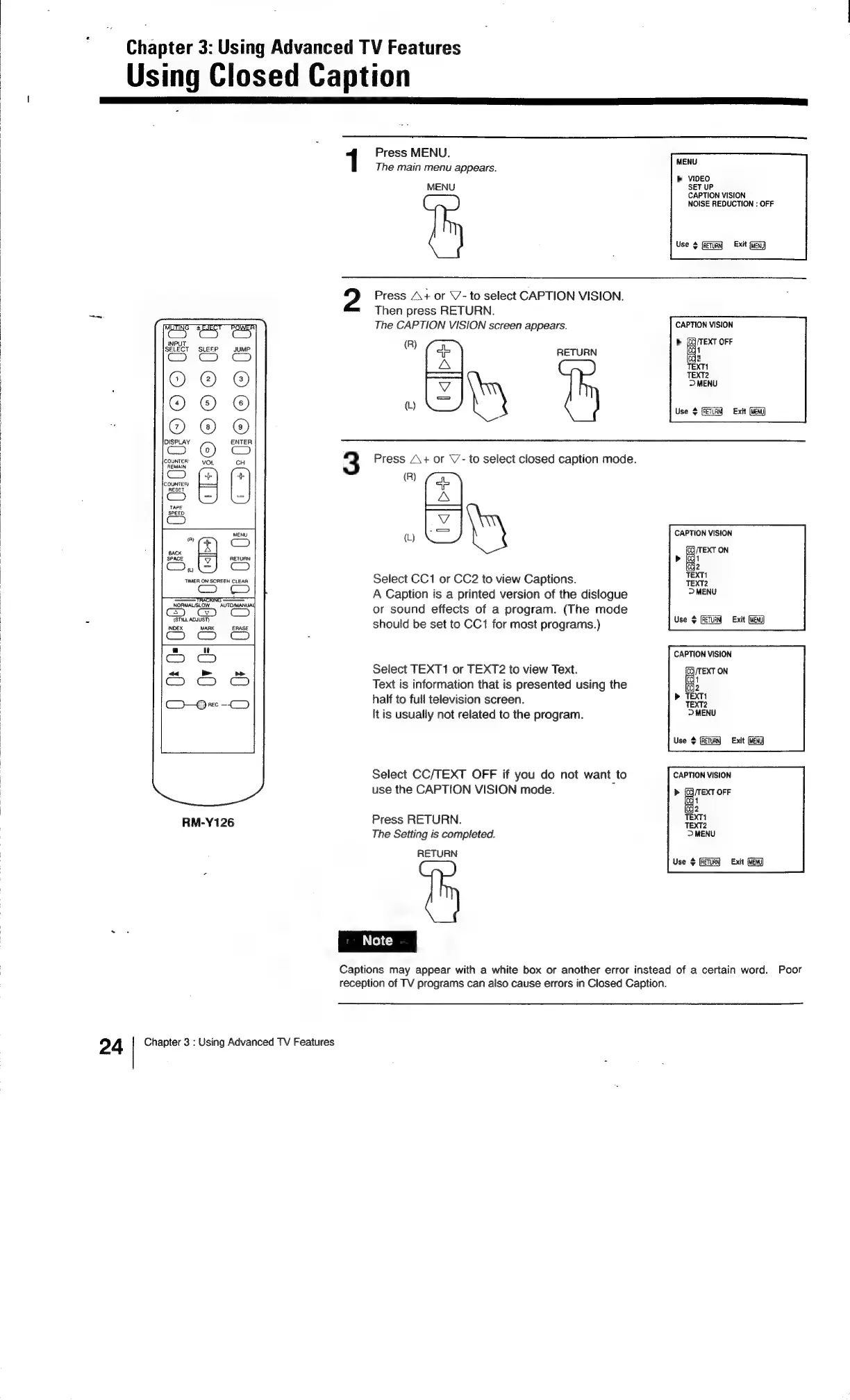
Press
MENU.
:
MENU
The
main
menu
appears.
>
VIDEO
MENU
SET
UP
CAPTION
VISION
NOISE
REDUCTION
:
OFF
Use
4
(Return)
«Exit
Press
A+
or
\/-
to
select
CAPTION
VISION.
Then
press
RETURN.
The
CAPTION
VISION
screen
appears.
CAPTION
VISION
»
cha
OFF
1
2
R
®)
e
RETURN
aA
TEXT!
————!
TEXT2
a
>
MENU
(L)
iS
Use
#
[RETURN
Exit
3
Press
A+
or
V7-
to
select
closed
caption
mode.
(R)
=
A
(L)
Es
y
CAPTION
VISION
Select
CC1
or
CC2
to
view
Captions.
A
Caption
is
a
printed
version
of
the
dislogue
or
sound
effects
of
a
program.
(The
mode
should
be
set
to
CC1
for
most
programs.)
eu
Exit
Ge)
CAPTION
VISION
Select
TEXT1
or
TEXT2
to
view
Text.
(oq
/TEXT
ON
Text
is
information
that
is
presented
using
the
ee
half
to
full
television
screen.
[tis
usually
not
related
to
the
program.
Use
Exit
(MEN)
Select
CC/TEXT
OFF
if
you
do
not
want
to
CAPTION
VISION
use
the
CAPTION
VISION
mode.
>
eae
Cc}
t
{oc}
Press
RETURN.
The
Setting
is
completed.
RETURN
Use
}
(RETURN
Captions
may
appear
with
a
white
box
or
another
error
instead
of
a
certain
word.
Poor
reception
of
TV
programs
can
also
cause
errors
in
Closed
Caption.

Related product manuals