EasyManua.ls Logo

Sony Trinitron KV-13VM20 - Setting the ON;OFF TIMER

Sony Trinitron KV-13VM20
97 pages
Print Icon
To Next Page IconTo Next Page
To Previous Page IconTo Previous Page
Loading...
:
DQ
U
OOO
©OO
J
is]
a
a)
S
x
Zz
5
m
D
0
©OO©OO0
U
-
TIMER
ON
SCREEN
CLEAR
Capi
C=)
NORWALSIOW
‘AUTO/MANUAU
RM-Y126
Setting
the
ON/OFF
TIMER
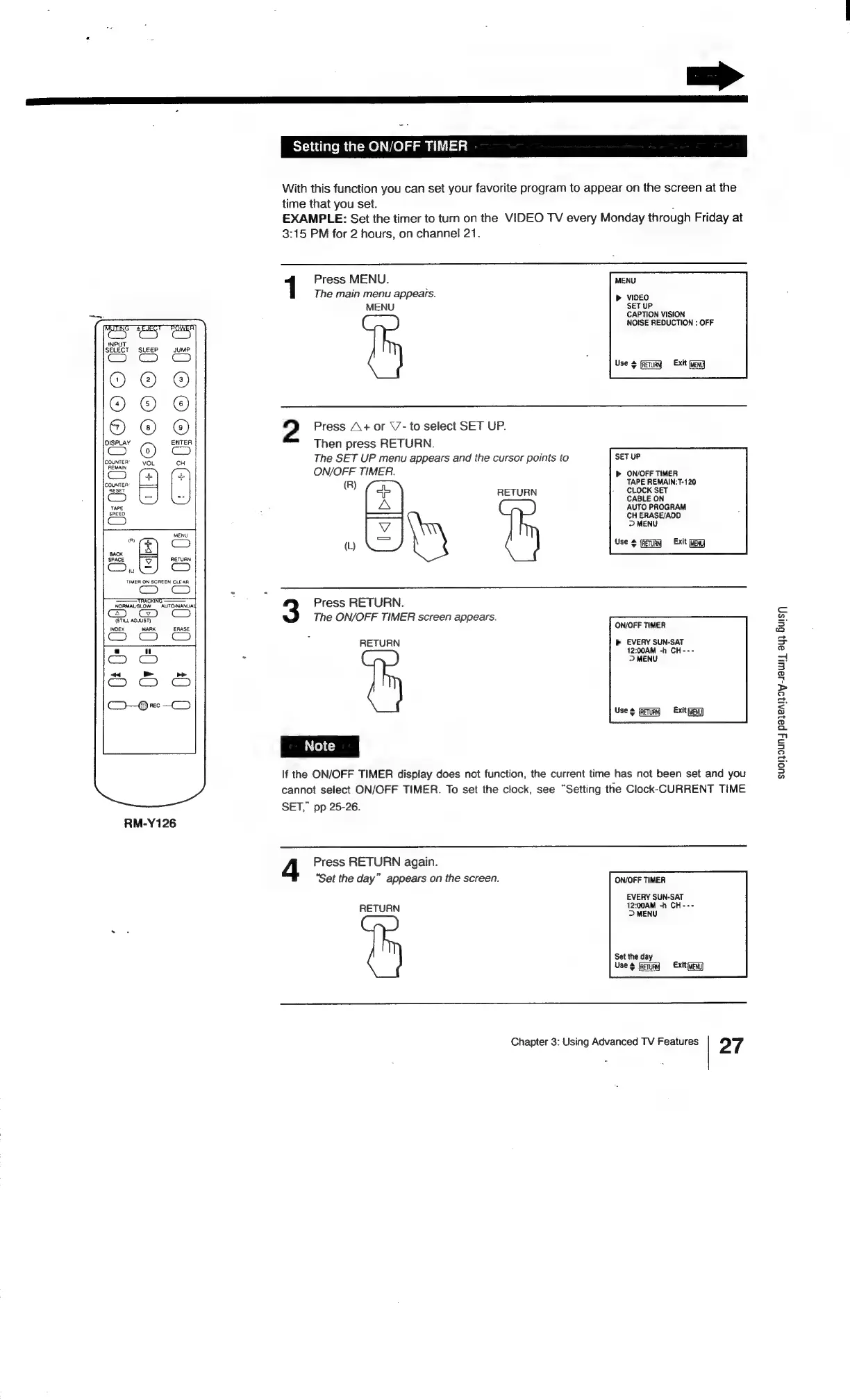
With
this
function
you
can
set
your
favorite
program
to
appear
on
the
screen
at
the
time
that
you
set.
.
EXAMPLE:
Set
the
timer
to
turn
on
the
VIDEO
TV
every
Monday
through
Friday
at
3:15
PM
for
2
hours,
on
channel
21.
1
Press
MENU.
MENU
The
main
menu
appears.
>
VIDEO
MENU
SET
UP
CAPTION
VISION
NOISE
REDUCTION
:
OFF
Use
¢
(Tim
Exit
fag
2
Press
A+
or
\/-
to
select
SET
UP.
Then
press
RETURN.
The
SET
UP
menu
appears
and
the
cursor
points
to
SET
UP
ON/OFF
TIMER.
>
ON/OFF
TIMER
(R)
TAPE
REMAIN:T-120
+
RETURN
aor
A
AUTO
PROGRAM
——d
CH
ERASE/ADD
>
MENU
(L)
Use
¢
Exit
(eng
Press
RETURN.
The
ON/OFF
TIMER
screen
appears.
ON/OFF
TIMER
RETURN
b>
EVERY
SUN-SAT
12:00AM
-h
CH---
>
MENU
Use
¢
(feTuRn)
«Exit
eng)
If
the
ON/OFF
TIMER
display
does
not
function,
the
current
time
has
not
been
set
and
you
cannot
select
ON/OFF
TIMER.
To
set
the
clock,
see
“Setting
the
Clock-CURRENT
TIME
SET,”
pp
25-26.
Press
RETURN
again.
‘Set
the
day”
appears
on
the
screen.
ON/OFF
TIMER
EVERY
SUN-SAT
12:00AM
-h
CH---
RETURN
>
MENU
Set
the
day
Use
¢
fet]
Extt(ueN]
Chapter
3:
Using
Advanced
TV
Features
27
SUOI]OUNY
payeAloy-s8wWty
ayy
Buis-)

Related product manuals