EasyManua.ls Logo

Sony Trinitron KV-13VM20 - Page 28

Sony Trinitron KV-13VM20
97 pages
Print Icon
To Next Page IconTo Next Page
To Previous Page IconTo Previous Page
Loading...
Using
the
Timer-Activated
Functions
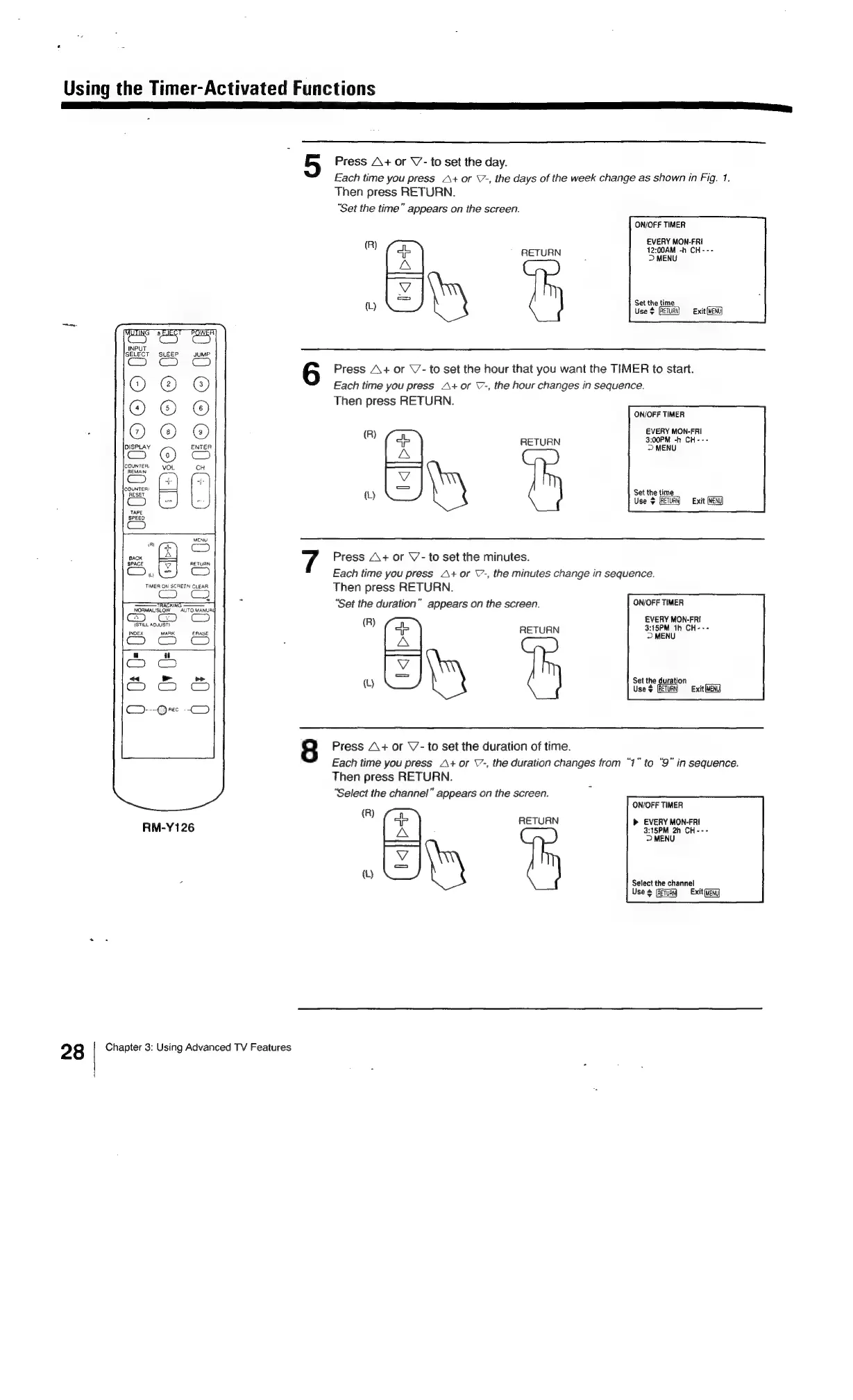
Press
A+
or
V’-
to
set
the
day.
Each
time
you
press
A+
or
V7-,
the
days
of
the
week
change
as
shown
in
Fig.
1.
Then
press
RETURN.
“Set
the
time”
appears
on
the
screen.
ON/OFF
TIMER
(R)
EVERY
MON-FRI
oP
RETURN
;
cave
-h
CH---
A
aa,
{L)
Eg
Set
the
time
Use
$
Exit
MENU
Press
A+
or
\/-
to
set
the
hour
that
you
want
the
TIMER
to
start.
Each
time
you
press
A+
or
\7-,
the
hour
changes
in
sequence.
Then
press
RETURN.
ON/OFF
TIMER
R)
EVERY
MON-FRI
ee
RETURN
ne
Ls
ee
Es
Set
the
time
(L)
i
Use
©
[RETURN
Exit
ear
Press
A+
or
V-
to
set
the
minutes.
w
CO)
Each
time
you
press
A+
or
\7-,
the
minutes
change
in
sequence.
TIMER
ON
SCREEN
CLEAR
T
R
RN.
aan
i
cs
hen
press
RETU
4
-
ee
“Set
the
duration”
appears
on
the
screen.
ON/OFF
TIMER
NORMAL/SLOW
AUTO.
MANUAL
Ce”.
G2)
EVERY
MON-FRI
STILL
AL
R
ice
si
RETURN
Sew"
aces
as
A
a
“u
at
|
al
>>
Set
the
duration
5
es
w
Uses
GR
eG
Cy).
-@
REC
-
Cy)
8
Press
A+
or
V7-
to
set
the
duration
of
time.
Each
time
you
press
A+
or
\-,
the
duration
changes
from
“1”
to
“9"
in
sequence.
Then
press
RETURN.
‘Select
the
channel”
appears
on
the
screen.
ON/OFF
TIMER
(R)
RETURN
EVERY
MON-FRI
RM-Y126
3:15PM
2h
CH---
>
MENU
TS
(L)
[=
|
-
Select
the
channel
Uses
Exit
(MENU
28
Chapter
3:
Using
Advanced
TV
Features

Related product manuals