EasyManua.ls Logo

Sony Trinitron KV-13VM20 - Page 23

Sony Trinitron KV-13VM20
97 pages
Print Icon
To Next Page IconTo Next Page
To Previous Page IconTo Previous Page
Loading...
Using
Noise
Reduction
Function
SOOO
© ©
J
Gp
SPACE
RETURN
TIMER
ON
SCREEN
CLEAR
TRAINS
—————
NORMAL/SLOW
AUTO/MANU;
(STILL
ADJUST)
INOEX
ERASE
CO
RM-Y126
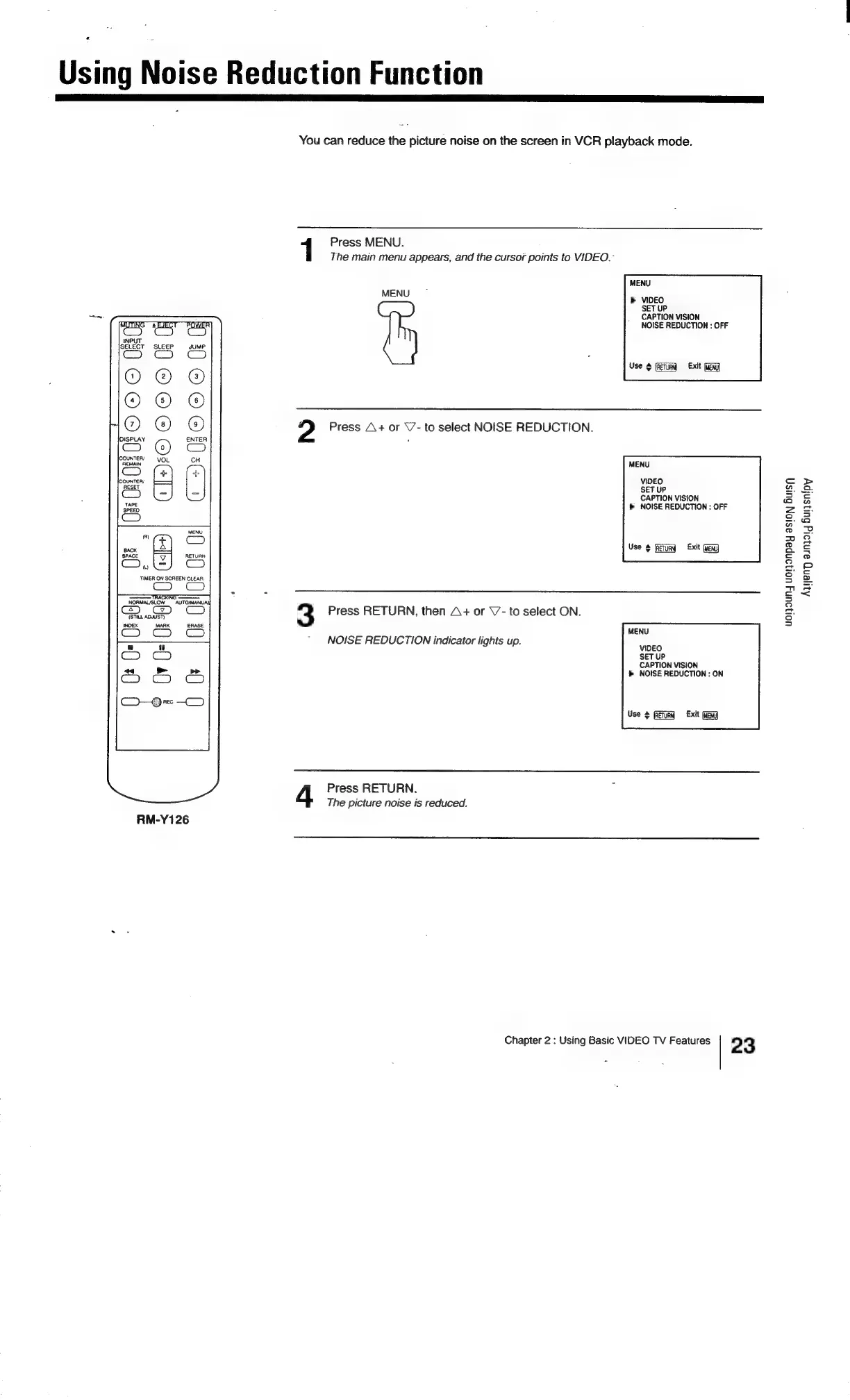
You
can
reduce
the
picture
noise
on
the
screen
in
VCR
playback
mode.
Press
MENU.
The
main
menu
appears,
and
the
cursor
points
to
VIDEO.-
MENU
MENU
»
VIDEO
SET
UP
CAPTION
VISION
NOISE
REDUCTION
:
OFF
Use
¢
Exit
Gg
2
Press
A+
or
V-
to
select
NOISE
REDUCTION.
MENU
VIDEO
SET
UP
CAPTION
VISION
>
NOISE
REDUCTION
:
OFF
Use
¢
Exit
(MEN)
3
Press
RETURN,
then
A+
or
V7-
to
select
ON.
MENU
NOISE
REDUCTION
indicator
lights
up.
Woes
SET
UP
CAPTION
VISION
>
NOISE
REDUCTION
:
ON
Use
$
Gilg
Exit
GEN)
Press
RETURN.
The
picture
noise
is
reduced.
Chapter
2
:
Using
Basic
VIDEO
TV
Features
2
3
uorouny
uN
oNpay
asion
Burs;
Aqyeng
aunjaig
Bulysnipy

Related product manuals