EasyManua.ls Logo

Sony Trinitron KV-13VM20 - Page 22

Sony Trinitron KV-13VM20
97 pages
Print Icon
To Next Page IconTo Next Page
To Previous Page IconTo Previous Page
Loading...
Adjusting
Picture
Quality
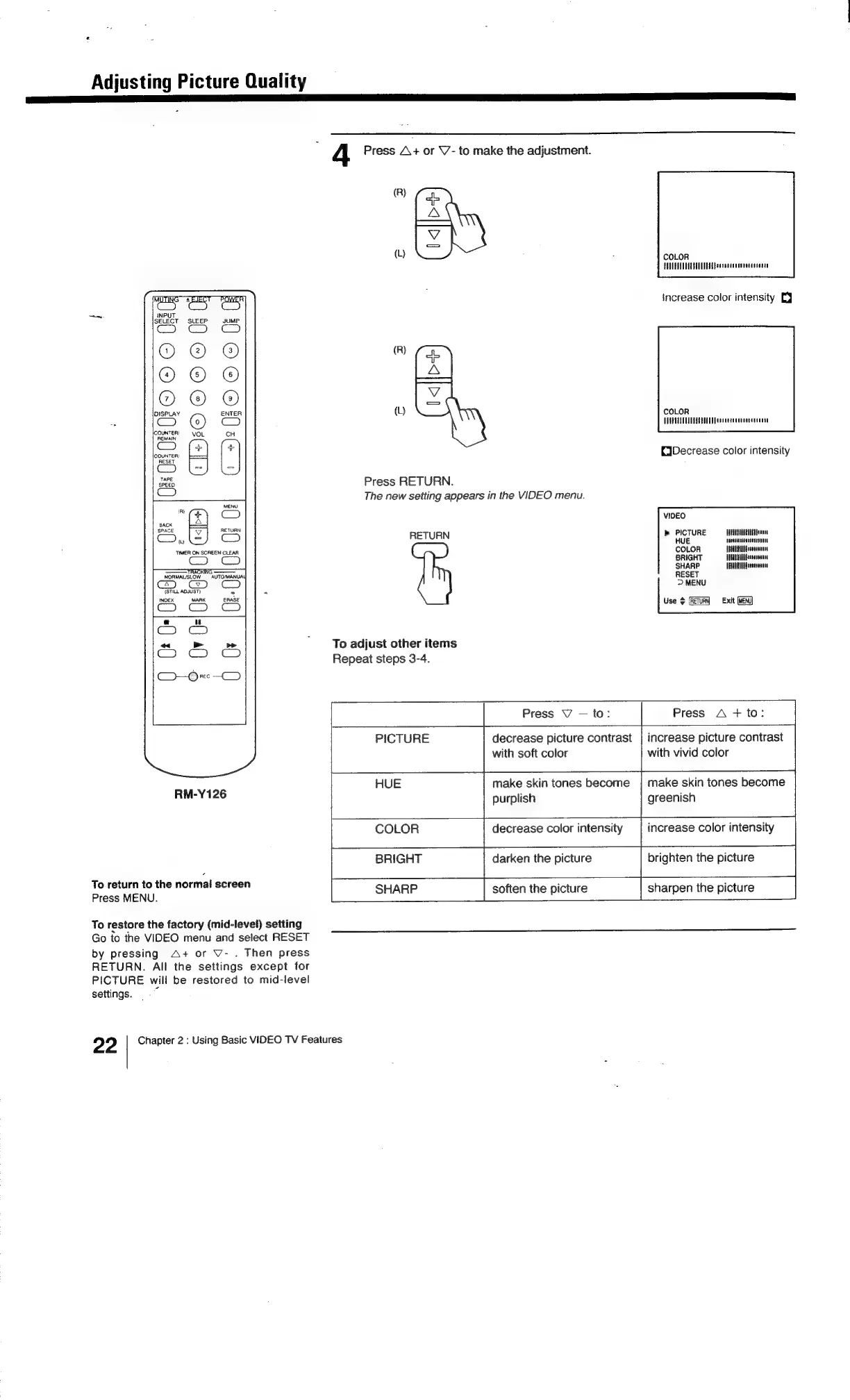
4
Press
A+
or
V-
to
make
the
adjustment.
(R)
oh
(L)
&
:
COLOR
PEUUEAAUGURIUENESEpaerecaauasveccoceene
increase
color
intensity
EJ
(R)
fo
())
ES
COLOR
VOU
PT
CUUTTA
AGED
Peaneereccneettrocier
CiDecrease
color
intensity
Press
RETURN.
The
new
setting
appears
in
the
VIDEO
menu.
MENU
VIDEO
RETURN
b
PICTURE
HAUTE}
RETURN
HUE
eeacansesnancesnutt
COLOR
BRIGHT
SHARP
TELUUCAANfresseeeee
RESET
>
MENU
TIMER
ON
SCREEN
CLEAR
———
TR
ING
————
NOAMAL/SLOW
AUTOMANUA\
(STILL
ADJUST)
-
-
INDEX
MARK
ERASE
|:
Use
$
{RETURN
Exit
(MENU)
To
adjust
other
items
Repeat
steps
3-4.
Press
VY
to:
Press
A
+
to:
PICTURE
decrease
picture
contrast
|
increase
picture
contrast
with
soft
color
with
vivid
color
HUE
make
skin
tones
become
|
make
skin
tones
become
RM-Y126
purplish
greenish
COLOR
decrease
color
intensity
increase
color
intensity
BRIGHT
darken
the
picture
brighten
the
picture
To
return
to
the
normal
screen
Press
MENU.
soften
the
picture
sharpen
the
picture
To
restore
the
factory
(mid-level)
setting
Go
to
the
VIDEO
menu
and
select
RESET
by
pressing
A+
or
V-
.
Then
press
RETURN.
All
the
settings
except
for
PICTURE
will
be
restored
to
mid-level
settings.
.~
22
Chapter
2
:
Using
Basic
VIDEO
TV
Features

Related product manuals