EasyManua.ls Logo

Sony Trinitron KV-13VM20 - Page 7

Sony Trinitron KV-13VM20
97 pages
Print Icon
To Next Page IconTo Next Page
To Previous Page IconTo Previous Page
Loading...
Pe
Bes]
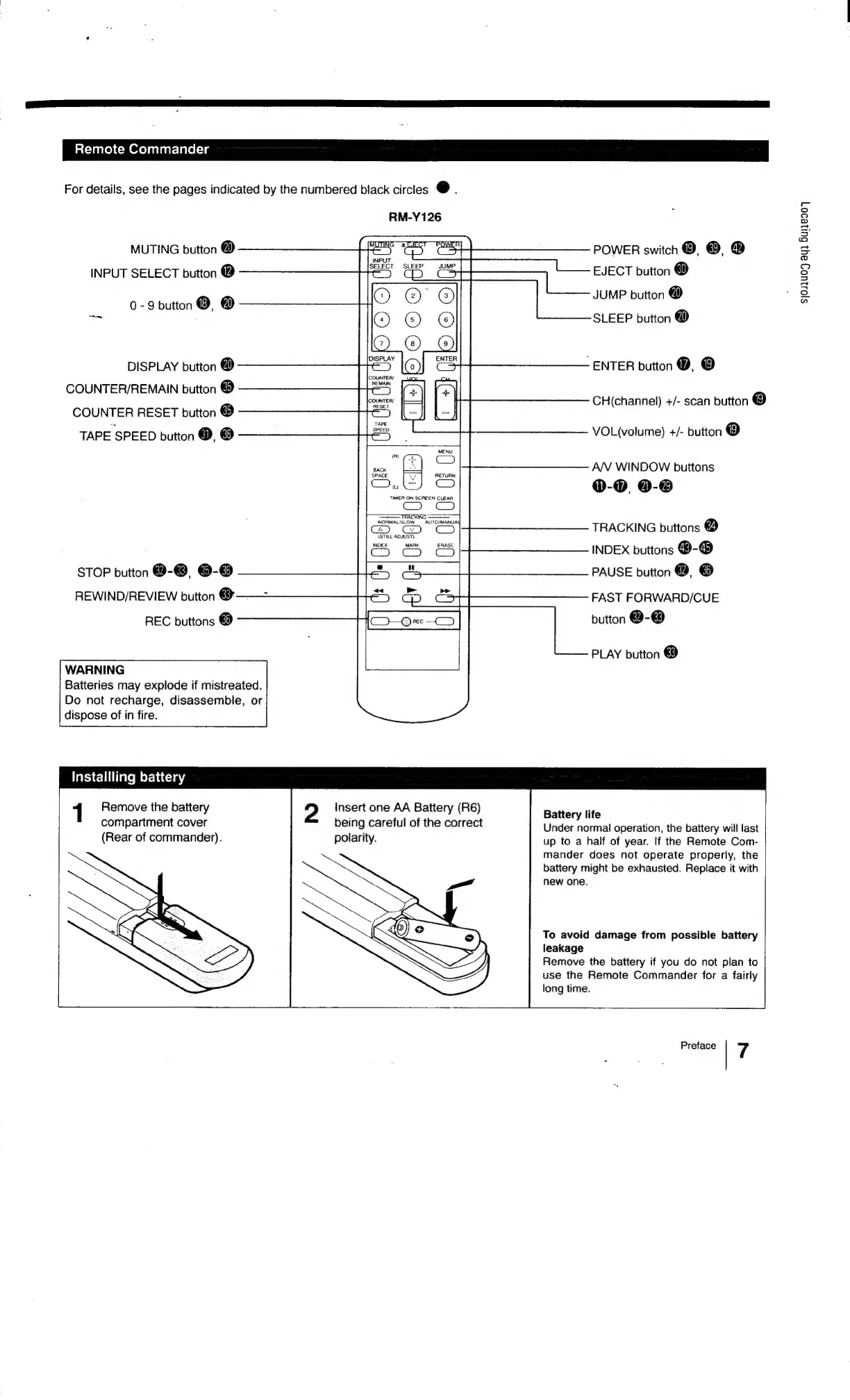
Remote
Commander
For
details,
see
the
pages
indicated
by
the
numbered
black
circles
@.
RM-Y126
POWER
switch
@, @,
@
EJECT
button
@
JUMP
button
@
SLEEP
button
@
MUTING
button
@
INPUT
SELECT
button
®
0
-
9
button
©,
@
DISPLAY
button
@
-
ENTER
button
@,
©
COUNTER/REMAIN
button
@
COUNTER
RESET
button
@
TAPE
SPEED
button
@,
®
CH(channel)
+/-
scan
button
@
VOL(volume)
+/-
button
@
AN
WINDOW
buttons
0-0
@-®
TRACKING
buttons
@
v
(STILL
ADJUST}
neu
tens)
INDEX
buttons
@-@
PAUSE
button
@,
@
STOP
button
@-@
6-@
REWIND/REVIEW
button
@——
FAST
FORWARD/CUE
button
@-@
REC
buttons
@
PLAY
button
®
WARNING
Batteries
may
explode
if
mistreated.
Do
not
recharge,
disassemble,
or
dispose
of
in
fire.
Installling
battery
1
Remove
the
battery
compartment
cover
(Rear
of
commander).
2
Insert
one
AA
Battery
(R6)
being
careful
of
the
correct
polarity.
Battery
life
Under
normal
operation,
the
battery
will
last
up
to
a
half
of
year.
lf
the
Remote
Com-
mander
does
not
operate
properly,
the
battery
might
be
exhausted.
Replace
it
with
new
one.
To
avoid
damage
from
possible
battery
leakage
Remove
the
battery
if
you
do
not
plan
to
use
the
Remote
Commander
for
a
fairly
long
time.
Preface
7
$/03U09
oy}
Bui1e907

Related product manuals