EasyManua.ls Logo

Sony TRINITRON KV-29C3A - Page 12

Sony TRINITRON KV-29C3A
84 pages
Print Icon
To Next Page IconTo Next Page
To Previous Page IconTo Previous Page
Loading...
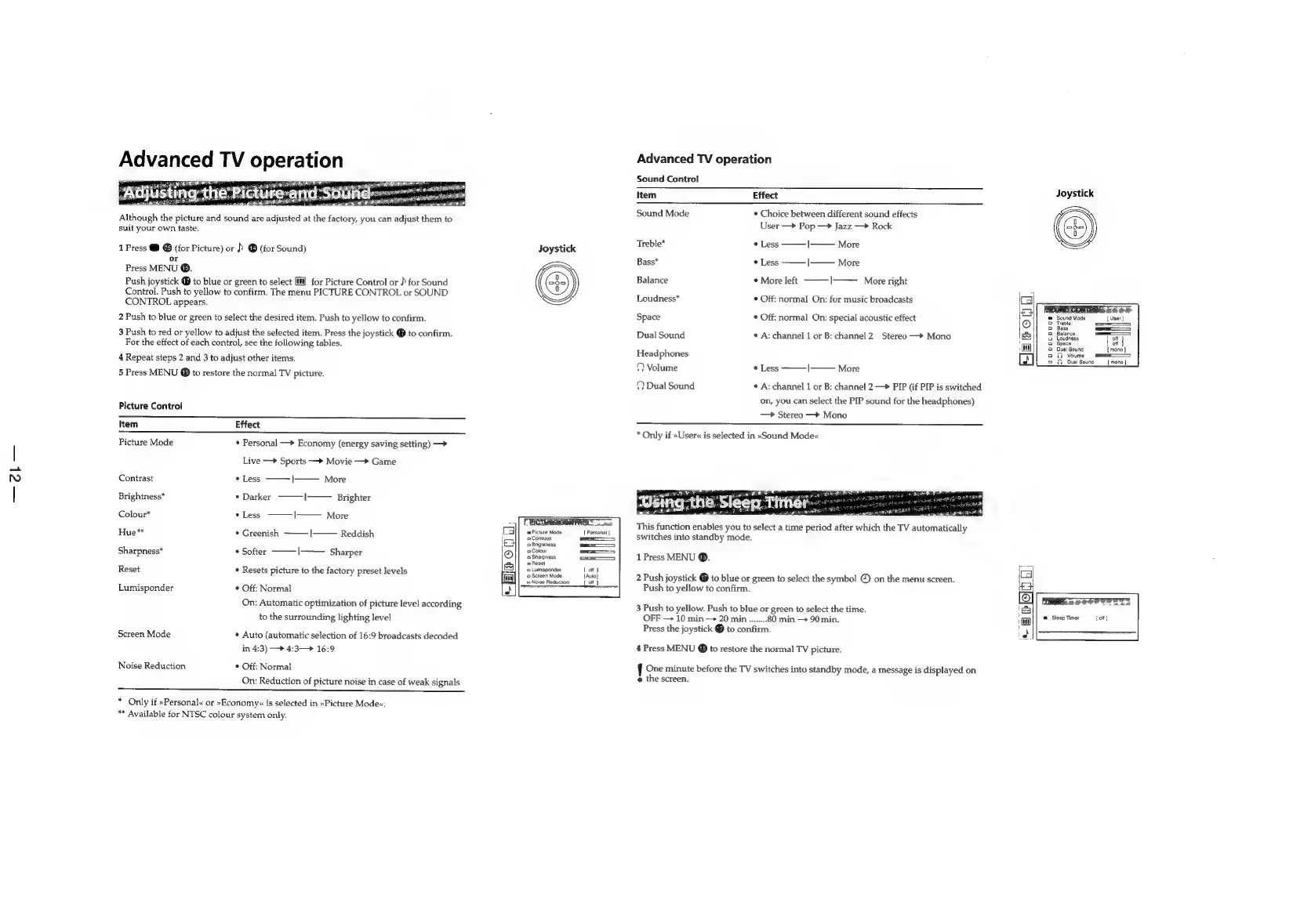
Although
the
picture
and
sound
are
adjusted
at
the
factory,
you
can
adjust
them
to
suit
your
own
taste.
1
Press
@
@
(for
Picture)
or
)
@
(for
Sound)
or
Press
MENU
@.
Push
joystick
@
to
blue
or
green
to
select
[il]
for
Picture
Control
or
}
for
Sound
Control.
Push
to
yellow
to
confirm.
The
menu
PICTURE
CONTROL
or
SOUND
CONTROL
appears.
2
Push
to
blue
or
green
to
select
the
desired
item.
Push
to
yellow
to
confirm.
3
Push
to
red
or
yellow
to
adjust
the
selected
item.
Press
the
joystick
@
to
confirm.
For
the
effect
of
each
control,
see
the
following
tables.
4
Repeat
steps
2
and
3
to
adjust
other
items.
5
Press
MENU
@
to
restore
the
normal
TV
picture.
Picture
Control
Item
Effect
Picture
Mode
*
Personal
—>
Economy
(energy
saving
setting)
—>
Live
+
Sports
—+
Movie
—>
Game
Contrast
*
Less
|——
More
Brightness*
*
Darker
I
Brighter
Colour*
*
Less
|
More
Hue**
*
Greenish
———|
Reddish
Sharpness*
*
Softer
|——
Sharper
Reset
*
Resets
picture
to
the
factory
preset
levels
Lumisponder
°
Off:
Normal
On:
Automatic
optimization
of
picture
level
according
to
the
surrounding
lighting
level
Screen
Mode
*
Auto
(automatic
selection
of
16:9
broadcasts
decoded
Noise
Reduction
in
4:3)
—>
4:3—>
16:9
*
Off:
Normal
On:
Reduction
of
picture
noise
in
case
of
weak
signals
——
*
Only
if
»Personal«
or
»Economy<«
is
selected
in
»Picture
Mode«.
Available
for
NTSC
colour
system
only.
Joystick
CRICTUREOONTROL
an
m=
Picture
Mode
[
Personal
|
Contrast
—=——
0
Brightness
—_
2
Colour
—=——
9
Sharpness
=
o
Reset
‘=
Lumisponder
Lot)
‘©
Screen
Mode
[Auto]
|
Noise
Reduction
[of
|
Advanced
TV
operation
Sound
Control
Item
Effect
Sound
Mode
*
Choice
between
different
sound
effects
User
—>
Pop
Jazz
—>
Rock
Treble*
*
Less
|——
More
Bass*
*
Less
|——
More
Balance
©
More
left
I——
More
right
Loudness*
©
Off:
normal
On:
for
music
broadcasts
Space
¢
Off:
normal
On:
special
acoustic
effect
Dual
Sound
¢
A:
channel
1
or
B:
channel
2.
Stereo
—*
Mono
Headphones
©
Volume
*
Less
|
More
(}
Dual
Sound
¢
A:
channel
1
or
B:
channel
2
—>
PIP
(if
PIP
is
switched
on,
you
can
select
the
PIP
sound
for
the
headphones)
Stereo
—>
Mono
*
Only
if
»User«
is
selected
in
»Sound
Mode«
This
function
enables
you
to
select
a
time
period
after
which
the
TV
automatically
switches
into
standby
mode.
1
Press
MENU
®.
2
Push
joystick
@
to
blue
or
green
to
select
the
symbol
©
on
the
menu
screen.
Push
to
yellow
to
confirm.
3
Push
to
yellow.
Push
to
blue
or
green
to
select
the
time.
OFF
10
min
-+
20
min........
80
min
90
min.
Press
the
joystick
to
confirm.
4
Press
MENU
@
to
restore
the
normal
TV
picture.
!
One
minute
before
the
TV
switches
into
standby
mode,
a
message
is
displayed
on
e
the
screen.
Joystick
Sound
Mode
Treble
Bass
Balance
Loudness
Space
Dual
Sound
OD
Volume:
QO
Dual
Sound
__[
mono]
[of]
©
Sleep
Timer

Related product manuals