Preparation
Before Printing
19
2
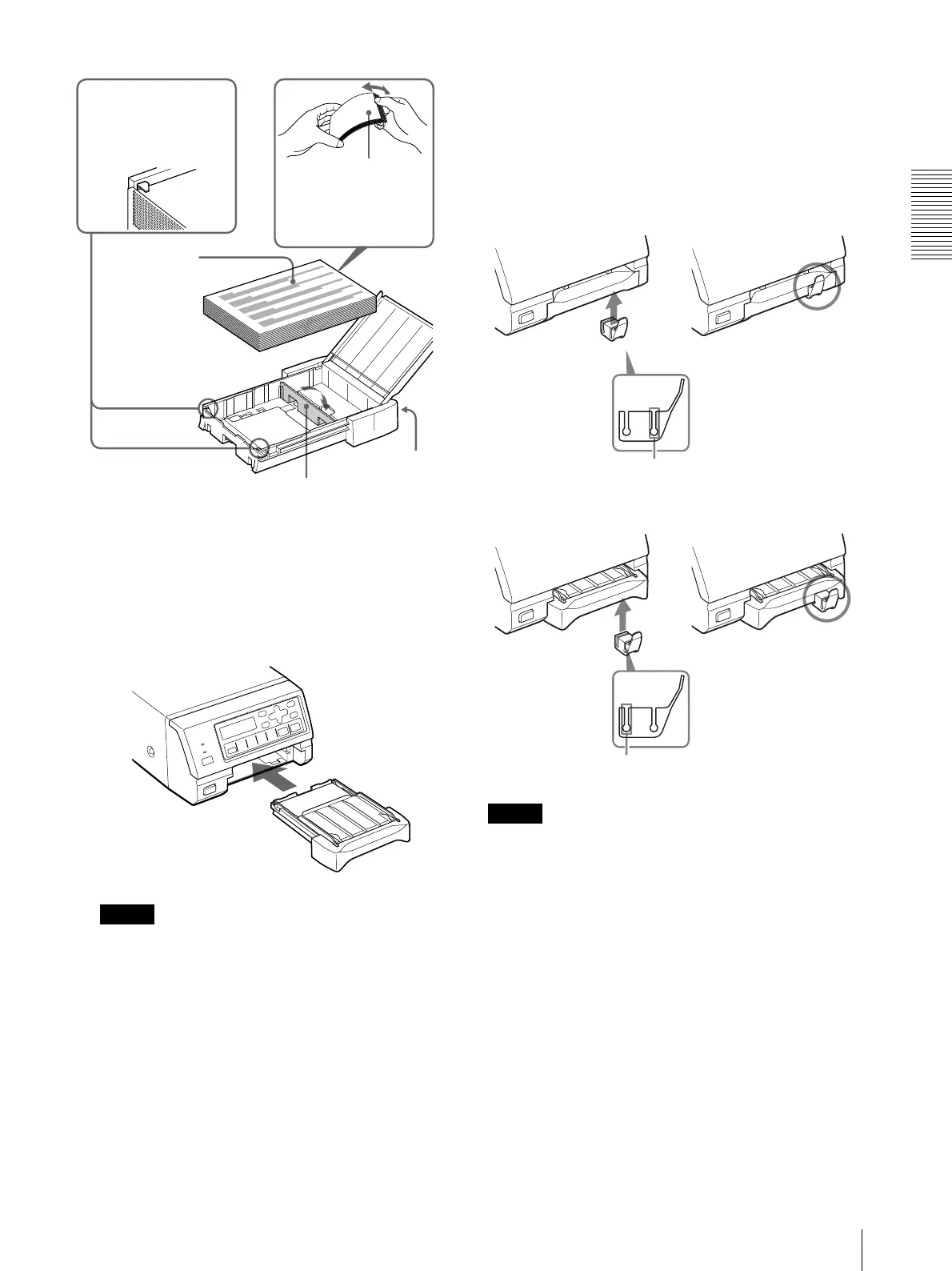
Remove the protection sheet placed on the top of
the paper.
3
Close the cover of the paper tray, and then slide the
paper tray back into the printer until it clicks into
place.
Note
When you cannot slide the paper tray back into the
printer, check whether or not paper or printouts are
left around the paper outlet slot. Remove them if
there are.
When storing the paper
• Avoid storing the paper in a location subject to:
– high temperatures
– high humidity
– excessive dust
– direct sunlight
• Use the original package for storing unused paper.
Attaching the Stopper
When multiple printouts are being ejected, printouts
accumulated on the paper tray may be pushed out of the
paper tray when a new printout is ejected.
To prevent them from being pushed, attach the stopper
as illustrated.
When your tray is the S (small) size tray
When your tray is the L (large) size tray
Note
Do not leave more than 10 sheets of ejected printouts on
the paper tray. Doing so may cause a paper jam.
Riffle the paper with
the protection sheet.
Place the paper
along with the
protection sheet
in the paper tray
with the printing
surface facing
up.
Front
Set the paper securely
under the tab.
Partition
Groove for S size tray
b
Groove for L size tray
b



 To Next Page