44
Basic Menu Operations
Adjustment
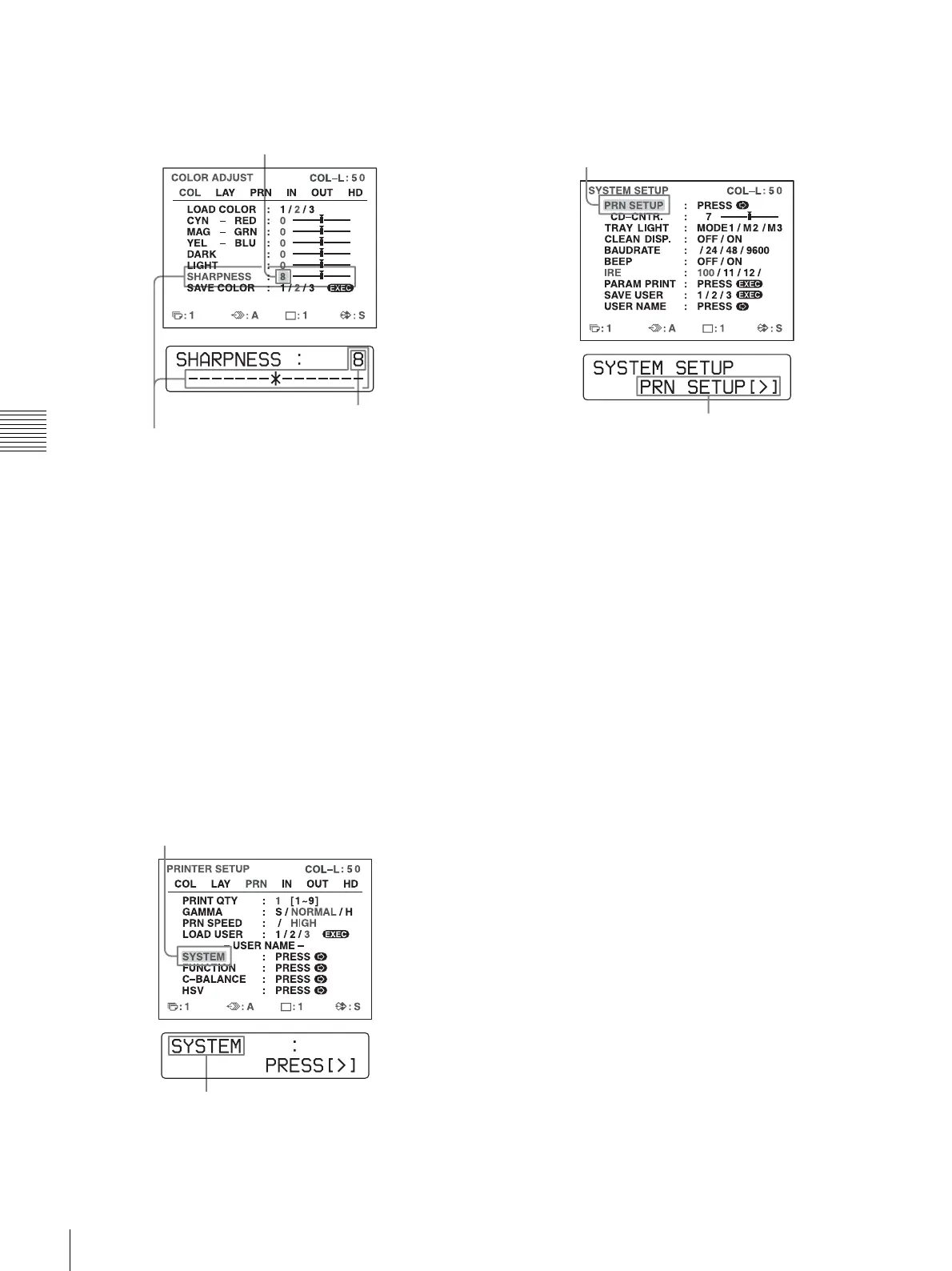
To change the setting values:
Press the < or , button to decrease or increase the
setting values.
To reset the values to factory setting:
Position the cursor at the item to be reset to defaults,
then press the < and , buttons simultaneously.
When there are sub menus:
When there are sub menus, PRESS [>] is displayed on
the selection part of the menu. Select the desired sub
menu by pressing the M or m button, then press the
, button.
Example: On the PRINTER SETUP menu
To display the SYSTEM SETUP sub menu:
Select SYSTEM by pressing the M or m button, then
press the , button.
The SYSTEM SETUP menu appears.
To return from the sub menu:
Select the menu on the top line, then press the ,
button.
The current setting value
The setting value increases every time you press , button
and decreases every time you press the < button.
The current setting value
Highlight SYSTEM in green by pressing the M or m
button, then press the , button.
Press the M or m button until SYSTEM appears, then
press the , button.
Highlight PRN SETUP in green by pressing the M or m
button, then press the , button.
Press the M or m button until PRN SETUP appears,
then press the , button.



 To Next Page