40
Functions That Can be Set on Menus
Adjustment
Adjustment
Functions That Can be
Set on Menus
You can set up the printer to meet various specifications.
Once you have adjusted and stored the settings, the printer
operates according to those settings until their values are
modified.
You can set up the printer according to its intended
purpose, connected equipment, or your individual
preferences. You can store up to three sets of user settings,
called user set 1, 2 and 3.
Functions that can be set on those menus are as follows:
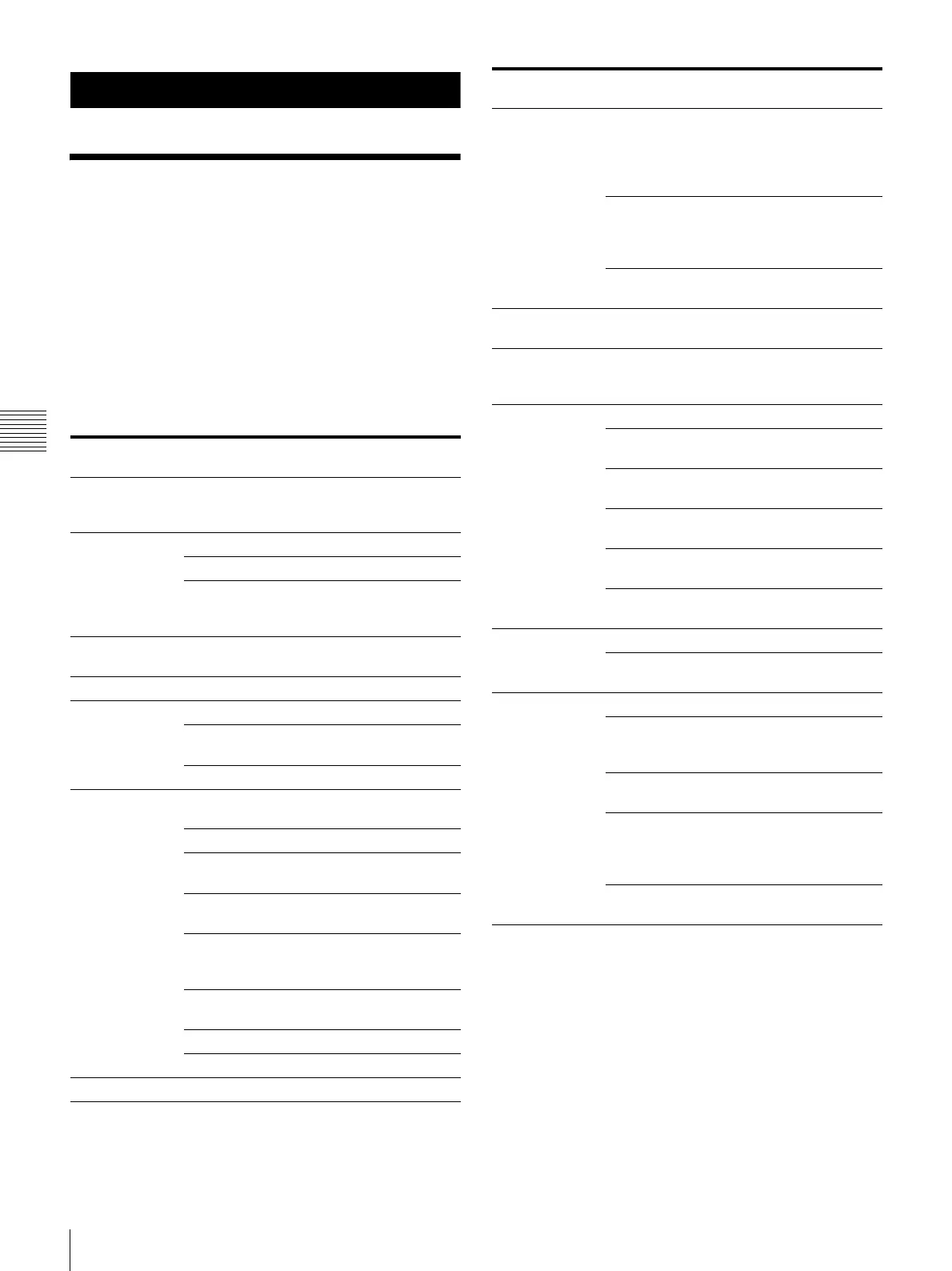
Menu Functions to be set Reference
pages
COLOR
ADJUST
Adjusting the printout color
(color intensity and contrast)
and sharpness
46
LAYOUT
SETUP
Selecting the memory mode 27
Selecting the type of printout 29
Selecting whether or not
white borders are added to
multiple reduced images
32
WINDOW
SETUP
Eliminating the black lines
produced on the printout
49
CAPTION Entering a caption 33
PRINTER
SETUP
Setting the print quantity 23
Adjusting the tone of the
printout
48
Selecting the print speed 22
SYSTEM SETUP Adjusting the brightness of
the printer window display
61
Setting the tray light mode 61
Setting the cleaning message
display function
61
Setting the baud rate for
computer communication
62
Selecting whether or not the
operation and error tones
sound
61
Adjusting the contrast of
printouts
45
Printing menu configurations 62
Registering user settings 62
USER NAME Editing the user name 62
FUNCTION
SETUP
Selecting the image which
appears after storing the
image into memory, the
source image or the memory
image
30
Assigning the function to
remote control units
connected to the REMOTE 2
connector
60
Setting the function of the
CLEAR button
36
COLOR
BALANCE
Adjusting the color balance 50
HSV Adjusting printout colors
(specify colors for
adjustment)
52
HDTV SETUP Selecting the input signal 57
Selecting the input signal
type
57
Selecting the input signal
format
57
Selecting the synchronization
method for input signals
58
Selecting the output signal
type
58
Selecting the downconvert
method
59
INPUT SETUP Selecting the input signal 19
Compensating for the input
signals
45
OUTPUT SETUP Erasing the screen display 38
Selecting whether or not
information about the ink
ribbon is displayed
62
Selecting the output signal
from the printer
45
Selecting whether the printer
synchronizes with the internal
sync signal included in
channel G of the RGB signals
13
Matching the video monitor
color to the printout color
45
Menu Functions to be set Reference
pages



 To Next Page