74
Error/Warning Messages
Miscellaneous
Clearing a Paper Jam
If the ALARM indicator on the ribbon door panel lights
after printing starts, or if the “REMOVE PAPER” or
“CHECK PAPER” message appears on the printer window
display, a paper jam may have occurred inside the printer.
If the message does not disappear after removing the paper
feed tray and reinserting it with paper loaded inside,
perform the following to clear the jammed paper.
1
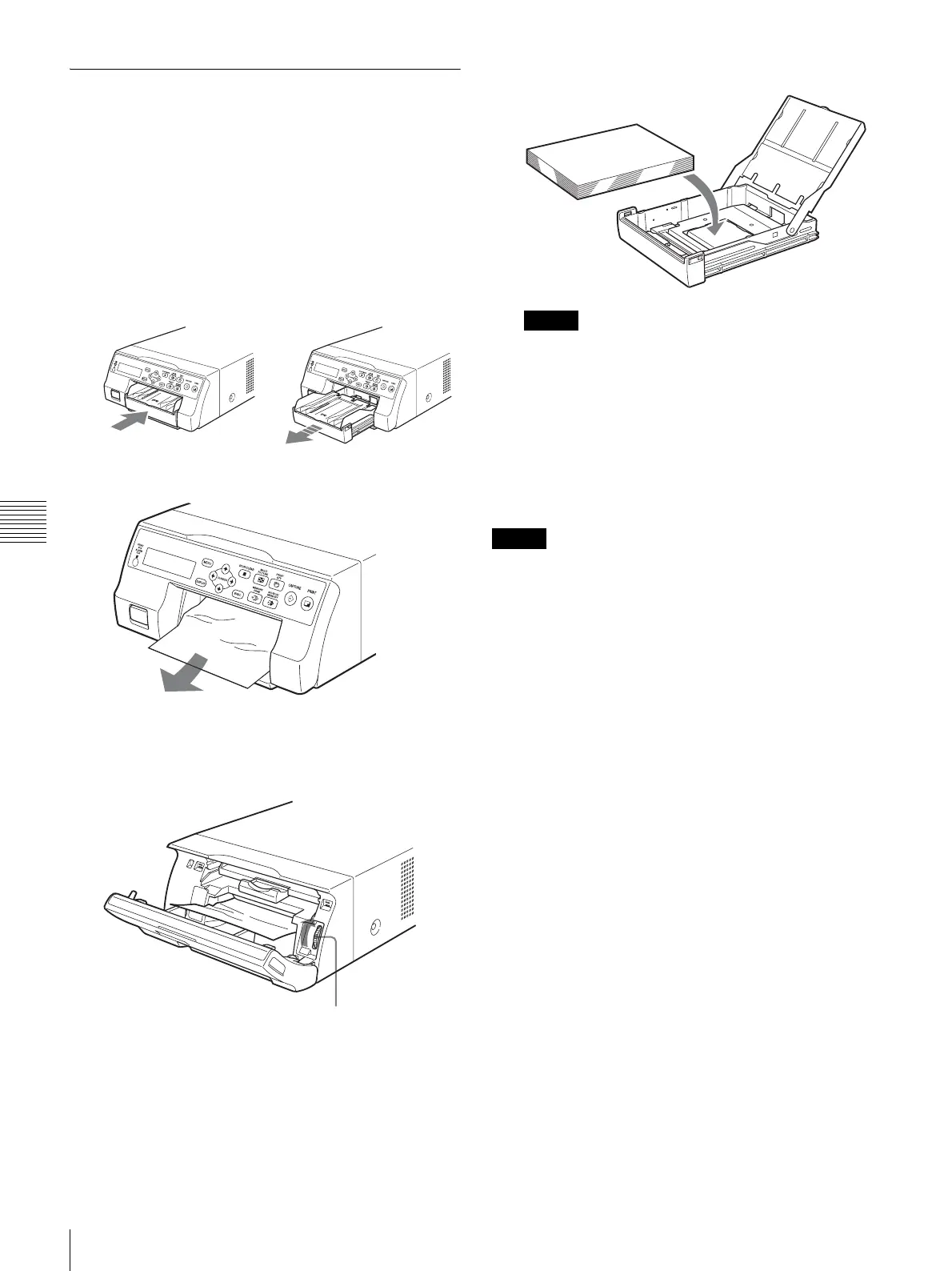
Press the Z mark on the paper feed tray to eject the
tray.
2
Clear any paper that jammed halfway.
When the paper jam is deep inside the printer and
cannot be cleared, open the ribbon door panel and turn
the dial upward. This ejects the paper jammed deep
inside.
If the paper jam cannot be cleared even by turning the
dial, refer to “If a paper jam cannot be cleared” on
page 74.
3
Load the paper properly.
Notes
• Do not reuse the paper removed in step 2.
• Only use paper from the printing packs
recommended for this printer.
4
Insert the paper feed tray into the printer.
If a paper jam cannot be cleared
Follow the steps below to open the base plate on the printer
and clear the paper jam.
Notes
• Before clearing a paper jam with the following
procedure, press the ! POWER switch to turn off the
printer, but also unplug the power cord from the wall
outlet.
• Before turning over the printer, disconnect any
connecting cables. Bending or twisting cables can
damage them and may cause a fire hazard or an electric
shock hazard.
• When it is necessary to touch internal printer parts to
remove a paper jam inside the printer, be careful not to
damage the internal parts.
1
Press the ! POWER switch to turn off the printer, and
then unplug the power cord and connecting cables.
2
Eject the paper feed tray from the printer.
3
Turn the printer over.
Dial



 To Next Page