EasyManua.ls Logo

Sony UP-D897 - 2-4. Initialization of Print Count History

Sony UP-D897
60 pages
Print Icon
To Next Page IconTo Next Page
To Previous Page IconTo Previous Page
Loading...
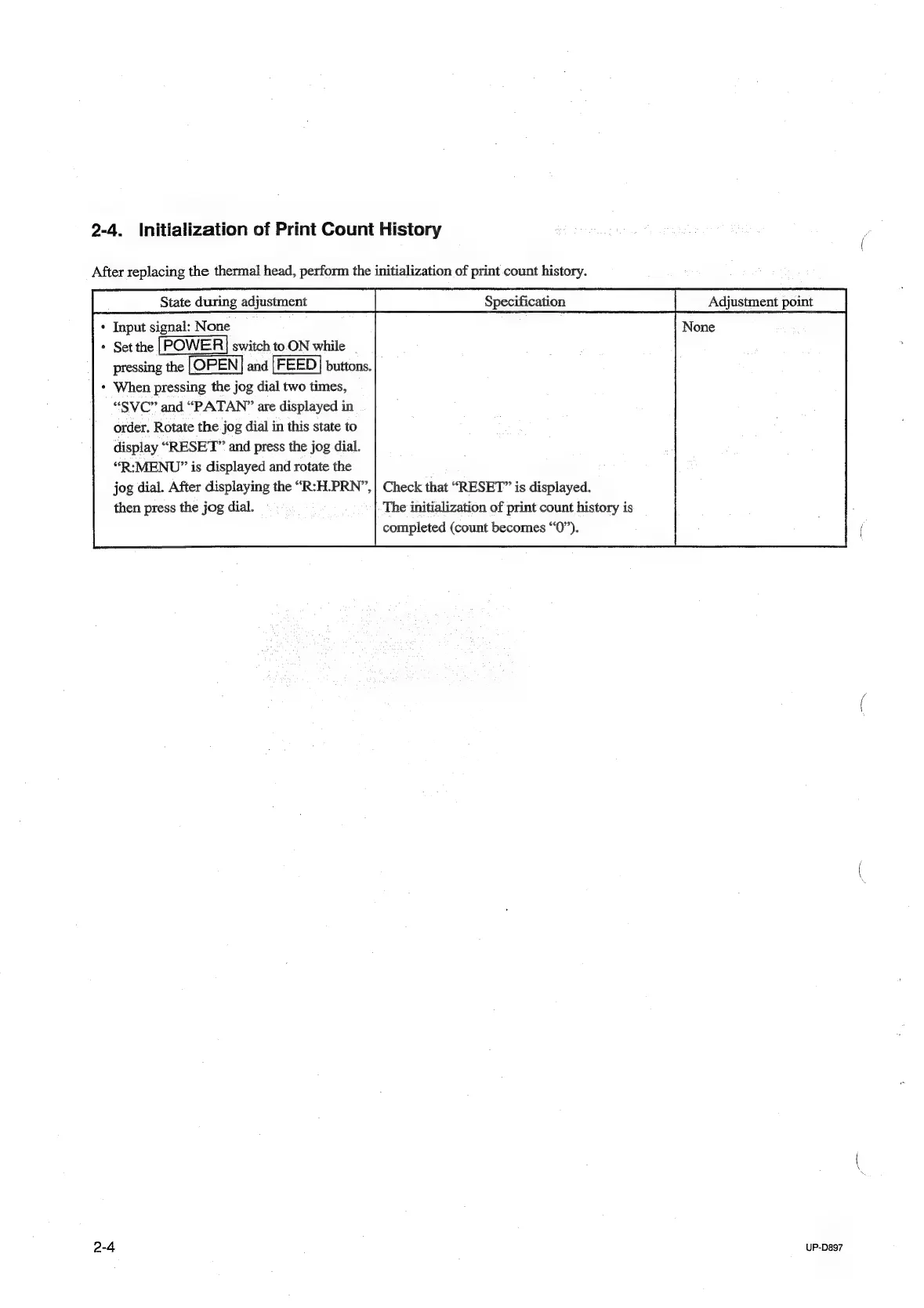
2-4.
Initialization
of
Print
Count
History
After
replacing
the
thermal
head,
perform
the
initialization
of
print
count
history.
*
Input
i
None
*
Set
the
switch
to.ON
while
|
pressing
ie
and
buttons.
When
pressing
the
jog
dial
two
times,
“SVC”
and
“PATAN?”
are
displayed
in
order.
Rotate
the
jog
dial
in
this
state
to
display
“RESET”
and
press
the
jog
dial.
“R:MENU”
is
displayed
and
rotate
the
jog
dial.
After
displaying
the
“R:H.PRN”,
then
press
the
jog
dial.
Check
that
“RESET”
is
displayed.
The
initialization
of
print
count
history
is
completed
(count
becomes
“0”).
2-4
UP-D897

Table of Contents

Other manuals for Sony UP-D897

Related product manuals